EasyManua.ls Logo

Samsung SRD-476D - User Manual

Samsung SRD-476D
142 pages
Print Icon
To Next Page IconTo Next Page
Loading...
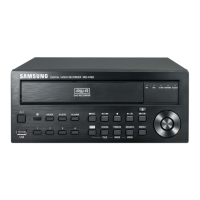
4 CHANNEL DVR
User Manual
SRD-476D

Table of Contents

Other manuals for Samsung SRD-476D

Questions and Answers

  • U
    uhickmanAug 20, 2025
    What to do if my Samsung SRD-476D DVR does not turn on?
    • D
      David GardnerAug 20, 2025
      If your Samsung DVR doesn't turn on, start by checking if the power supply is properly connected. Next, verify the system is receiving the correct input voltage from the power source. If the problem continues after these checks, the power supplier might be faulty and need replacement.
  • H
    Heather SmithAug 22, 2025
    What to do if my Samsung SRD-476D DVR displays the “NO HDD” icon?
    • J
      Jesse LesterAug 22, 2025
      If your Samsung DVR displays the “NO HDD” icon and an error message, first check the HDD connection. If the problem persists, it is recommended to contact the nearest service center to have the HDD checked by service personnel.
  • D
    daledavisAug 25, 2025
    Why does my Samsung SRD-476D DVR display only a black screen on some channels?
    • M
      Michelle GarzaAug 25, 2025
      If some channels on your Samsung DVR display only a black screen, first check if the camera connected to the system properly displays the image. Also, check if the camera is properly supplied with power. If these are fine, input the video source of the camera directly into the DVR.
  • D
    Dawn CarsonAug 26, 2025
    What to do if Samsung DVR backup data is not played by the PC or DVR?
    • M
      Miss Jane StewartAug 27, 2025
      When backing up data on your Samsung DVR, you must select the appropriate player: PC or DVR. If using a PC to play the data, ensure the backup file format is SEC. If using the DVR, formatting backup files should be done by the DVR.
  • P
    pmorenoAug 28, 2025
    What to do if the channel button does not work on the Samsung DVR Live screen?
    • E
      Emily JohnstonAug 28, 2025
      If the Channel button on your Samsung DVR Live screen isn't working, and you are in the event monitoring screen, press the [ALARM] button to exit the screen and then select a channel.
  • C
    Chad SmithAug 29, 2025
    How to fix a Samsung SRD-476D that does not recognize installed HDDs?
    • M
      Mark AndersonAug 30, 2025
      If your Samsung DVR doesn't recognize all installed HDDs, try again in a moment. If the problem persists, it may be due to a mechanical error of the installed HDD. Try again with a different HDD.
  • K
    kent32Aug 31, 2025
    What to do if Samsung SRD-476D player does not switch to Live mode?
    • T
      Timothy SimmonsSep 1, 2025
      To switch your Samsung DVR player to Live mode, press the Stop [@] button on the DVR or the remote control, or click the [ ] icon on the launcher.
  • J
    jasoncarrilloSep 2, 2025
    What to do if the Samsung SRD-476D DVR REC indicator does not flash when I press the REC button?
    • J
      Jacqueline ClarkSep 2, 2025
      If the REC indicator on your Samsung DVR doesn't flash when you press the [REC] button, check if there is free space on the HDD for recording. Also, verify that the record mode is set to ON in the record mode setting.
  • A
    alyssabradleySep 4, 2025
    What to do if Samsung DVR cursor will not move to the Start button when I start the calendar search?
    • A
      Anna PetersonSep 4, 2025
      If the cursor won't move to the Start button during a calendar search on your Samsung DVR, check if the channel and the date you want to play are marked with the V symbol.
  • M
    michaelbridgesSep 6, 2025
    How to fix Samsung DVR PTZ button not working?
    • A
      Alyssa WillisSep 6, 2025
      If the [PTZ] button on the Live screen of your Samsung DVR isn't working, check if the current protocols and other settings in the PTZ device are properly configured according to the PTZ camera.

Summary

Overview

Important Safety Instructions

Crucial guidelines for safe operation and maintenance of the apparatus.

Security Precautions

Essential security measures for user accounts and network access to prevent threats.

Part Names and Functions

Front Panel Components

Detailed identification and explanation of the DVR's front panel components.

Rear Panel Connectors

Detailed identification and explanation of the DVR's rear panel connectors and ports.

Connecting Devices and Network

Live Mode Operations

System Startup and Login

Initial steps to power on the DVR and log in to the system interface.

Main Menu System Setup

User and Permission Management

Setting up administrator, users, groups, and managing access permissions.

Search and Playback

Web Viewer Operations

Appendix and Support

Troubleshooting Common Issues

Guidance on identifying and resolving common operational problems with the DVR.

Samsung SRD-476D Specifications

General IconGeneral
Video Output Channels1
Recording Rate120 fps
Compression FormatH.264
Audio Inputs4
Audio Outputs1
Internal HDDYes
Power Supply12V DC
Video Input Channels4
Recording ResolutionCIF
Max. Resolution720x480
USB2 USB ports
Network Interface10/100Mbps Ethernet

Related product manuals