English - 16
Adjusting Your Monitor
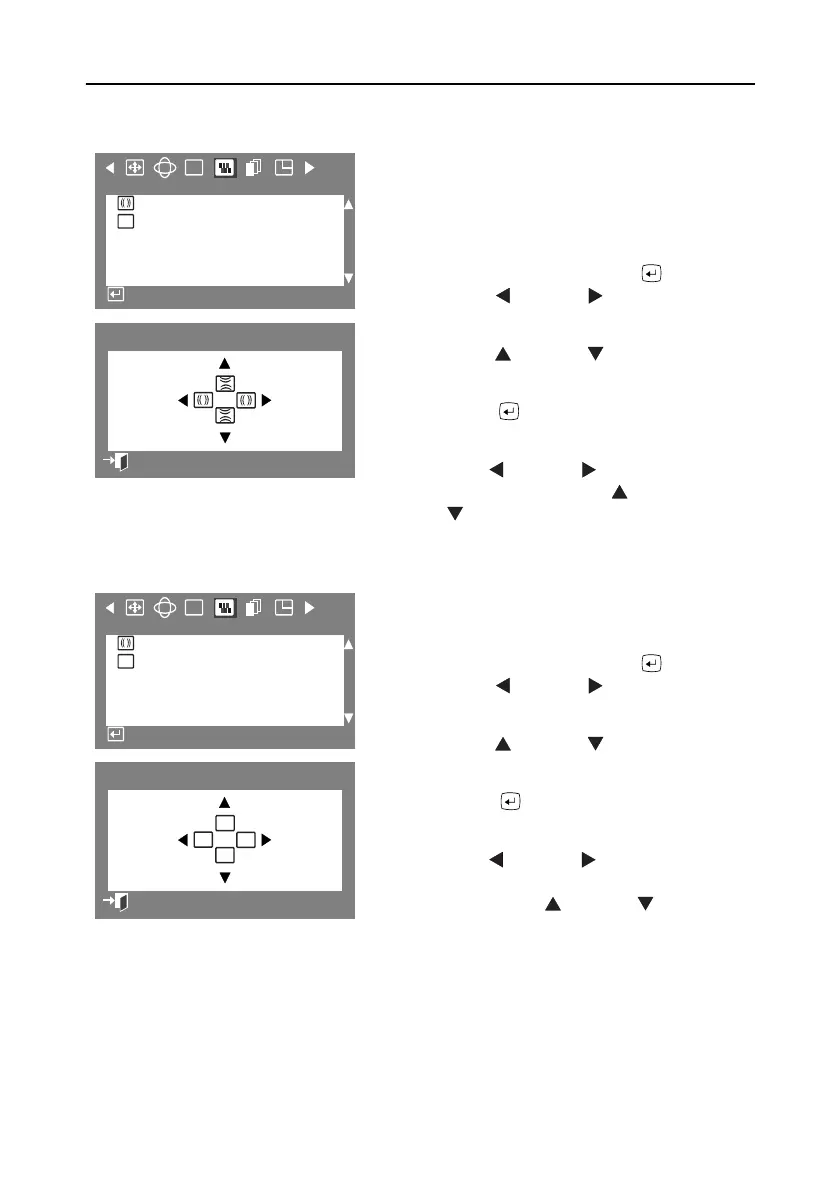
Clear Moiré
A “moiré” pattern can appear on your screen,
looking like a series of concentric circles or arcs. To
eliminate this pattern, use the clear moiré
adjustments.
1
With the menu off, push the button.
Push the button or button until the
“Screen” OSD is displayed.
2
Push the button or button to select
Clear Moiré
.
3
Push the button to open the clear moiré
adjustment screen.
4
Use the button or button to adjust
horizontal moiré; use the button
or button to adjust vertical moiré.
Focus
Use the focus control when the image displayed on
the screen is not sharp in all areas.
1
With the menu off, push the button.
Push the button or button until the
“Screen” OSD is displayed.
2
Push the button or button to select
Focus
.
3
Push the button to open the Focus
adjustment screen.
4
Use the button or button to adjust the
focus along the left and right areas of the
screen. Use the button or button to
adjust the center area of the screen.
RGB
:
F
Screen
Clear Moire
Focus
Access Function
:
2
17
Clear Moire
Previous Menu
RGB
:
F
Screen
Clear Moire
Focus
Access Function
:
2
17
Fv
Fh
Fh
Fv
Focus
Previous Menu
9550eApp.book Page 16 Thursday, December 30, 1999 10:19 AM











 To Next Page