25
2 Using "MHL(Mobile High-Definition Link)"
2
Using "MHL(Mobile High-Definition Link)"
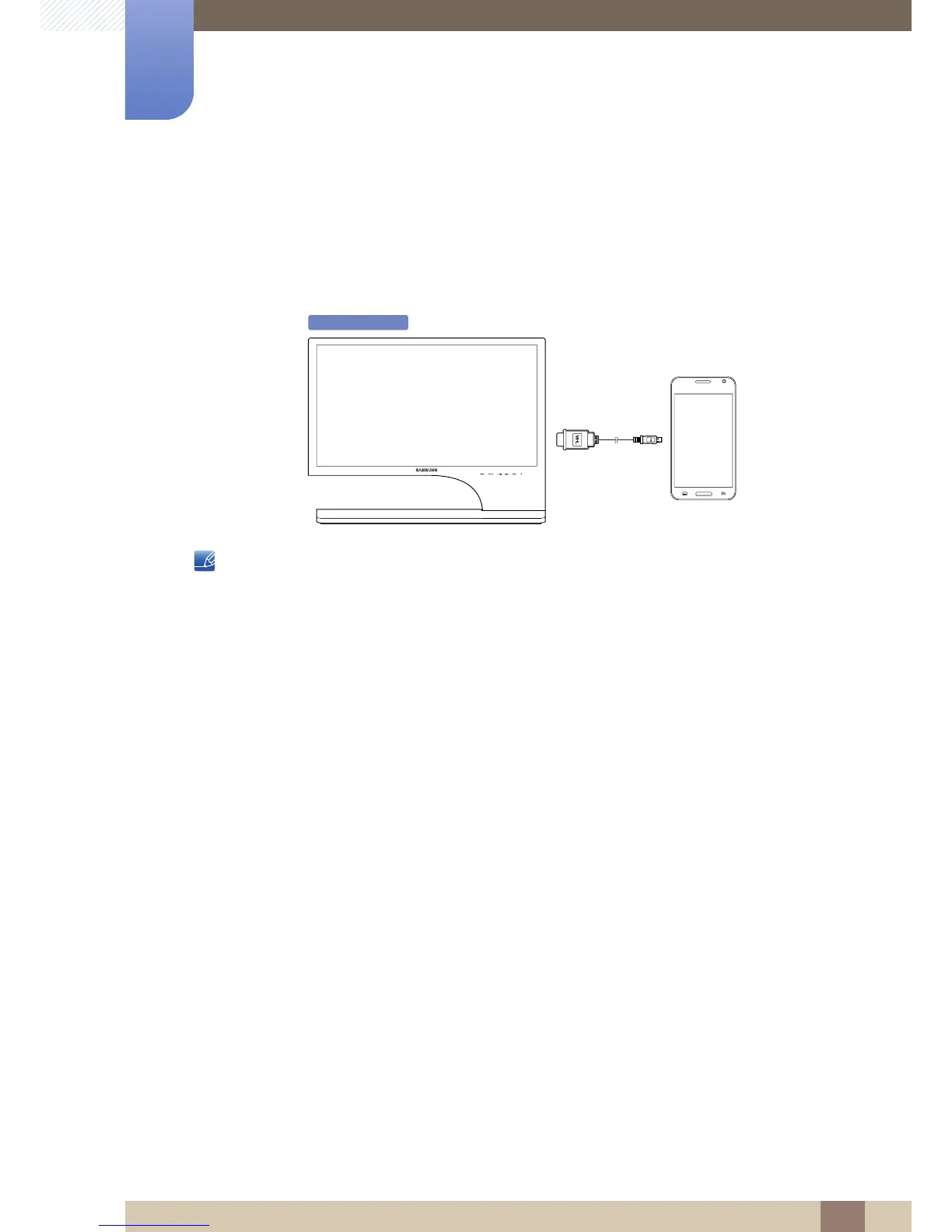
The "MHL" function is available on the S24B750V / S27B750V model only.
2.1 "MHL" (Mobile High-Definition Link)
This feature allows you to enjoy videos and photos (imported from a connected mobile device that
supports MHL) on the screen of the product.
z To use the MHL function, you need an MHL-certified mobile device. You can check if your mobile
device is MHL certified on the device manufacturer's website. To find a list of MHL-certified
devices, visit the official MHL website (http://www.mhlconsortium.org).
z To use the MHL function, the latest version of software must be installed on the mobile device.
z On some mobile devices, the MHL function may not be available depending on the device's
performance or functionality.
z Since the display size of the product is larger than those of mobile devices, the picture quality may
degrade.
z This product is officially MHL-certified. If you encounter any problem when using the MHL function,
please contact the manufacturer of the mobile device.
z The picture quality may degrade when content (imported from the mobile device) with a low
resolution is played on the product.



 To Next Page