EasyManua.ls Logo

Samsung VXK-306 - Page 2

Samsung VXK-306
70 pages
Print Icon
To Next Page IconTo Next Page
To Previous Page IconTo Previous Page
Loading...
IMPORTANT
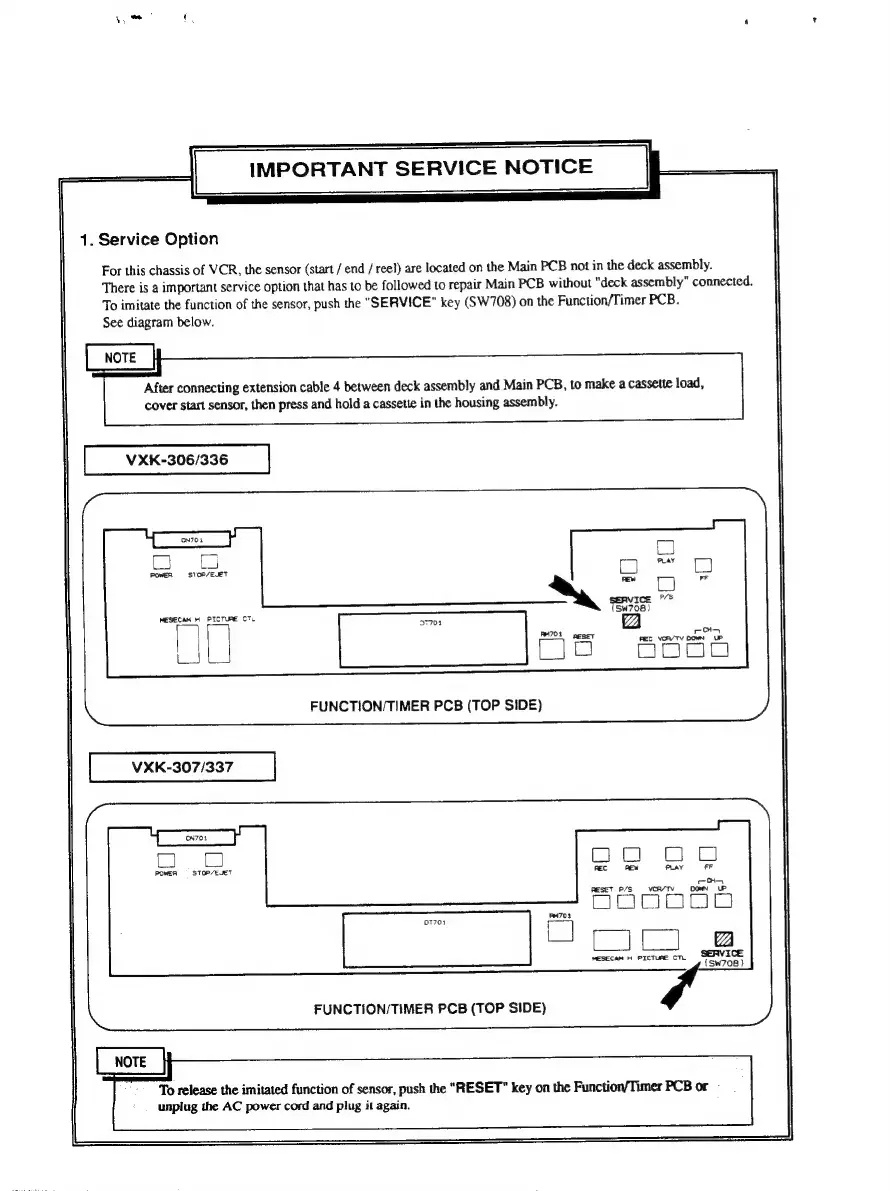
SERVICE
NOTICE
1.
Service
Option
For
this
chassis
of
VCR,
the
sensor
(start
/
end
/
reel)
are
located
on
the
Main
PCB
not
in
the
deck
assembly.
There
is
a
important
service
option
that
has
to
be
followed
to
repair
Main
PCB
without
"deck
assembly”
connected.
To
imitate
the
function
of
the
sensor,
push
the
"SERVICE"
key
(SW708)
on
the
Function/Timer
PCB.
See
diagram
below.
After
connecting
extension
cable
4
between
deck
assembly
and
Main
PCB,
to
make
a
cassette
load,
cover
start
sensor,
then
press
and
hold
a
cassette
in
the
housing
assembly.
VXK-306/336
MESECAM
HH
PICTURE
CTL
FUNCTION/TIMER
PCB
(TOP
SIDE)
VXK-307/337
i=
POWER
=
STOP/EJET
FUNCTION/TIMER
PCB
(TOP
SIDE)
To
release
the
imitated
function
of
sensor,
push
the
"RESET"
key
on
the
Function/Timer
PCB
or
unplug
the
AC
power
cord
and
plug
it
again.

Related product manuals