EasyManua.ls Logo

Samsung VXK-306 - Electrostatically Sensitive (ES) Devices; General Information

Samsung VXK-306
70 pages
Print Icon
To Next Page IconTo Next Page
To Previous Page IconTo Previous Page
Loading...
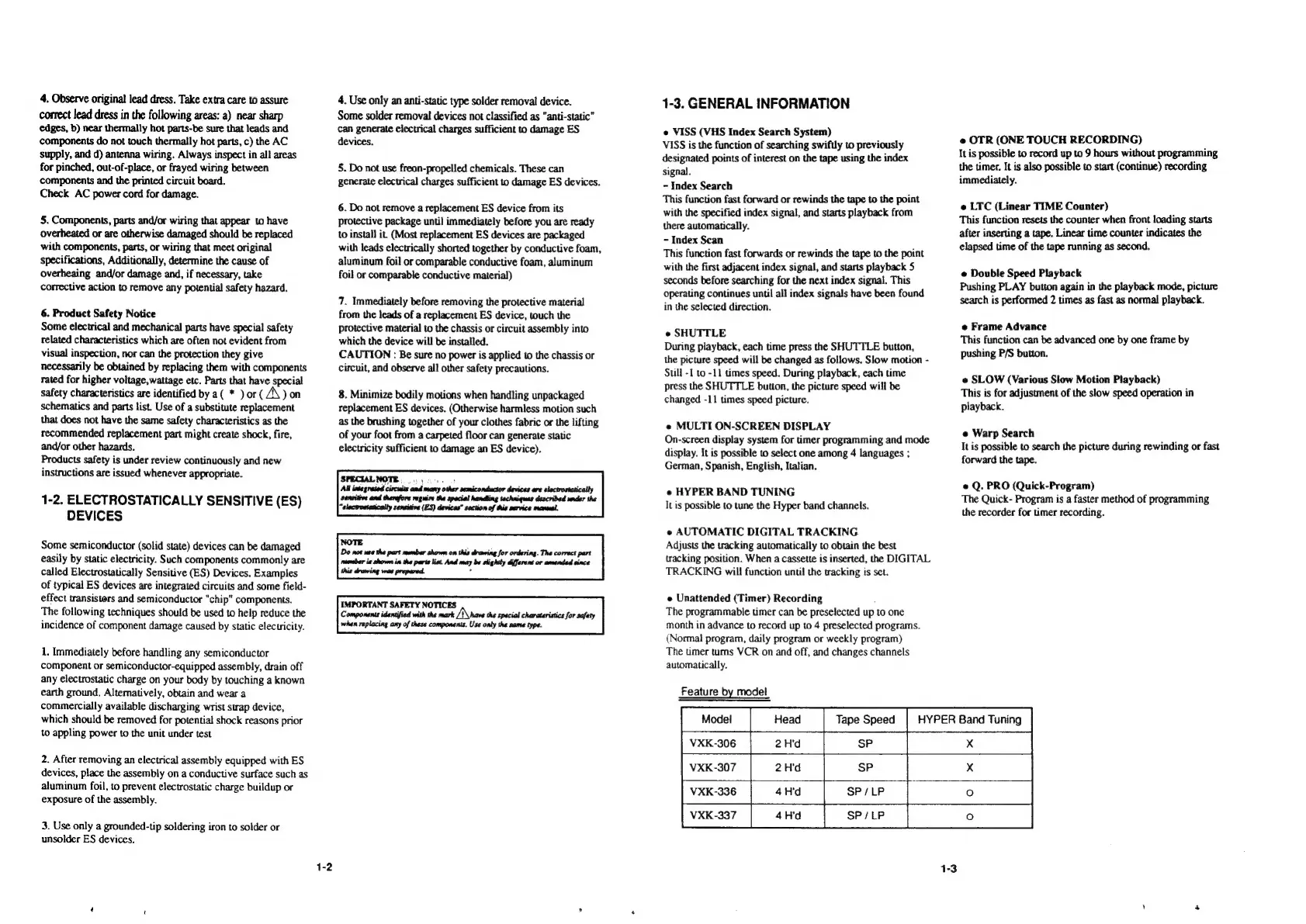
4.
Observe
original
lead
dress.
Take
extra
care
to
assure
correct
lead
dress
in
the
following
areas:
a)
near
sharp
edges,
b)
near
thermally
hot
parts-be
sure
that
leads
and
components
do
not
touch
thermally
hot
parts,
c)
the
AC
supply,
and
d)
antenna
wiring.
Always
inspect
in
all
areas
for
pinched,
out-of-place,
or
frayed
wiring
between
components
and
the
printed
circuit
board.
Check
AC
power
cord
for
damage.
5.
Components,
parts
and/or
wiring
that
appear
to
have
overheated
or
are
otherwise
damaged
should
be
replaced
with
components,
parts,
or
wiring
that
meet
original
specifications,
Additionally,
determine
the
cause
of
overheaing
and/or
damage
and,
if
necessary,
take
corrective
action
to
remove
any
potential
safety
hazard.
6.
Product
Safety
Notice
Some
electrical
and
mechanical
parts
have
special
safety
related
characteristics
which
are
often
not
evident
from
visual
inspection,
nor
can
the
protection
they
give
necessarily
be
obtained
by
replacing
them
with
components
rated
for
higher
voltage,wattage
etc.
Parts
that
have
special
safety
characteristics
are
identified
by a(
*
)
or
(
A\)
on
schematics
and
parts
list.
Use
of
a
substitute
replacement
that
does
not
have
the
same
safety
characteristics
as
the
recommended
replacement
part
might
create
shock,
fire,
and/or
other
hazards.
Products
safety
is
under
review
continuously
and
new
instructions
are
issued
whenever
appropriate.
1-2,
ELECTROSTATICALLY
SENSITIVE
(ES)
DEVICES
Some
semiconductor
(solid
state)
devices
can
be
damaged
easily
by
static
electricity.
Such
components
commonly
are
called
Electrostatically
Sensitive
(ES)
Devices,
Examples
of
typical
ES
devices
are
integrated
circuits
and
some
field-
effect
transisters
and
semiconductor
"chip"
components.
The
following
techniques
should
be
used
to
help
reduce
the
incidence
of
component
damage
caused
by
static
electricity.
1.
Immediately
before
handling
any
semiconductor
component
or
semiconductor-equipped
assembly,
drain
off
any
electrostatic
charge
on
your
body
by
touching
a
known
earth
ground.
Altematively,
obtain
and
wear
a
commercially
available
discharging
wrist
strap
device,
which
should
be
removed
for
potential
shock
reasons
prior
to
appling
power
to
the
unit
under
test
2.
After
removing
an
electrical
assembly
equipped
with
ES
devices,
place
the
assembly
on
a
conductive
surface
such
as
aluminum
foil,
to
prevent
electrostatic
charge
buildup
or
exposure
of
the
assembly.
3.
Use
only
a
grounded-tip
soldering
iron
to
solder
or
unsolder
ES
devices.
1-2
4.
Use
only
an
anti-static
type
solder
removal
device.
Some
solder
removal
devices
not
classified
as
“anti-static”
can
generate
electrical
charges
sufficient
to
damage
ES
devices.
5.
Do
not
use
freon-propelled
chemicals.
These
can
generate
electrical
charges
sufficient
to
damage
ES
devices.
6.
Do
not
remove
a
replacement
ES
device
from
its
protective
package
until
immediately
before
you
are
ready
to
install
it.
(Most
replacement
ES
devices
are
packaged
with
leads
electrically
shorted
together
by
conductive
foam,
aluminum
foil
or
comparable
conductive
foam,
aluminum
foil
or
comparable
conductive
material)
7.
Immediately
before
removing
the
protective
material
from
the
leads
of
a
replacement
ES
device,
touch
the
protective
material
to
the
chassis
or
circuit
assembly
into
which
the
device
will
be
installed.
CAUTION
:
Be
sure
no
power
is
applied
to
the
chassis
or
circuit,
and
observe
all
other
safety
precautions.
8.
Minimize
bodily
motions
when
handling
unpackaged
replacement
ES
devices.
(Otherwise
harmless
motion
such
as
the
brushing
together
of
your
clothes
fabric
or
the
lifting
of
your
foot
from
a
carpeted
floor
can
generate
static
electricity
sufficient
to
damage
an
ES
device).
SPECIALNOTE.
...
.
handling
“alectrostatically
sensitive
(ES)
devices”
section
of
this
sarvice
manual.
Do
not
use
the
part
munber
shown
on
this
drawing
for
ordering.
Tha
correct
part
rueuber
is
shown
in
the
parts
list.
And
may
be
slightly
Gfferent
or
amended
since
1-3.
GENERAL
INFORMATION
e
VISS
(VHS
Index
Search
System)
VISS
is
the
function
of
searching
swiftly
to
previously
designated
points
of
interest
on
the
tape
using
the
index
signal.
-
Index
Search
This
function
fast
forward
or
rewinds
the
tape
to
the
point
with
the
specified
index
signal,
and
starts
playback
from
there
automatically.
-
Index
Scan
This
function
fast
forwards
or
rewinds
the
tape
to
the
point
with
the
first
adjacent
index
signal,
and
starts
playback
5
seconds
before
searching
for
the
next
index
signal.
This
operating
continues
until
all
index
signals
have been
found
in
the
selected
direction.
e
SHUTTLE
During
playback,
each
time
press
the
SHUTTLE
button,
the
picture
speed
will
be
changed
as
follows.
Slow
motion
-
Still
-1
to
-11
times
speed.
During
playback,
each
time
press
the
SHUTTLE
button,
the
picture
speed
will
be
changed
-11
times
speed
picture.
e
MULTI
ON-SCREEN
DISPLAY
On-screen
display
system
for
timer
programming
and
mode
display.
It is
possible
to
select
one
among
4
languages
;
German,
Spanish,
English,
Italian.
e
HYPER
BAND
TUNING
It
is
possible
to
tune
the
Hyper
band
channels.
e@
AUTOMATIC
DIGITAL
TRACKING
Adjusts
the
tracking
automatically
to
obtain
the
best
tracking
position.
When
a
cassette
is
inserted,
the
DIGITAL
TRACKING
will
function
until
the
tracking
is
set.
e
Unattended
(Timer)
Recording
The
programmable
timer
can
be
preselected
up
to
one
month
in
advance
to
record
up
to
4
preselected
programs.
(Normal
program,
daily
program
or
weekly
program)
The
timer
turns
VCR
on
and
off,
and
changes
channels
automatically.
Feature
by
model
Model
Head
————+—
VXK-306
2H'd
Tape
Speed
HYPER
Band
Tuning
e
OTR
(ONE
TOUCH
RECORDING)
It
is
possible
to
record
up
to
9
hours
without
programming
the
timer.
It
is
also
possible
to
start
(continue)
recording
immediately.
e
LTC
(Linear
TIME
Counter)
This
function
resets
the
counter
when
front
loading
starts
after
inserting
a
tape.
Linear
time
counter
indicates
the
elapsed
time
of
the
tape
running
as
second.
e
Double
Speed
Playback
Pushing
PLAY
button
again
in
the
playback
mode,
picture
search
is
performed
2
times
as
fast
as
normal
playback.
e
Frame
Advance
This
function
can
be
advanced
one
by
one
frame
by
pushing
P/S
button.
e
SLOW
(Various
Slow
Motion
Playback)
This
is
for
adjustment
of
the
slow
speed
operation
in
playback.
e
Warp
Search
It
is
possible
to
search
the
picture
during
rewinding
or
fast
forward
the
tape.
e
Q.
PRO
(Quick-Program)
The
Quick-
Program
is
a
faster
method
of
programming
the
recorder
for
timer
recording.
VXK-307
2H'd
VXK-336
SP/LP
VXK-337
4
=m
d
SP/LP
x
X

Related product manuals