47
4.5.3 GROUP CALL
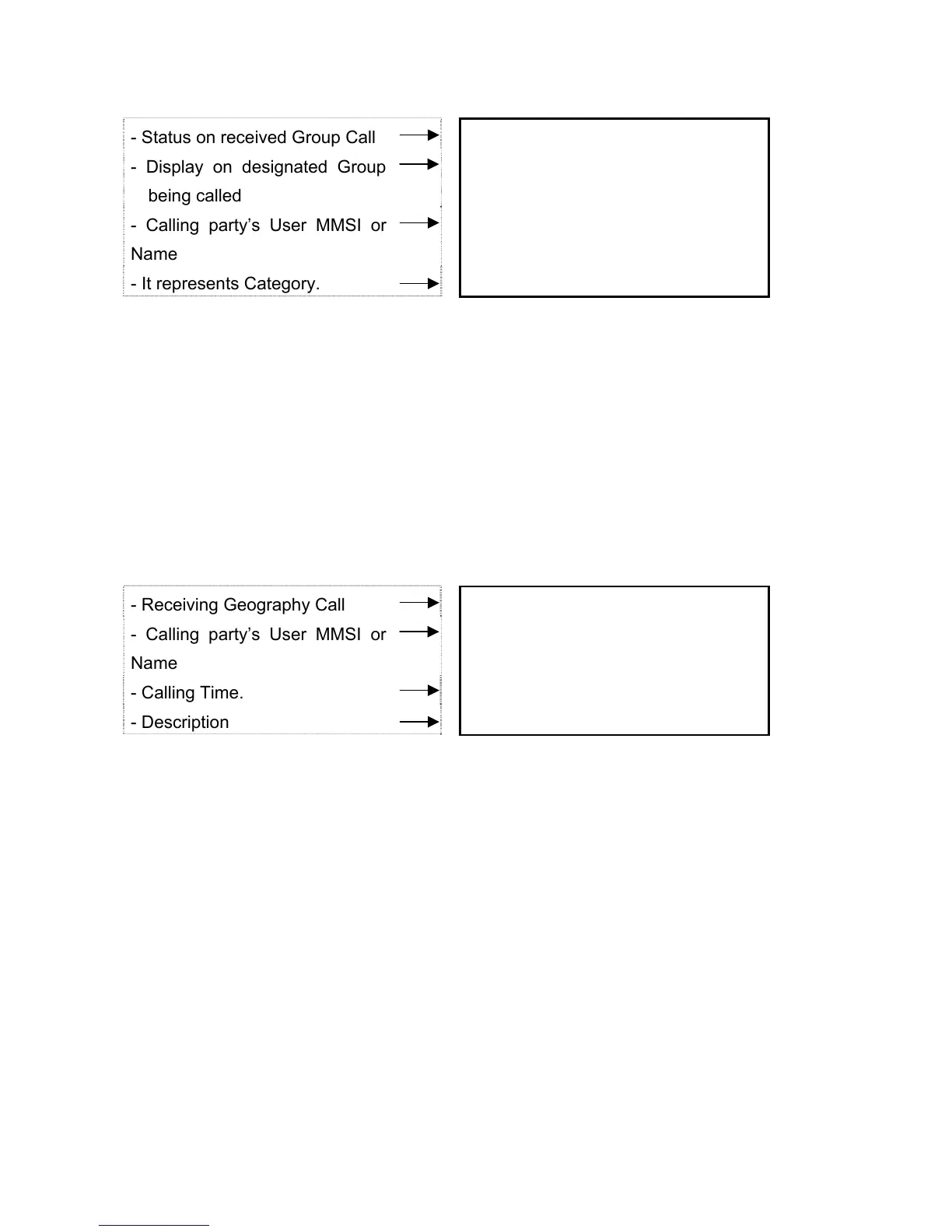
- Status on received Group Call R : GROUP ITU
- Display on designated Group
being called
D GROUP
- Calling party’s User MMSI or
Name
STR6000D ALL
- It represents Category. ROUTINE
16
1) When received Group Call, press any keys except ENT, ESC to stop alarm. Channel is
changed to the designated channel on the automatically received DSC Call. Name of
group is one of three groups name, which avails to set up.
2) It does not need to send Acknowledgement, if wanted, it may be initiated with voice
communication by pressing PTT on designated channel. The received calling date will be
stored at Call Log.
4.5.4 GEOGRAPHY CALL
- Receiving Geography Call R : GEOGRAPH ITU
- Calling party’s User MMSI or
Name
STR6000D
- Calling Time. 12:30 UTC ALL
- Description ESC ->EXIT
16
P
GEOGRAPH CALL is received within the specific areas.
1) When received GEOGRAPHY Call, press ant buttons except ENT, ESC to stop the
alarm. Channel is changed to the designated channel on the automatically received DSC
Call. Time and USER MMSI or Name is displayed on the screen.
2) Go through monitoring the specified channel from calling vessel.


 To Next Page