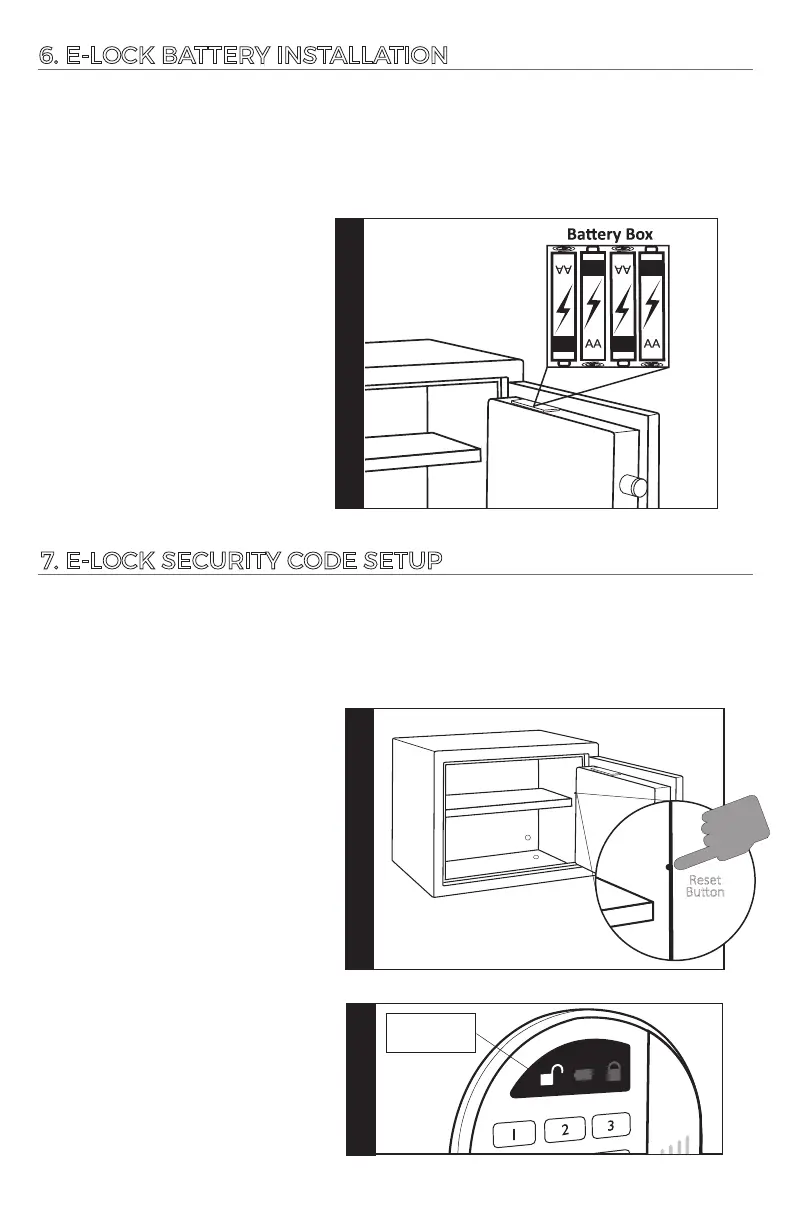
6. E-LOCK BATTERY INSTALLATION
Step 1
1.
WARNING: The baeries must be inserted with the correct polarity. Exhausted
baeries must be removed from the product and discarded safely. Do not mix old
and new baeries. Do not mix alkaline or standard (carbon
–
zinc) baeries.
Do not use rechargeable (nickel
–
cadmium) baeries.
Important: It is necessary to re-program your safe with a new security code you
have personally selected to provide maximum household security. Be careful,
in choosing your new security code, you’ll want to be sure that you can operate
the unit quickly without making an error.
7. E-LOCK SECURITY CODE SETUP
Step 1
1.
2.
6
Locate the baery compartment
on the top of the door panel.
Insert the baeries in the proper
orientaon and order. Keypad
will beep when baeries are
successfully installed. Replace
baery cover.
Input your new 3-8 digit code in
3 seconds, each input will result
in 1 beep and 1 green light flash.
Reset
Buon
Step 1
Locate and remove the red cap
covering the reset buon on
the inside of the door panel.
Push the buon to begin the
process of seng your own
unique entry code. There will
be one beep and one green
light flash.
Step 2
1X green light
and 1X beep
+
+
+ +
-
-
--




 To Next Page