8. UNLOCKING YOUR SAFE
3.
1.
2.
3.
7. E-LOCK SECURITY CODE SETUP (continued)
7
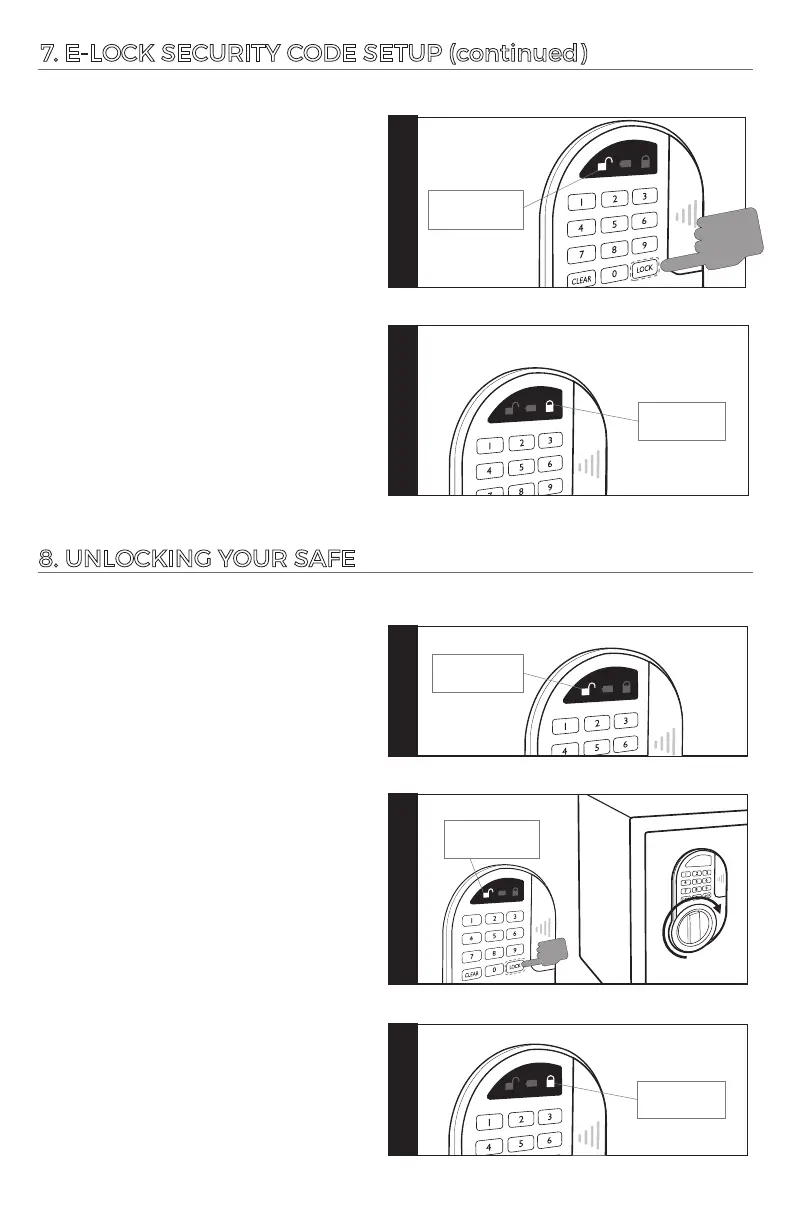
Press “LOCK” to confirm. There will be
2 beeps with a flashing green light. It
means the new code was successful.
4.
If the red light flashes twice and
beeps, the code failed. Press the
reset buon again and repeat the
code programming sequence.
Press your new code (3-8 digits),
each input results in a green light
flash and one beep.
Step 1
Step 1
Step 1
Step 1
1X green light
and 1X beep
2X green lights
and 2X beeps
3X red lights
and 3X beeps
Unsuccessful,
Try Again:
Successful:
Step 1
Step 2
Step 1
Step 3
2X red lights
and 2X beeps
Unsuccessful,
Try Again:
Step 1
Step 4
If the red light flashes 3 mes with
3 beeps, the operaon has failed.
Please enter your code again.
Step 1
Step 3
2X green lights
and 2X beeps
Successful:
Press “LOCK” to confirm, there will
be 2 beeps and the green light flashes
twice. This means the operaon is
correct. Turn the knob clockwise
to open the door.




 To Next Page