EasyManua.ls Logo

Sandel SA4550 - Radar Altimeter Test; Mini-USB Port; Figure 2-5 ATT Test

Sandel SA4550
27 pages
Print Icon
To Next Page IconTo Next Page
To Previous Page IconTo Previous Page
Loading...
Operation
82010-PG, REV. F Sandel SA4550 Pilot’s Guide 2-7
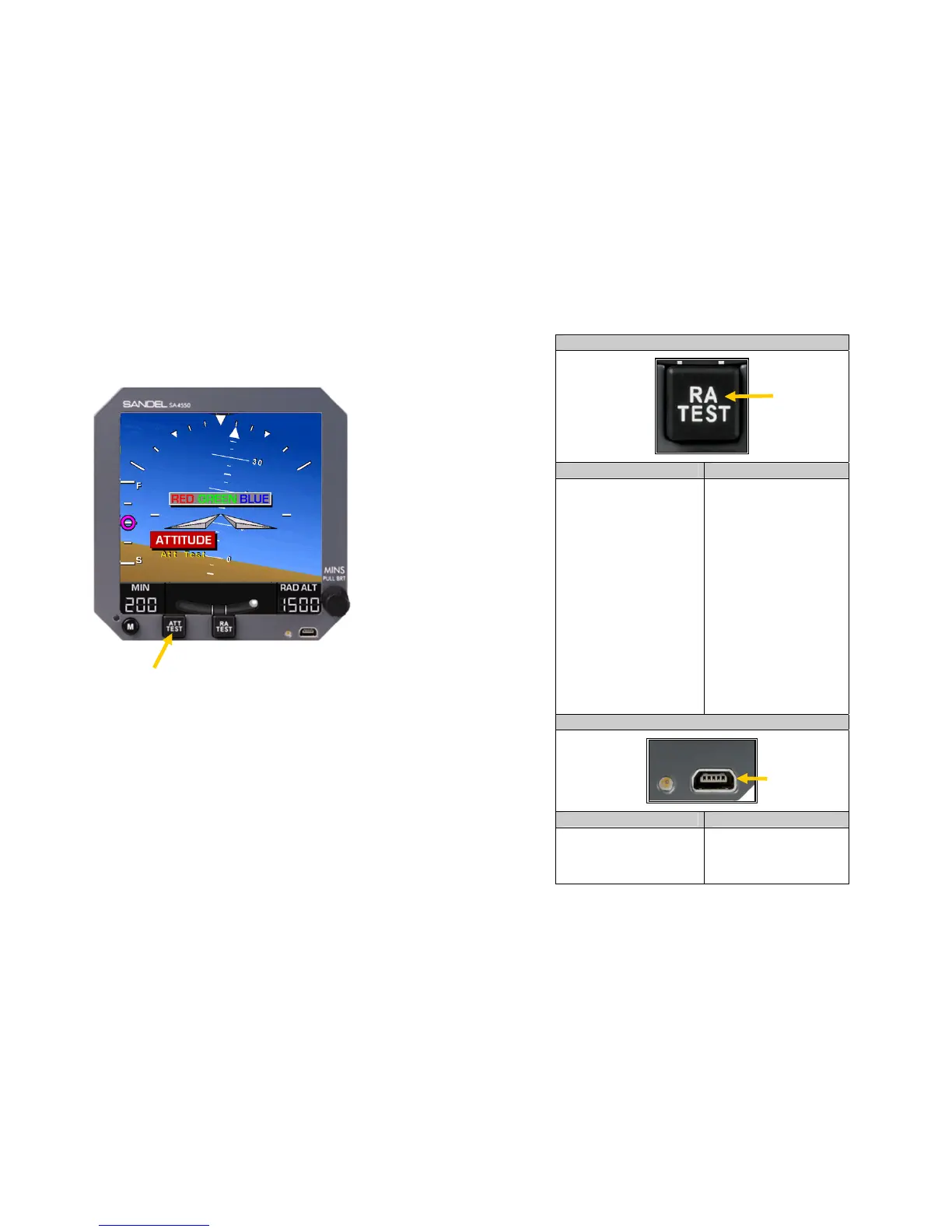
Figure 2-5 ATT Test
Press and hold
[ATT TEST]
button to
perform display
test.
Operation
82010-PG, REV. F Sandel SA4550 Pilot’s Guide 2-8
CONTROL FEATURE
FUNCTION OPERATION
Radar Altimeter Test:
Used to test radar
altimeter system. If a
radar altimeter system is
not installed or remote
test function is not
enabled, the message
“Function Not Installed”
will appear when [RA
TEST] is pressed.
Depress [RA TEST]
button and observe
radar altimeter display
for proper indications.
See AFM for proper
radar altimeter test
display indications. For
installations using a
digital 429 radar
altimeter, the text “RAD
ALT” in the radar
altimeter window of the
display will be replaced
with “RA TEST” in
amber while the system
is under test.
CONTROL FEATURE
FUNCTION OPERATION
Mini-USB Port:
Used for updating
internal software.
Maintenance function
only.
MINI USB PORT
RADAR
ALTIMETER
TEST

Table of Contents

Related product manuals