EasyManua.ls Logo

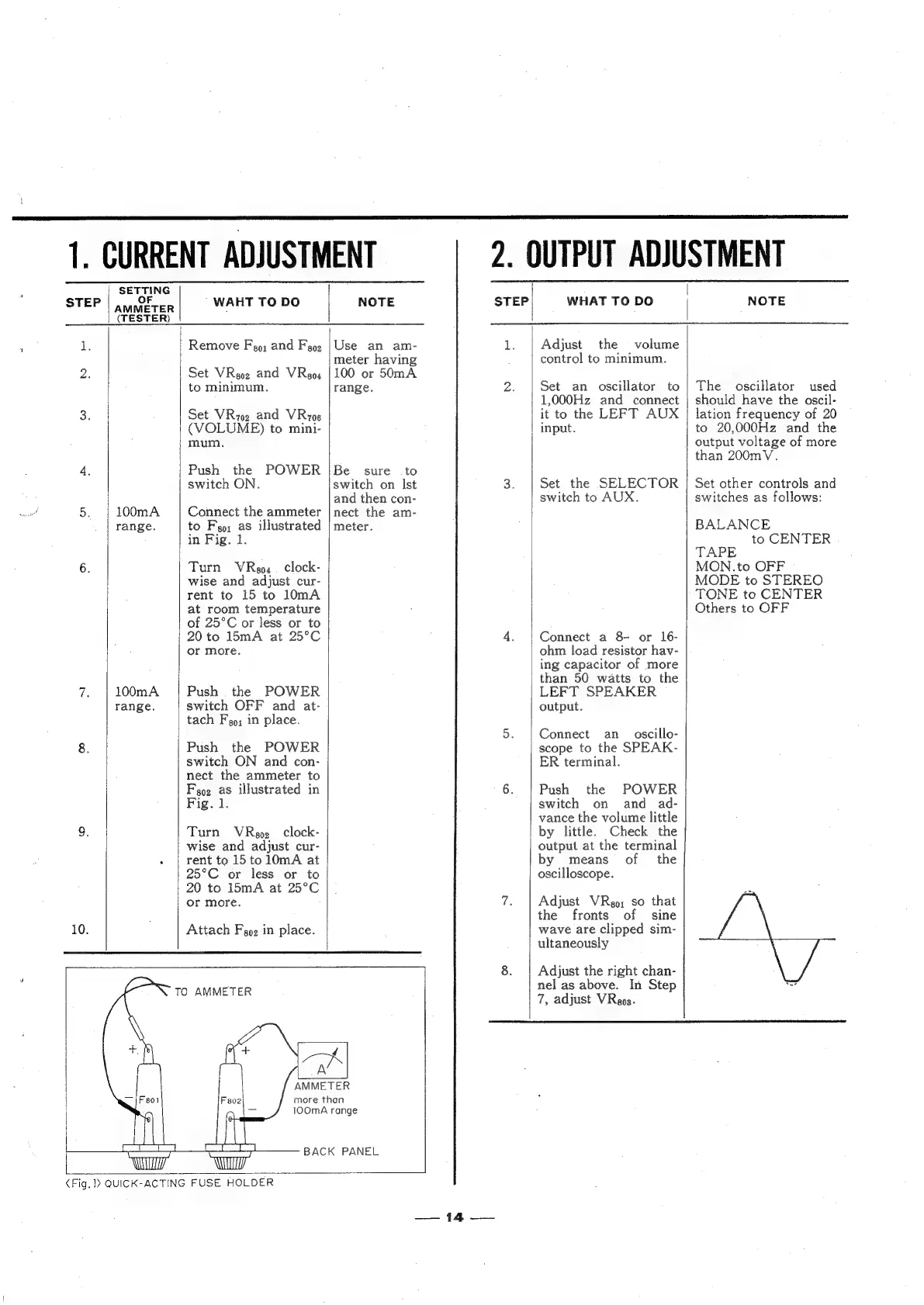
Sansui 2000X - Current Adjustment; Output Adjustment

Sansui 2000X
31 pages
Print Icon
To Next Page IconTo Next Page
To Previous Page IconTo Previous Page
Loading...
STEP
SETTING
OF
AMMETER
(TESTER)
100mA
range.
100mA
range.
WAHT
TO DO
Remove
F
9;
and
Foe
Set
VReoz
and
VReo4
to
minimum.
Set
VRioe
and
VRuiog
(VOLUME)
to
mini-
mum.
Push
the
switch
ON.
POWER
Connect
the
ammeter
to
Feo;
as
illustrated
in
Fig.
1.
Turn
VRgo,
_
clock-
wise
and
adjust
cur-
rent
to
15
to
l0mA
at
room
temperature
of
25°C
or
less
or
to
20
to
15mA
at
25°C
or
more.
|
Push
the
POWER
|
switch
OFF
and
at-
tach
Fo;
in
place.
Push
the
POWER
switch
ON
and
con-
nect
the
ammeter
to
Foz
as
illustrated
in
Fig.
1.
Turn
VRgoz
clock-
wise
and
adjust
cur-
rent
to
15to10mA
at
25°C
or
less
or
to
20
to
15mA
at
25°C
or
more.
Attach
Fgoe
in
place.
1.
CURRENT
ADJUSTMENT
NOTE
Use
an
am-
meter
having
100
or
50mA
range.
Be
sure
to
switch
on
lst
and
then
con-
nect
the
am-
meter.
Feoi
TO
AMMETER
AMMETER
more
than
100mA
range
BACK
PANEL
<Fig,
>
QUICK-ACTING
FUSE
HOLDER
STEP
A
4a
Ss
WHAT
TO
DO
Adjust
the
volume
control
to
minimum.
Set
an
oscillator
to
1,000Hz
and
connect
it
to
the
LEFT
AUX
|
input.
Set
the
SELECTOR
switch
to
AUX.
Connect
a
8
or
16-
ohm
load
resistor
hav-
ing
capacitor
of
more
than
50
watts
to
the
LEFT
SPEAKER
output.
Connect
an
oscillo-
scope
to
the
SPEAK-
ER
terminal.
Push
the
POWER
switch
on
and
ad-
vance
the
volume
little
by
little.
Check
the
output
at
the
terminal
by
means
of
the
oscilloscope.
Adjust
VRgo;
so
that
the
fronts
of
sine
wave
are
clipped
sim-
ultaneously
Adjust
the
right
chan-
nel
as
above.
In
Step
7,
adjust
VRaps.
2.
OUTPUT
ADJUSTMENT
NOTE
The
oscillator
used
should
have
the
oscil-
lation
frequency
of
20
to
20,000Hz
and
the
output
voltage
of
more
than
200mV.
Set
other
controls
and
switches
as
follows:
BALANCE
to
CENTER
TAPE
MON.to
OFF
MODE
to
STEREO
TONE
to
CENTER
Others
to
OFF

Related product manuals