EasyManua.ls Logo

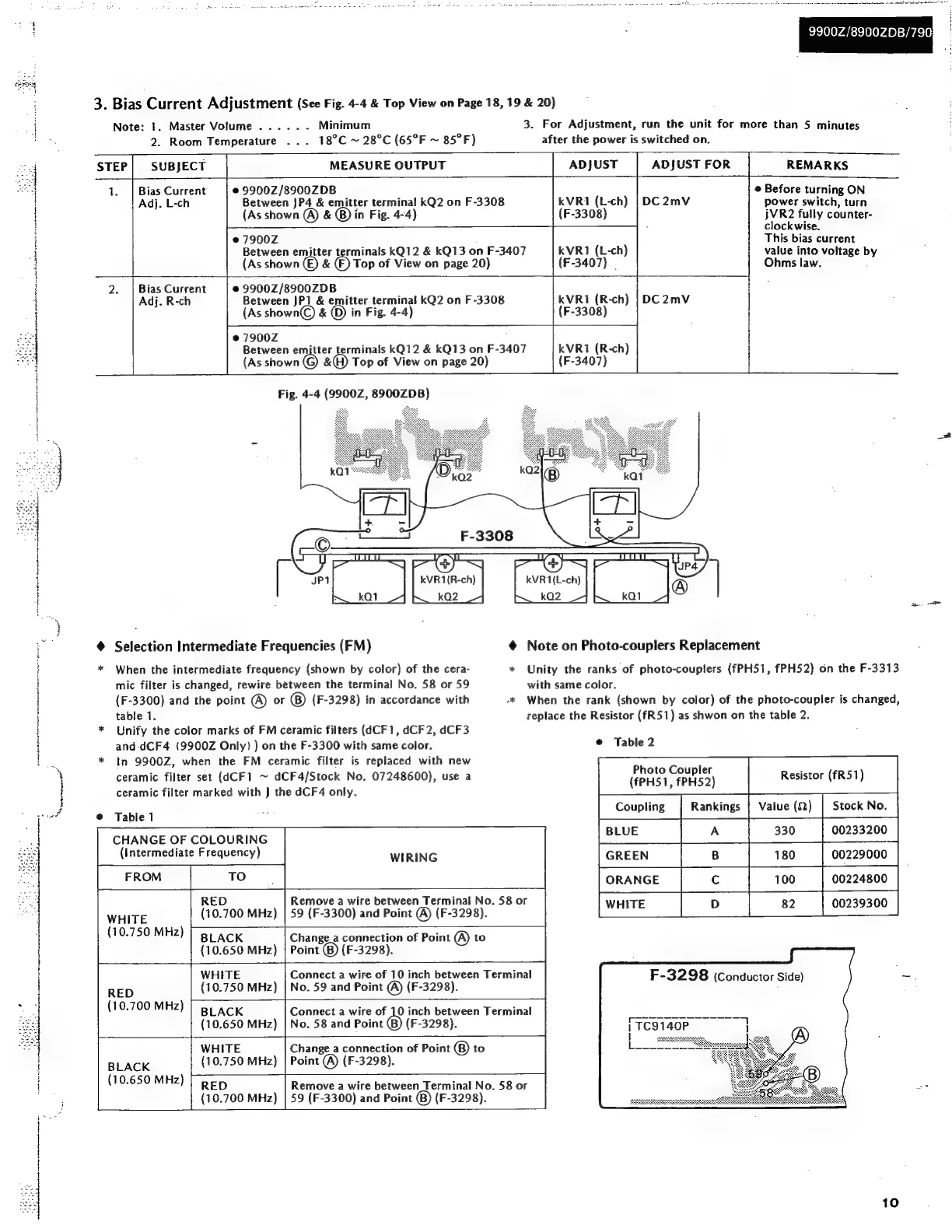
Sansui 7900Z - Bias Current Adjustment; FM Intermediate Frequency Selection

Sansui 7900Z
44 pages
Print Icon
To Next Page IconTo Next Page
To Previous Page IconTo Previous Page
Loading...
4
:
}
:
9900Z/89002DB/790
3.
Bias
Current
Adjustment
(See
Fig.
4-4
&
Top
View
on
Page
18,
19
&
20)
7
3.
For
Adjustment,
run
the
unit
for
more
than
5
minutes
after
the
power
is
switched
on.
Note:
1.
Master
Volume
.....
-
Minimum
2.
Room
Temperature
18°C
~
28°C
(65°F
~
85°F)
STEP
SUBJECT
MEASURE
OUTPUT
ADJUST
ADJUST
FOR
REMARKS
©
Before
turning
ON
power
switch,
turn
jVR2
fully
counter-
clockwise.
This
bias
current
value
into
voltage
b
Ohms
law.
:
©
9900Z/8900ZDB
Between
JP4
&
emitter
terminal
kQ2
on
F-3308
(As
shown
@)
&
®)
in
Fig.
4-4)
e@
7900Z
Between
emitter
terminals
kQ12
&
kQ13
on
F-3407
Top
of
View
on
page
20)
1.
|
Bias
Current
Adj.
L-ch
kVR1
(L-ch)
(F-3308)
kVR1
(L-ch)
(F-3407)
|
(As
shown
€)
&
©
9900Z/8900ZDB
Between
JP1
&
emitter
terminal
kQ2
on
F-3308
(As
shown©)
&
(D)
in
Fig.
4-4)
©
7900Z
Between
emitter terminals
kQ12
&
kQ13
on
F-3407
(As
shown
&(H)
Top
of
View
on
page
20)
2.
|
Bias
Current
Adj.
R-ch
kVRt1
(R-ch)
(F-3308)
KVR
(R-ch)
(F-3407)
Fig.
4-4
(9900Z,
8900ZDB)
ape
@
Selection
Intermediate
Frequencies
(FM)
@
Note
on
Photo-couplers
Replacement
*
When
the
intermediate
frequency
(shown
by
color)
of
the
cera-
*
Unity
the
ranks
of
photo-couplers
(fPH51,
fPH52)
on
the
F-3313
mic
filter
is
changed,
rewire
between
the
terminal
No.
58
or
59
with
same
color.
(F-3300)
and
the
point
(A)
or
(F-3298)
in
accordance
with
~*
When
the
rank
(shown
by
color)
of
the
photo-coupler
is
changed,
table
1.
replace
the
Resistor
(fR51)
as
shwon
on
the
table
2.
Unify
the
color
marks
of
FM
ceramic
filters
(4CF1,
dCF2,
dCF3
and
dCF4
(9900Z
Only)
)
on
the
F-3300
with
same
color.
*
In
9900Z,
when
the
FM
ceramic
filter
is
replaced
with
new
ceramic
filter
set
(dCF1
~
dCF4/Stock
No.
07248600),
use
a
ceramic
filter
marked
with
J
the
dCF4
only.
©
Table
2
LE
Ne
ee
a
a
ea
TE
*
Photo
Coupler
(fPH51,
fPH52)
Resistor
(fR51)
Stock
No.
nee”
Coupling
Rankings
|
Value
(2)
@
Table
1
CHANGE
OF
COLOURING
(Intermediate
Frequency)
330
00233200
WIRING
180
00229000
FROM
TO
ORANGE
100
00224800
82
00239300
RED
Remove
a
wire
between
Terminal
No.
58
or
WHITE
(10.750
MHz)
(10.700
MHz)
59
(F-3300)
and
Point
@
(F-3298).
BLACK
(10.650
MHz)
Change_a
connection
of
Point
(A)
to
Point
()
(F-3298).
RED
(10.700
MHz)
WHITE
(10.750
MHz)
Connect
a
wire
of
10
inch
between
Terminal
No.
59
and
Point
@
(F-3298).
BLACK
(10.650
MHz)
Connect
a
wire
of
10
inch
between
Terminal
No.
58
and
Point
()
(F-3298).
BLACK
(10.650
MHz)
WHITE
(10.750
MHz)
Change
_a
connection
of
Point
®
to
Point
(A)
(F-3298).
RED
(10.700
MHz)
Remove
a
wire
between
Terminal
No.
58
or
59
(F-3300)
and
Point
@®)
(F-3298).
F-3298
(Conductor
Side)
10

Related product manuals