EasyManua.ls Logo

Sansui AU-70 - Operations Guide; Record Playing Procedures; Broadcast Reception; Tape Recording and Playback

Sansui AU-70
15 pages
Print Icon
To Next Page IconTo Next Page
To Previous Page IconTo Previous Page
Loading...
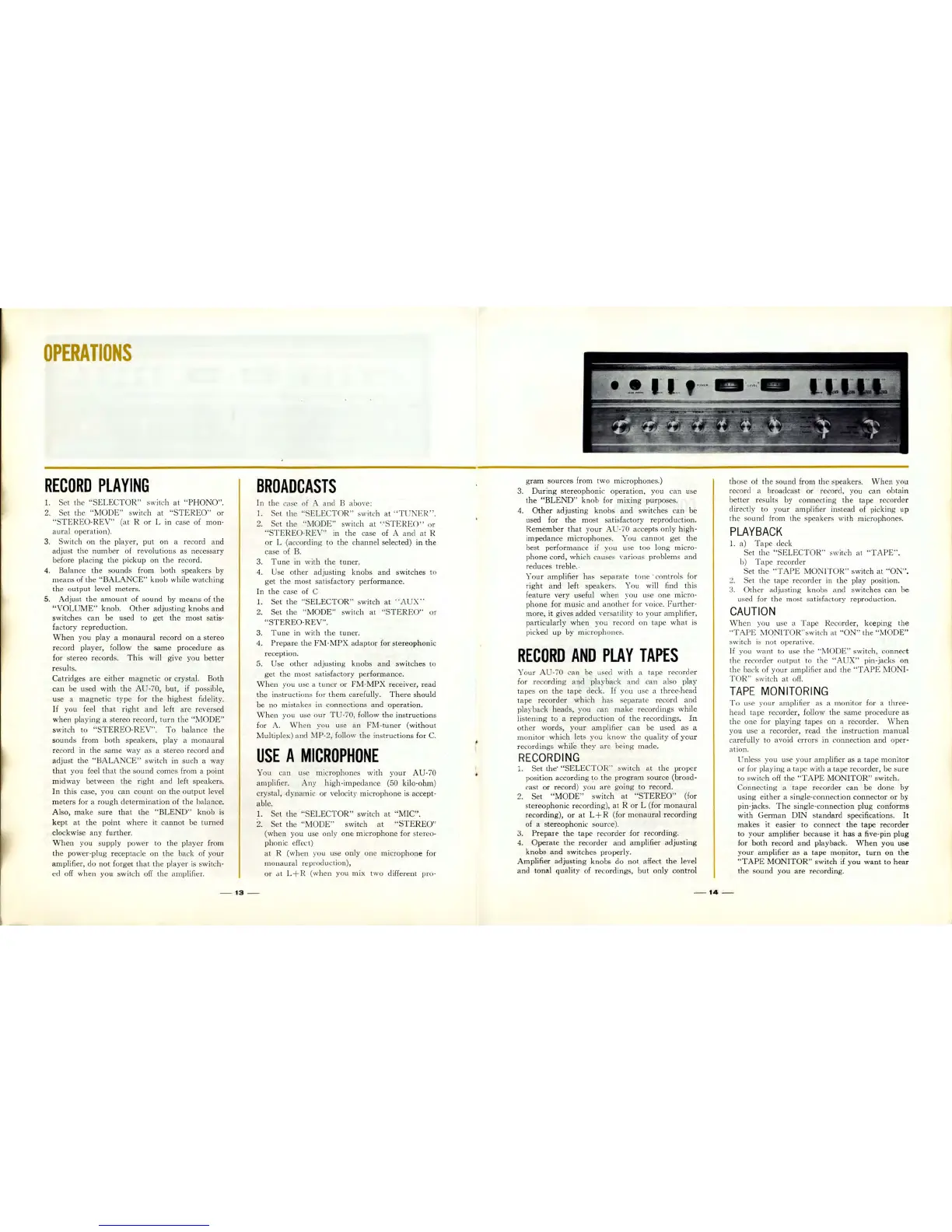
OPERATIONS
RECORD
PLAYING
1.
Set
the
"SELECTOR"
switch
at
"
PHONO".
2.
Set
the
"MODE"
sw
it
ch
at
"
STEREO
"
or
"S
T EREO-
REV
"
(at
R
or
L in case of mon-
aura
l
operat
ion
).
3.
Sw
itch on
th
e player, put
on
a record
and
adjust
the
numb
er of
revolutions
as
ne
cessa
ry
before placing
th
e
pickup
on
th
e record.
4.
Balance
the
so
und
s from
both
s
peakers
by
me
ans of
the
"BALANCE"
knob
while
wat
c
hing
the
output
level meters.
.
5.
Adju
st
the
amount
of
sound
by
means
of
the
"VOLUME"
knob.
Other
adjusting
knobs
and
switches
can
be used to
get
the
most
satis-
factory
repreduction
.
When
you play a
monaural
record
on
a
stereo
record player, follow
the
same
procedure
as
for stereo
re
cord
s.
Thi
s will
give
you
better
re
sults.
Catridg
es
are
either
ma
gn
et
ic
or
crystal. Both
can
be used
with
the
AU-70,
but,
if possible,
use a
magnetic
type for
the
highest
fidelity.
If
you feel
that
right
and left
are
r
eve
rsed
when
playing a st
ereo
record,
turn
the
"MODE"
switch to
"STEREO-REV".
To
balance
th
e
sound
s from
both
speakers, play a monaural
record in
the
sa
me
way
as
a stereo record
an
d
adjust
the
"BALANCE"
switch in such a
way
that
you feel
th
at
the sound co
me
s from a
point
midway
between
the
rig
ht
and left speakers.
In
this
case, you can
count
on
th
e
output
l
eve
l
meters
for a
rough
det
er
mina
ti
on of
the
balance.
Also,
make
sure
that
th
e
"BLEND"
knob
is
kept
at
the
point
wh
ere it ca
nnot
be
turn
ed
clockwise
any
further.
When
you supply
power
to
the
player
from
the
power-plu
g receptacle on
th
e back of
your
amplifier,
do
not
fo
rget
th
at
the
player
is
sw
itch-
ed off
when
you
switch
off
th
e
amp
lifier.
BROADCASTS
In
the case of A and B above:
1.
Set
the
"SE
LE
CT OR" switch
at
"TUNER"
.
2.
Set
the
"MO
DE
" switch
at
"STE
RE
O"
or
"STEREO-REV"
in
the
case of A
and
at R
or
L (according to
the
cha
nnel
selected) in
the
case of
B.
3.
Tun
e in
with
th
e
tun
er.
4.
Use
other
adjus
ting
knob
s
and
switches
to
get
th
e
mo
st
sa
ti
sfac
tor
y performance.
In
the
case of C
1.
Set
the
"SELECTOR"
s
witch
at
"AUX"
2.
Set
th
e
"MODE"
switch
at
"STEREO"
or
"STEREO-
REV".
3.
Tune
in
with
the
tuner.
4.
Prepare
th
e
FM-MPX
adaptor
for
stereophonic
re
ception.
5.
Use
other
adjusting
knobs
and
switches
to
get
the
most
sa
ti
sfac
tory
performance.
When
you use a
tun
er
or
FM-MPX
receiver, read
th
e
instru
ctions for
th
em carefully.
There
should
be no mistakes in co
nne
ctions
and
operation.
When
you usc o
ur
T U -70, follow
the
instruction
s
for
A.
Wh
en you use
an
FM-tuner
(without
Multiplex)
and
MP·2,
fo
ll
ow
the
instructions
for
C.
USE
A
MICROPHONE
You can use
microphones
with
yo
ur
AU-70
amplifier.
Any
hig
h-imp
e
dan
ce (50 kilo-ohm)
crystal, dynamic or velocity mic
rophone
is accept-
able.
1. Set
th
e
"SELECTOR"
switch
at
"MIC".
2.
Set
th
e
"MO
DE
" sw
itch
at "
STEREO"
(when you use only
one
micro
phone
for
ste
reo-
ph
onic effect)
at
R (when you use
only
one
microphone
for
mo
naural
reprod uc
ti
on),
or
at
L + R (w
hen
you mix
two
different
pro-
-
13
-
gram
sources from
tw
o
mi
c
rophon
es.)
3.
During
stereophoni
c
operation,
you can use
the
"BLEND"
knob
for
mixing
purposes.
4.
Other
adjusting
knob
s
and
switches can be
used for
the
mo
st satisf
ac
tory reproduction.
Remember
that
yo
ur
AU·70
accepts only high-
i
mpedance
micr
ophones. You
canno
t
get
the
best
perform
ance if you use too long micro-
phone
cord,
whi
ch causes \'arious
problems
and
re
du
ces treble. ·
Your
amplifier
ha
s separ
ate
tone'
co
ntr
ols for
right
and
left speaker
s.
You will find this
feature
very
useful
wh
en you use
one
micro-
phone
for
musi
c
and
a
noth
er
for voice.
Furth
er
-
more, it gives added
\,
ersatility to yo
ur
amplifier,
particularly
wh
en you record on
tape
what
is
pic
ked
up
by
microphones.
RECORD
AND
PLAY
TAPES
Your
AU·70
can be sed
with
a
tape
recorder
for
recording
and
pl
aybac
k
and
can also
play
tapes on
th
e
tape
deck.
If
you use a
thre
e
·h
ead
t
ape
re
co
rder
whi
ch
ha
s separ
ate
record
and
playback
heads
, you
can
make
reco
rding
s
while
li
sten
ing to a
repr
oduc
ti
on
of
the
recordings
.
In
oth
er
words, yo
ur
amp
lifier
can
be us
ed
as
a
monitor
which
lets you
know
th
e
quality
of
your
recordin
gs
while
th
ey are
being
made
..
RE
CORDING
Set
th
e'
"SELECTOR
" switch
at
the
prop
er
position
according
to
th
e
program
so
urce
(broad-
cas
tor
record) you
are
going
to record.
2.
Set
"MODE"
switch
at
"STEREO
" (for
s
tereophonic
recording
),
at
R
or
L (for
monaural
recording),
or
at
L+
R (for
monaural
recording
of a
stereophonic
so
ur
ce).
3.
Prepare
the
tape
re
co
rd
er for recording.
4.
Operate
the
recorder
and
amplifier
adjusting
knobs
and
switches properly.
Amplifier
adjusting
knobs
do
not affect
the
level
and
tonal
quality
of recordings,
but
only
control
th
ose
ot
the sound from
th
e spea
ker
s.
Wh
en you
record ' a broadcast
cir
record, you
can
obtain
be
tt
er results by co
nn
ecting
the
tape
. reco
rder
directly to
your
amplifier
in
stead of picking
up
th
e sound fr om
th
e
spea
kers with micro
phone
s.
PLAYBACK
1.
a) T
ape
deck
Set
the
"SELECTOR"
switch
at
"TAPE".
b)
Tape
recorder
Set
the "
TAPE
MONITOR
" switch
at
"ON".
2.
Set
the
tape
recorder
in
the
play position.
3.
Other
adjusting
kn
obs and switches can
be
used for
th
e most
sa
tisfactory
reproduction.
CAUTION
Wh
en you use a
Tape
Recor
der
, keeping
the
"TAPE
MONITOR
"
sw
itch
at
"ON"
the
"MODE"
switch is n
ot
operative.
If
you
wan
t to use
the
"MODE"
switch,
connect
the
recorder
o
utput
to
the
"AU
X" pin-j
ackso
n
th
e back of your amplifi
er
and
the "
TAPE
MONI-
TOR"
switch at o
ff
.
T
APE
MONI
T
ORING
To
use your
amp
lifi
er
as a
monitor
for a
thr
ee-
head
t
ape
recorder, follow
the
same procedure as
the
one
for
playing
tapes
on
a recorder. Vvhen
yo
u use a recorder,
read
the
instruction
manual
carefully to
avo
id
errors
in
connect
ion
and
oper-
ation.
U
nl
ess you use your
amp
lifier
as
a
tape
mon
i
tor
or
for playing a t
ape
with a
tape
recorder,
be s
ure
to
switch off the "
TAPE
MONITOR
" switch.
Connecting
a
tap
e reco
rder
can
be
done
by
using
either
a single-co
nnection
connector
or
by
pin-jacks.
The
single-connection
plug
conforms
with
German
DIN
standard
specifications.
It
makes
it easier
to
connect
the
tape
recorder
to
your
amplifier because it
has
a five-pin
plug
for
both
record
and
playback.
When
you
use
your
amplifier
as
a
tape
moritor,
turn
on
the
"TAPE
MONITOR
" switch if
you
want
to
hear
the
sound
you
are
recording.
-
14
-

Related product manuals