EasyManua.ls Logo

Sansui G-5700 - Page 34

Sansui G-5700
49 pages
Print Icon
To Next Page IconTo Next Page
To Previous Page IconTo Previous Page
Loading...
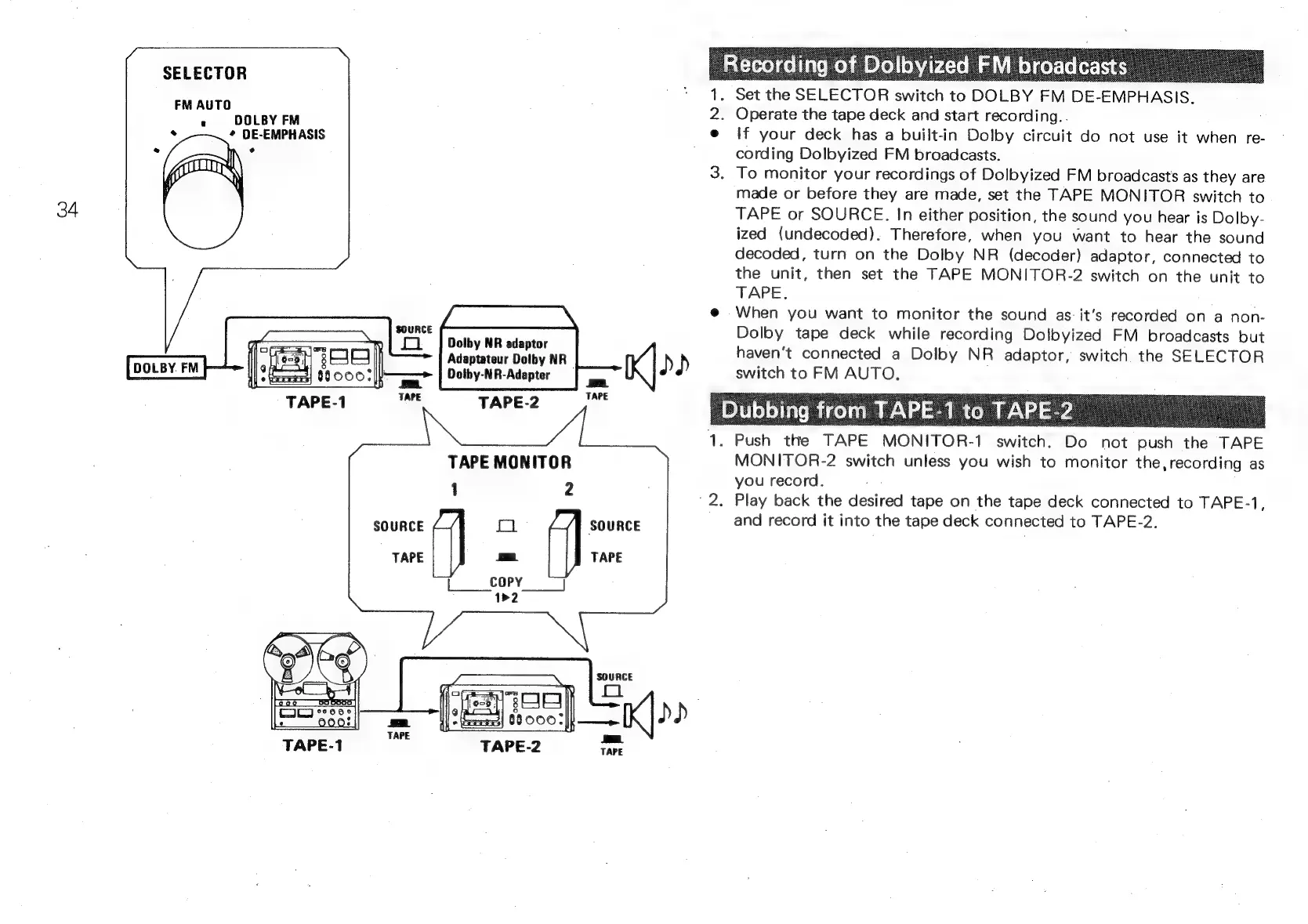
TAPE
MONITOR
1
2
7
ER
TAPE
=.
TAPE
|
COPY
J
1>2
SOURCE
[oso
eee
ee
-
TAPE-2
1.
Push
t
ees
SK
.
Set
the
SELECTOR
switch
to
DOLBY
FM
DE-EMPHASIS.
.
Operate
the
tape
deck
and
start
recording..
If
your
deck
has
a
built-in
Dolby
circuit
do
not
use
it
when
re-
cording
Dolbyized
FM
broadcasts.
.
To
monitor
your
recordings
of
Dolbyized
FM
broadcasts
as
they
are
made
or
before
they
are
made,
set
the
TAPE
MONITOR
switch
to
TAPE
or
SOURCE.
In
either
position,
the
sound
you
hear
is
Dolby-
ized
(undecoded).
Therefore,
when
you
want
to
hear
the
sound
decoded,
turn
on
the
Dolby
NR
(decoder)
adaptor,
connected
to
the
unit,
then
set
the
TAPE
MONITOR-2
switch
on
the
unit
to
TAPE.
When
you
want
to
monitor
the
sound
as:
it’s
recorded
on
a
non-
Dolby
tape
deck
while
recording
Dolbyized
FM
broadcasts
but
haven't
connected
a
Dolby
NR
adaptor,
switch
the
SELECTOR
switch
to
FM
AUTO,
.
fe
TAPE
MONITOR-1
switch.
Do
not
push
the
TAPE
MONITOR-2
switch
unless
you
wish
to
monitor
the,
recording
as
you
record.
.
Play
back
the
desired
tape
on
the
tape
deck
connected
to
TAPE-1,
and
record
it
into
the
tape
deck
connected
to
TAPE-2.