EasyManua.ls Logo

Sansui G-9700 - Tape-to-Tape Copying; Reverse Direction Copying

Sansui G-9700
50 pages
Print Icon
To Next Page IconTo Next Page
To Previous Page IconTo Previous Page
Loading...
34
Vere
deeetppaeetdesrit
eee
enseneeted
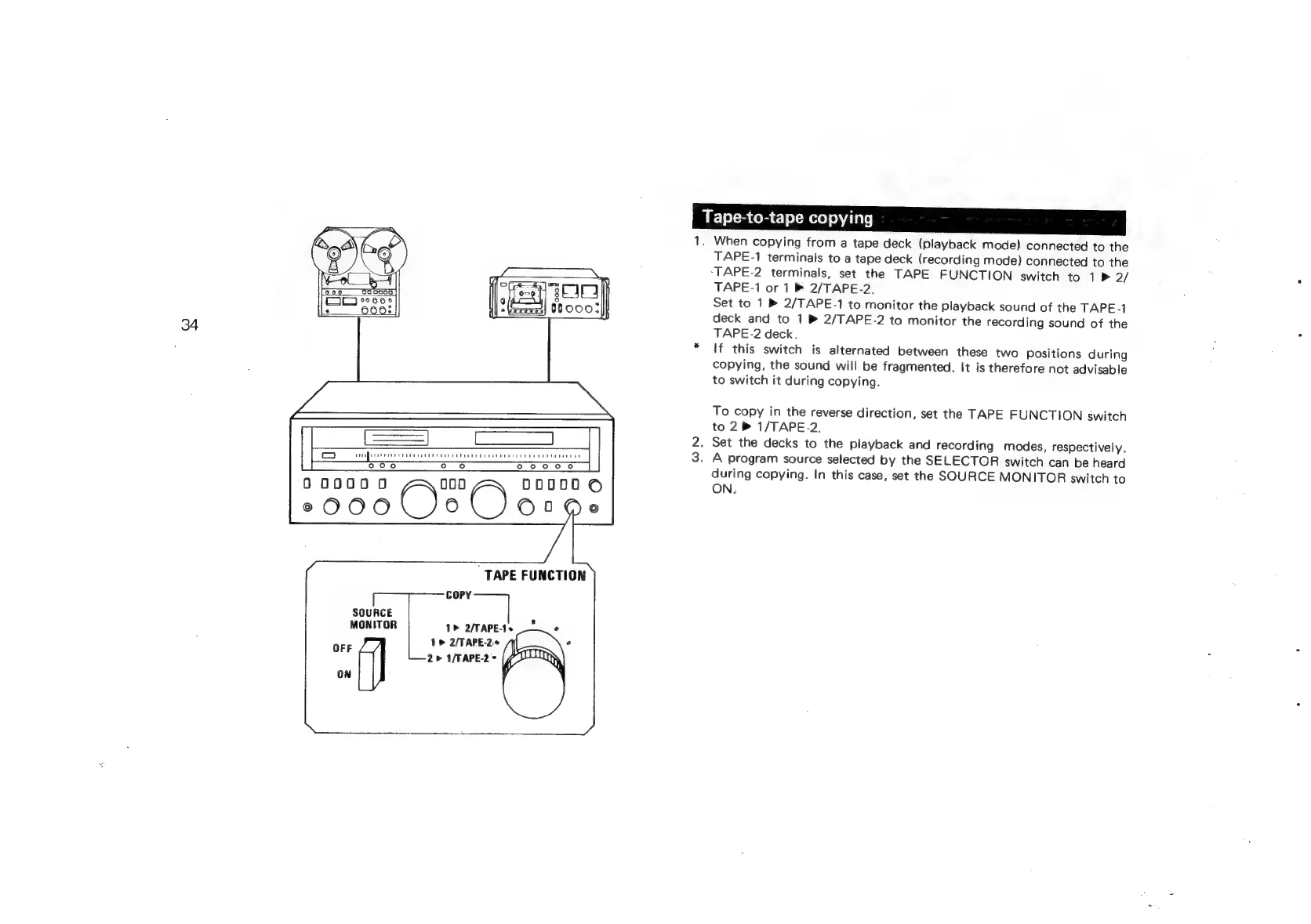
TAPE
FUNCTION
copy
SOURCE
<
MONITOR
1>
2/TAPE-1s
°
1
>
2/TAPE-2
e
tt)
r
2>
1/TAPE-2°
ON
Tape-to-tape
copying
1.
When
copying
from
a
tape
deck
(playback
mode)
connected
to
the
TAPE-1
terminals
to
a
tape
deck
(recording
mode)
connected
to
the
“TAPE-2
terminals,
set
the
TAPE
FUNCTION
switch
to
1
>
2/
TAPE-1
or
1
2/TAPE-2,
Set
to
1
®
2/TAPE-1
to
monitor
the
playback
sound
of
the
TAPE-1
deck
and
to
1
®
2/TAPE-2
to
monitor
the
recording
sound
of
the
TAPE-2
deck.
If
this
switch
is
alternated
between
these
two
Positions
during
copying,
the
sound
will
be
fragmented.
It
is
therefore
not
advisable
to
switch
it
during
copying.
To
copy
in
the
reverse
direction,
set
the
TAPE
FUNCTION
switch
to
2
PB
1/TAPE-2.
.
Set
the
decks
to
the
playback
and
recording
modes,
respectively.
.
A
program
source
selected
by
the
SELECTOR
switch
can
be
heard
during
copying.
In
this
case,
set
the
SOURCE
MONITOR
switch
to
ON.

Related product manuals