Basic Operation
Power On /Off
1
green
3
4 If
.Connect the TV unit to power source using power cord.
2.When the power indicator in red,the TV is in standby mode.Now press the " "button on remote
control or front panel to turn on the TV.The TV works normally when the power indicator is in .
.Switch the TV to standby mode,just press " "button on the remote control or front panel.
Now the indicator will be in red.
.The power consumption is less than 1W in standby mode. unused for a long time,please
disconnect the power cord from the wall outlet.
Standby
Select Viewing Source
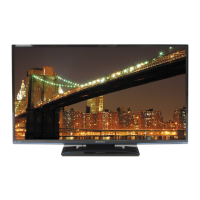
Press the "SOURCE"button to display the sources list.
Note:The TV set can turn off automatically after 5minutes while there has no signal input.
Input Source
DTV
AV1
Av2
Av3
Component1
Component2
PC-RGB
HDMI1
HDMI2
TV
EXIT
EXIT
OK
OK
Please use the direction buttons to select desired signal,and press "OK"or " "button to confirm.
Note:
If the TV can't find any signal input,you can
Try to press b u t t o n on remote control to restart the TV.
Please make sure the connection for your choice is available .
For example,"TV"for watching TV,"VGA"for PC
or the on the panel
.
- 11 -
Standby
Standby
" "
Operating Instructions



 To Next Page