Channel Menu
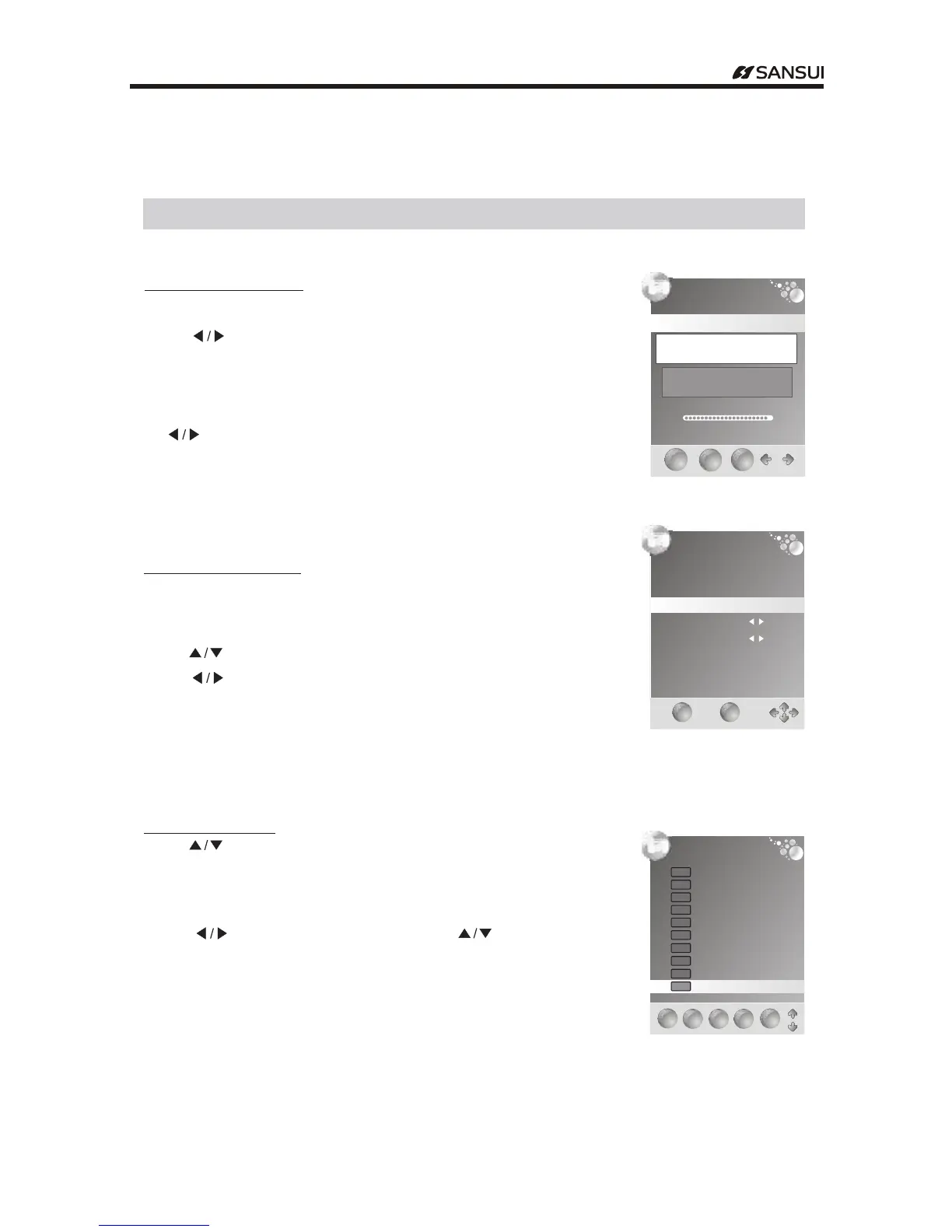
Press " button toOK search."
DTV Manual Tuning ( )only available in DTV mode
Press to ." "button select channel
You can also set program list again one by one by "Manual Search"function.
When a channel is found,the searchi ng proce ss will stop ,
the channel will be saved with current channel number
If the prog ram is not your expected one,please press
button to continue the searchi ng." "
Press EXIT to exit." "button
If you find one channel is a little weak,
you can adjust the frequency of the channel.
It might be improve the quality of picture and sound.
ATV Manual Tuning ( )only available in TV mode
Press to ." "butto n select items
Press to adjust it." "button
Press the red button to save it .
Press EXIT to exit.button
" "
Programme Edit
Press to ." "Button select items
Press red to .button delete the channel
Press green to .
: .
.
button rename the channel
Note Only the TV channel can be renamed
Press " "to select the letter and press" "to
change the letter
Press yellow to .button move the channel
Press SKIP to .button skip the channel
Press FAV to .button set the favorite channel
Note The list of programs include TV DTV and Radio
The programs can be moved only among the same kind
: , .
.
Menu Operation
DTV Manual Tuning
EXIT
EXIT
MENU
MENU
OK
OK
VHF CH
Please select channel then
Press ENTER to search
Bad Normal Good
67
ATV Manual Tuning
Storage To
System
Search
Fine-Tune
Skip
Frequency
Current CH
1
DK
NO
442.00 Mhz
1
EXIT
EXIT
SAVE
SAVE
Programme Edit
DELETE
DELETE
FAV
FAV
SKIP
SKIP
2ABC1
DTVDTV
20ABCHDTV
DTVDTV
21ABC1
DTVDTV
22ABC2
DTVDTV
23ABC3
DTVDTV
200ABCDIGRadio
200ABCDIGJazz
RadioRadio
RadioRadio
1BBC1
TVTV
2C -01
TVTV
3S- 42
TVTV
MOVE
MOVE
RENAME
RENAME
- 13 -
Operating Instructions



 To Next Page