55
Manufactured under license from Dolby Laboratories. “Dolby” and the double-D symbol are trademarks of Dolby
Laboratories. Confidential unpublished works.
“DTS” and “DTS Digital Out” are trademarks of Digital Theater Systems, Inc.
NOTES:
•
•
When you make the connection above, on the AV Amplifier, do not set DOLBY DIGITAL to DOLBY DIGITAL, or MPEG to
MPEG “ON”. If you do, a loud noise will emit from the speakers possibly causing damage to your hearing or to the speakers.
Some DTS decoders do not support DVD-DTS interface, and may not work properly with the unit.
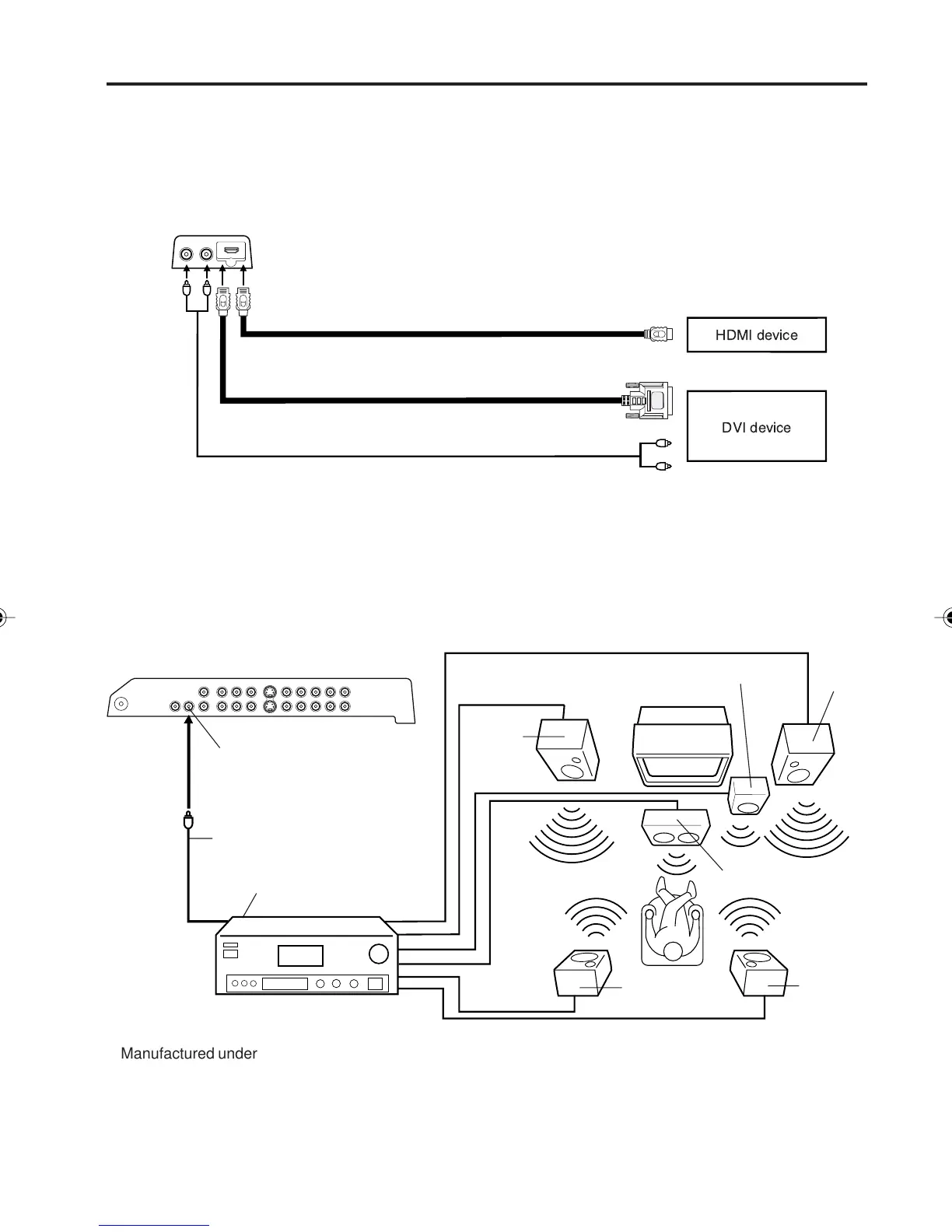
Coaxial digital cable
(not supplied)
AV Amplifier with built-in digital surround
decoder as listed above
Center Speaker
Coaxial Digital Audio Output
To Coaxial Digital Audio Input
Rear lower left of unit
Using an AV Amplifier with built-in digital surround
If you are using an Amplifier with built-in digital surround sound, you can enjoy various audio systems including
Dolby Digital Surround audio that sounds just like the movie.
Connect an AV amplifier with built-in Dolby Digital decoder, DTS decoder, or MPEG decoder etc. as
shown below.
*
*
Front
Speaker
(Left)
Front
Speaker
(Right)
Subwoofer
Surround
Speaker (Left)
Surround
Speaker
(Right)
TV/DVD
To connect a HDMI or a DVI device to the unit
Rear lower left of unit
HDMI - to - DVI adapter cable (HDMI type A connector)
(not supplied)
Connections to other equipment (continued)
Audio cord (not supplied)
HDMI cable (type A connector)
(not supplied)
To DVI output
To HDMI out
or
The HDMI input receives digital audio and uncompressed video from a HDMI device or uncompressed digital
video from a DVI device.
When you connect to a DVI device with a HDMI-to-DVI adapter cable, it transfers only video signal. Separate
analog audio cords required.
NOTE:
You must choose an appropriate setting for each connection (see page 32. “Selecting the HDMI audio input
source”).
5V10101A[EN] P49-55 9/30/05, 15:1155



 To Next Page