28
POWER
EJECT
TV/VCR
COUNTER RESET
INPUT SELECT
REC/OTR
SLOW
SPEED
MENU
–+
–
+
SET
SKIP
SEARCH
–+
TRACKING
AUTO
CANCEL
ENTER
STOP
PLAY
F.FWD
REW
TIMER REC
PAUSE/STILL
CHANNEL
CALL
1
2
3
456
78
0
9
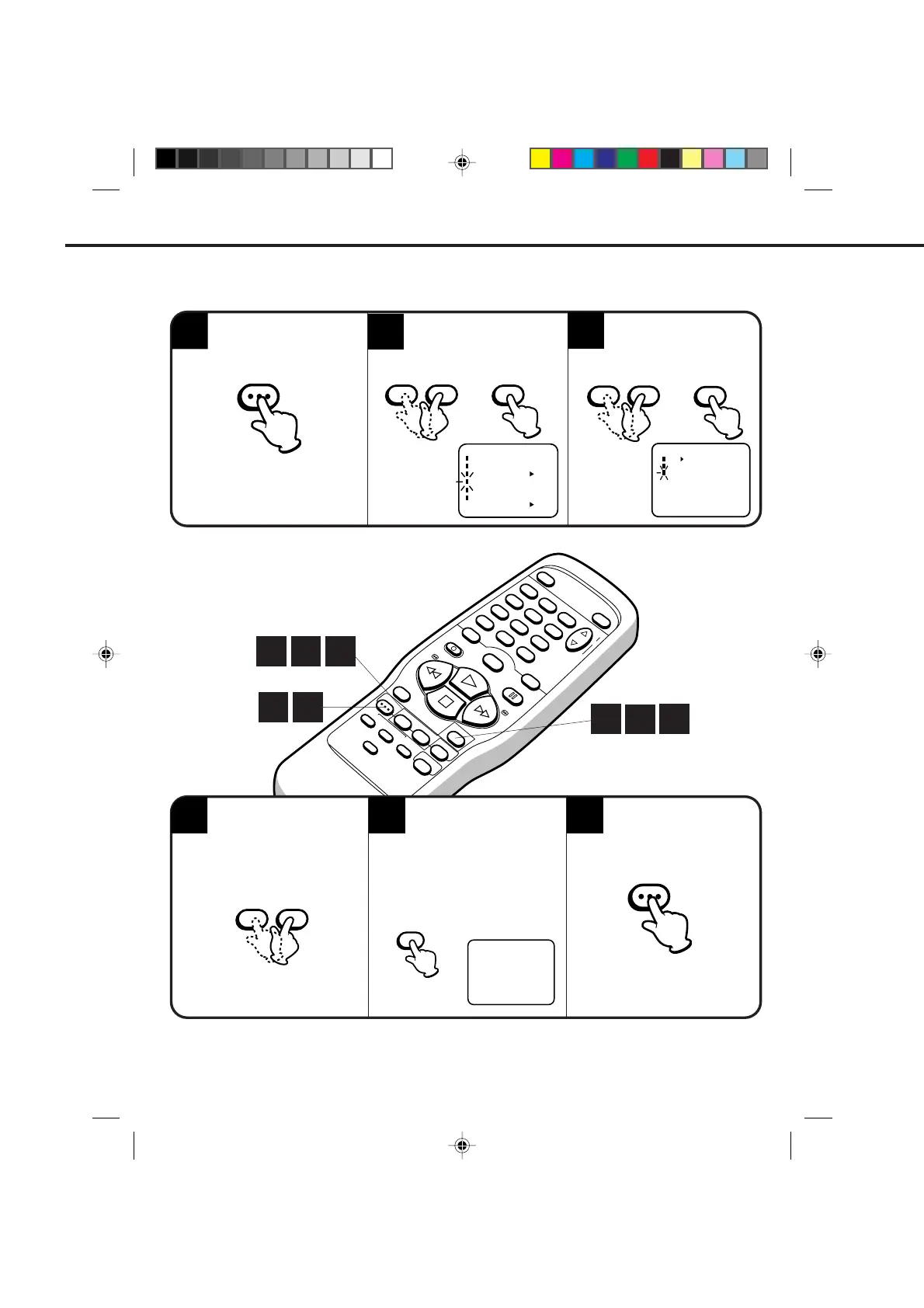
Press the SET + or – button
to select the CH SET UP
mode, then press the ENTER
button.
Press the SET + or – button
to select the ADD/DELETE
mode, then press the
ENTER button.
Press the MENU button until
the MENU screen is cleared.
Press the MENU button.
2
3
TO ADD/DELETE CHANNELS
Select the desired channel
to be memorized or deleted
using SET + or – button.
Press the ENTER button if
you wish to DELETE the
channel from memory.
CH 003ADD
〈
0–9/+/–/ENTER/MENU
〉
65
4
1
ENTER
ENTER
MENU
2
3
4
SETTING THE CHANNELS (CONTINUED)
CH SET UP
TV CATV
AUTO CH MEMORY
ADD/DELETE
〈
+/–/ENTER/MENU
〉
– SET +– SET +
〈+/–/ENTER/MENU〉
MENU
CLOCK SET
TIMER REC SET
ON OFF
AUTO REPEAT
CH SET UP
LANGUAGE/IDIOMA/LANGUE
ON OFF
NO NOISE BACKGROUND
Press the ENTER button if you wish
to ADD the unmemorized channel.
Repeat Steps 4 and 5 for each
channel to be added or deleted.
ENTER
– SET +
1
6
2
3
5
4C83101B(P28-35) 9*9*99, 10:3128


 To Next Page