EasyManua.ls Logo

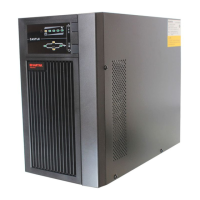
Santak Castle 2K - User Manual

Default Icon
38 pages
Print Icon
To Next Page IconTo Next Page
Loading...
1-3K

Questions and Answers

  • M
    Michael SullivanAug 18, 2025
    What to do if my Santak UPS is overloaded?
    • A
      Angela ThomasAug 18, 2025
      If your Santak UPS is overloaded, the cause is likely an overload. To resolve this, check the connected loads, remove some non-critical ones, and verify if any of the loads have failed.
  • D
    Dr. Larry Ramirez MDAug 20, 2025
    Why is the Santak Castle 2K UPS battery backup time so short?
    • J
      Jeremy WoodsAug 20, 2025
      If the emergency supply period of your Santak UPS is shorter than expected, it could be due to batteries not being fully charged or being defective. Try charging the batteries fully. If the problem persists, consider replacing the batteries or consulting your dealer.
  • Z
    Zachary FieldsAug 23, 2025
    Why is my Santak Castle 2K not turning on?
    • S
      Sheri StaffordAug 23, 2025
      If your Santak UPS has no indication and no warning tone, it could be due to no input voltage or an open breaker. Check the building wiring socket outlet and ensure the input system is connected to the mains power. Also, check the mains power supply.
  • L
    lawrenceleachAug 26, 2025
    What to do if Santak Castle 2K UPS has an output short circuit?
    • K
      Kelsey Green MDAug 26, 2025
      If your Santak UPS has an output short circuit, the cause is likely an output short circuit. Remove all the loads, turn off the UPS, and check whether the output of UPS and loads is short circuit. Ensure the short circuit is removed and the UPS has no internal faults before turning it on again.
  • P
    Peter CarlsonAug 28, 2025
    What does it mean when my Santak UPS indicates a low battery?
    • J
      Jennifer RoseAug 28, 2025
      If your Santak UPS indicates a low battery, it means the battery voltage is low. When you hear an audible alarm sounding every second, it indicates the battery is almost empty.
  • S
    sarahfitzpatrickAug 30, 2025
    Why is the heat sink on my Santak Castle 2K UPS overheating?
    • F
      fmcleanAug 30, 2025
      If the heat sink is overheating in your Santak UPS, it's likely due to a high heat sink temperature. Check if the air intake and outtake are blocked, or if the ambient temperature is too high.
  • J
    Jennifer HernandezSep 2, 2025
    What does 'Site fail' mean on my Santak Castle 2K?
    • R
      Richard ZimmermanSep 2, 2025
      If your Santak UPS indicates a site failure, it means the phase and neutral conductors at the input of the UPS system are reversed. Rotate the mains power socket by 180° or correctly connect the UPS system.
  • H
    haneyjasonSep 4, 2025
    Why is the inverter temperature high on my Santak UPS?
    • A
      Alexander ScottSep 5, 2025
      If your Santak UPS displays a high inverter temperature, it means the temperature of the UPS is too high. Check the ventilation.
  • J
    James CurrySep 7, 2025
    How to fix high ambient temperature in Santak Castle 2K?
    • A
      Anna CohenSep 7, 2025
      If your Santak UPS reports a high inner ambient temperature, it means the ambient temperature is too high. Check the environment ventilation.
  • D
    davidstrongSep 9, 2025
    What does 'Battery over voltage' mean on Santak UPS?
    • S
      Sarah ColemanSep 9, 2025
      If your Santak UPS shows a battery over voltage, it means the battery is over charged. The UPS will automatically switch to battery mode, and after the battery voltage returns to normal and the mains is normal, it will switch back to line mode automatically.

Summary

Safety and EMC Instructions

Installation Safety Guidelines

Instructions for UPS installation, covering environmental factors, connections, and ventilation.

UPS Operation Guidelines

Safe Operation Practices

Guidelines for operating the UPS, including safety during operation and power disconnection.

Maintenance, Servicing, and Faults

Maintenance Procedures

Information on maintenance, servicing, and handling faults of the UPS.

UPS Panel Features

Button Functions

Explains the function of the ON/OFF and Test/Silence buttons on the UPS panel.

UPS Panel Features - LCD Display

Connection and Operation Procedures

UPS Input and Output Connection

Details on connecting the UPS input and output sockets.

Connection and Operation Procedures - Battery

External Battery Connection

Guidelines for connecting external batteries for extended backup time models.

UPS Power Management Operations

Battery Recharge Procedure

Instructions on how to fully charge the UPS batteries.

Turning On the UPS

Steps to turn on the UPS, with and without mains power.

UPS Power Management Operations - Shutdown and Alarms

Turning Off the UPS

Procedures for turning off the UPS in different modes.

Trouble Shooting Guide

Problem Diagnosis and Solutions

Provides guidance on troubleshooting UPS issues based on LCD display and codes.

Technical Specifications

Electrical Specifications

Details electrical specifications for INPUT and OUTPUT of the UPS models.

Backup Time and Physical Dimensions

Typical Backup Time

Provides typical backup time values for 100% and 50% load conditions.

Communication Ports and Software

WinPower Monitoring Software

Introduces the WinPower UPS monitoring software.

WinPower Software Installation

Santak Castle 2K Specifications

General IconGeneral
Input Voltage220/230/240 VAC
Output Voltage220/230/240 VAC
Operating Temperature0-40°C
Output Frequency50Hz or 60Hz ± 1 Hz
Typical Recharge Time90% capacity after 4-6 hours
Communication InterfaceRS232

Related product manuals