98162 EN 1.3 - 01 2010 10 / 23 www.santos.fr
Custom menu
Your own menu can be created by assigning one of the 30 pre-recorded recipes to one of
the 6 keys on the control panel.
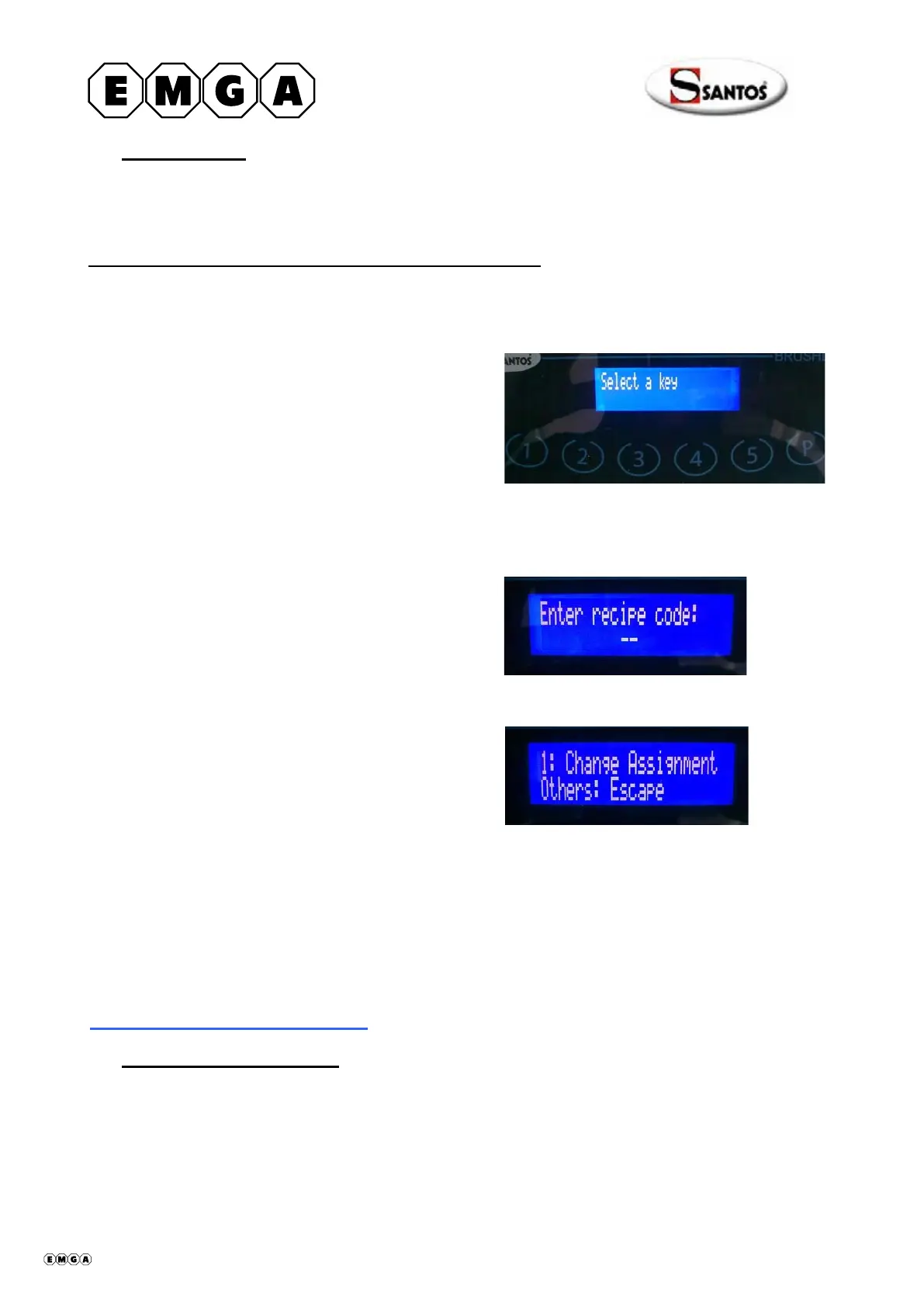
How to assign a recipe to one of the control panel keys
Note: All 6 keys can be parameterized
For example: to assign recipe n°34 to key n°2
Type in the following sequence:
"3 – 1 – P"
Select the key to be programmed Press key n°2
Enter the code for the desired recipe (see the table of 30 pre-recorded recipes)
Type code 34 on the keys
Press key "1" to validate, or one of the other keys to cancel
Once the "custom menu" has been set up, the standard menus can be activated (using the
appropriate code) without deleting the custom menu.
Use the code "2 – 5 – 4" to reactivate the "Custom menu".
CREATING CUSTOM RECIPES
Creating custom recipes
Your own recipes can be created by using a special program available from SANTOS and
a simple USB key for transfer from computer to the appliance.
Note: No special casing is required.
408062 en ma 2010.01 10/23


 To Next Page