11
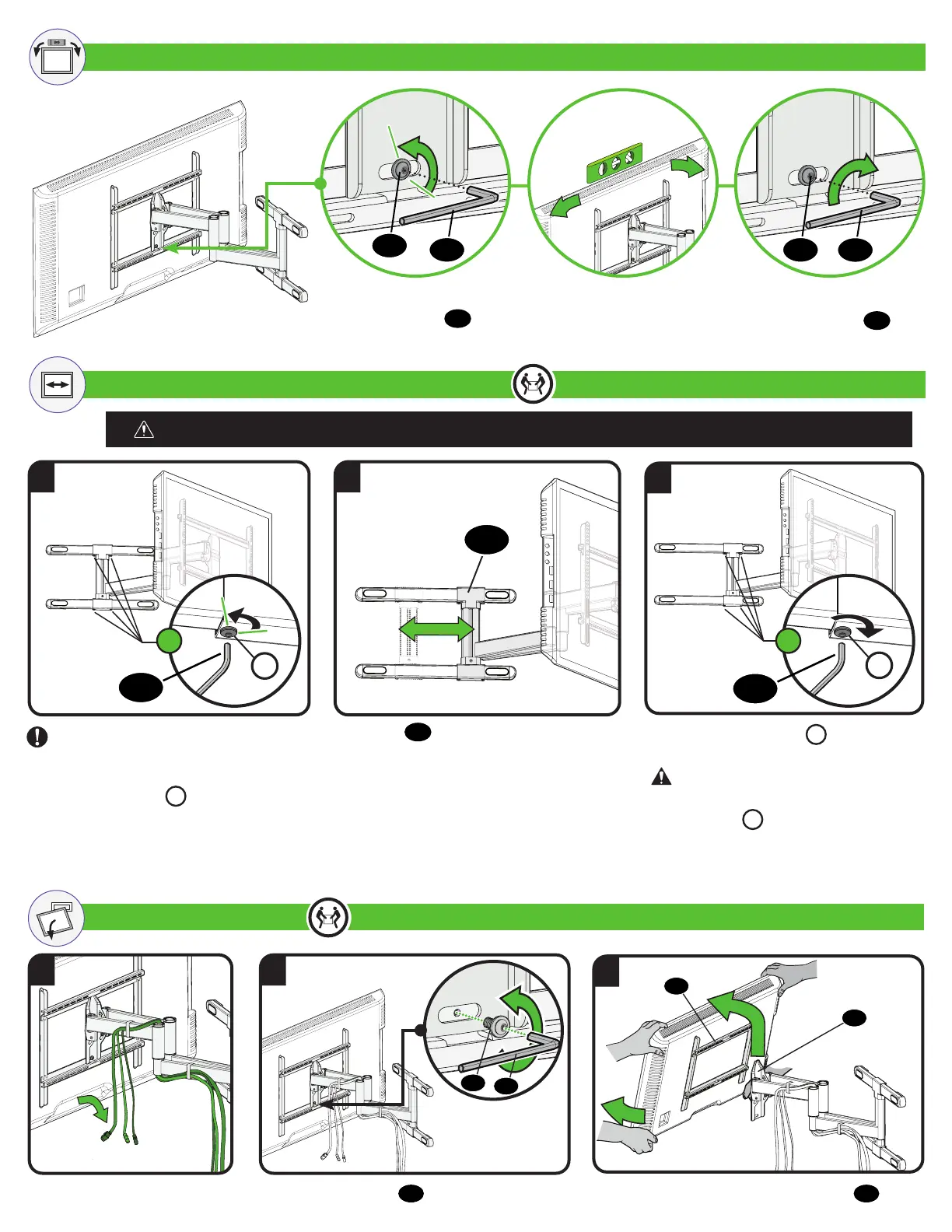
LEVEL ADJUSTMENT
SIDE-TO-SIDE SHIFT
REMOVING THE TV
2. Remove screw
11
.
1
1
3
3
2
2
11
13
05
08
HEAVY! You may need assistance with this step.
HEAVY! You may need assistance with this step.
3. Lift TV up and off the arm assembly
08
.
1. Disconnect cables.
1. Loosen the
locking screw
11
.
11
13
13
11
2. Level your TV. 3. Tighten the
locking screw
11
For Wood Stud ONLY
CAUTION: DO NOT Adjust for concrete installs
IMPORTANT: REMOVE YOUR TV
before adjusting.
Slide arm
08
to the desired position.
Only LOOSEN screws
L
to adjust
— DO NOT REMOVE.
Securely tighten screws
L
when
finished adjusting arm.
4
X
4
X
L
L
13
13
CAUTION: Avoid potential personal
injury or property damage! Always make sure
locking screws
L
are tightened so the TV is
securely fastened to wall plate.
08


 To Next Page