10
ADJUSTMENTS
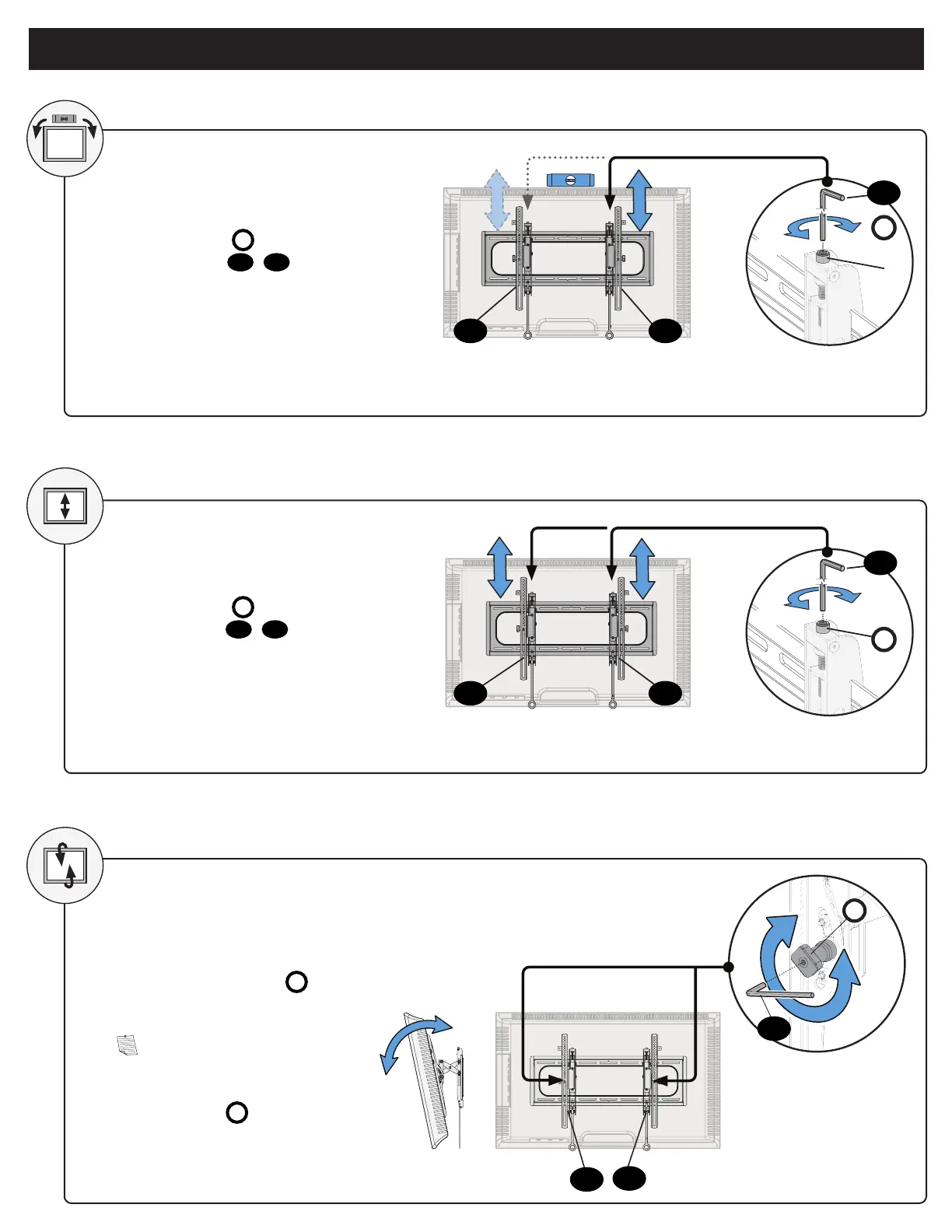
To level your TV, turn the level
adjustment screw
S
on the top of
either TV bracket
04
/
05
to raise or
lower that respective side of the TV.
Adjust the height by turning the level
adjustment screw
S
on the top of
both TV brackets
04
/
05
.
LEVEL
HEIGHT
S
S
RAISE
RAISE
LOWER
LOWER
TILT
Your TV should adjust easily when
moved, then stay in place.
Adjust the tilt tension knob
T
if
your TV naturally tilts up or down.
NOTE: If you do not intend to
adjust the tilt for different viewing
locations, you can tighten the
tilt tension knobs
T
to prevent
unwanted movement.
T
04
04
04
05
05
05
10
10
10


 To Next Page