11
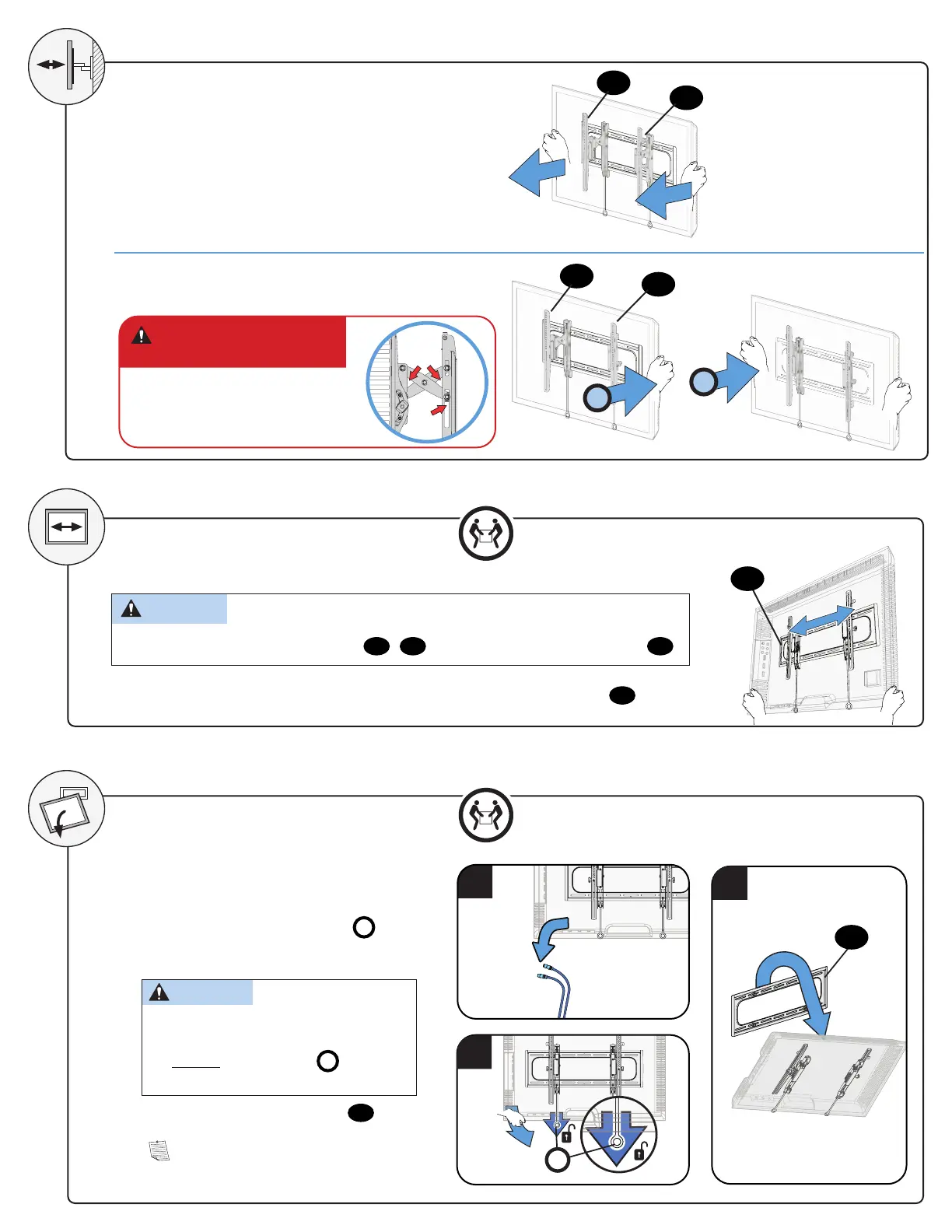
1. Disconnect all cables.
2. To unlock the TV from the wall plate: Pull
down and hold both release tabs
R
while
gently pulling the bottom of the TV away
from the wall.
CAUTION: Avoid potential personal
injury or property damage!
To prevent breaking the locking latch: always
pull and hold the release tabs
R
down while
pulling the TV away from the wall.
3. Lift the TV up and off of wall plate
07
.
NOTE: To rehang the TV, follow the
procedures in STEP 3 on PAGE 9.
1
EXTEND
RETRACT
1
2
CAUTION: Avoid potential
personal injury or property damage!
The TV brackets contain potential
pinch points during operation.
Keep fingers away from pinch points
when retracting the TV. (see arrows)
CAUTION: Avoid potential personal injury or property damage!
For concrete applications, TV brackets
04
/
05
must remain centered in wall plate
07
.
REMOVING THE TV
For Wood Stud Installations ONLY: Slide the TV left or right along the wall plate
07
to reposition.
SIDE-TO-SIDE SHIFT
3
HEAVY! You may need
assistance with this step.
HEAVY! You may need
assistance with this step.
2
R
04
05
07
07
04
05


 To Next Page