12
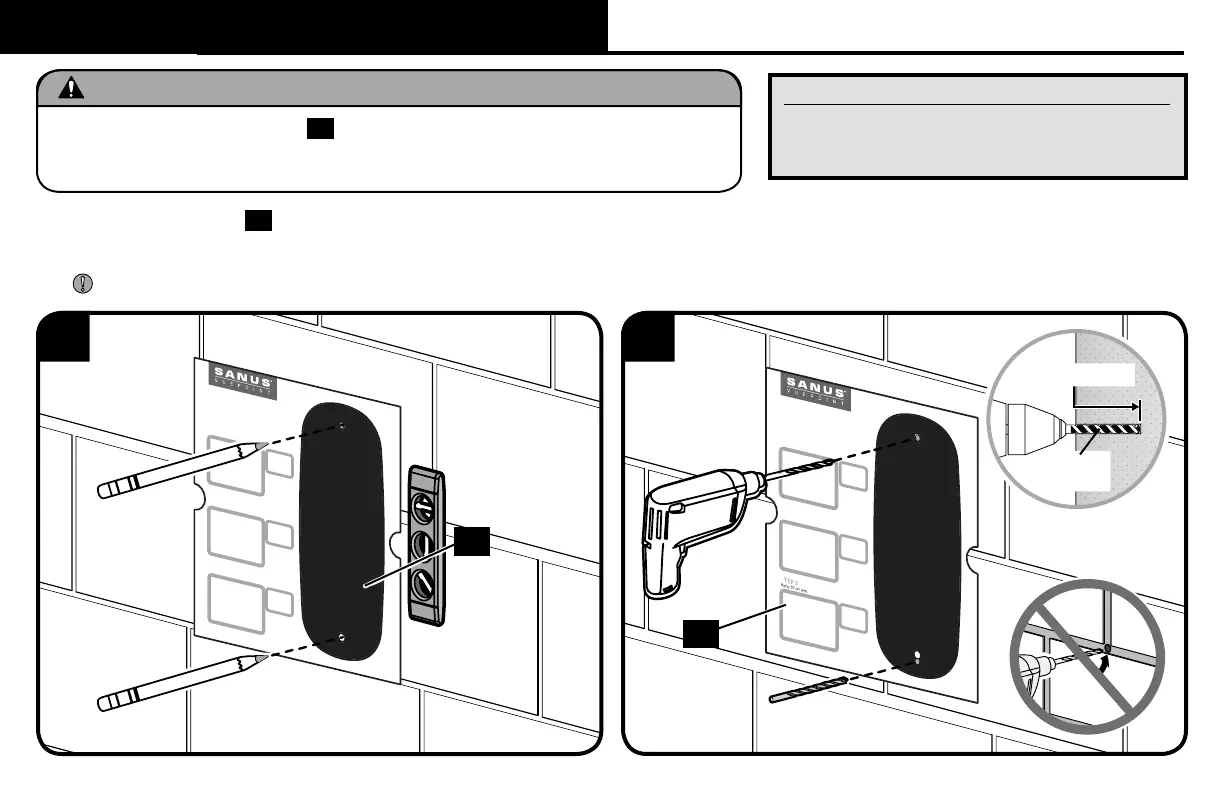
1. Position the template
17
on the wall at your desired height. Level the template and mark the hole locations.
2. Drill two pilot holes using a 3/8 in. (10 mm) diameter masonry drill bit.
IMPORTANT: Pilot holes must be drilled to a depth of 3 in. (75 mm). Never drill into the mortar between blocks.
WELCOME! THANKS FOR
CHOOSING SANUS VUEPOINT.
THIS IS GOING TO BE EASY!
LET’S GET STARTED.
STEP 1
Attach TV brackets to back of TV.
STEP 2
Attach wall plate to wall using
provided hardware.
STEP 3
Hang TV on arm.
Our live, US-based install
experts are standing by to help.
Call us at:
Or, chat at:
Get it right the rst time!
HeightFinder
™
shows you
where to drill.
Use it now at:
Want to watch a video that
shows how easy this is?
Watch it now at:
WELCOME! THANKS FOR
CHOOSING SANUS VUEPOINT.
THIS IS GOING TO BE EASY!
LET’S GET STARTED.
STEP 1
Attach TV brackets to back of TV.
STEP 2
Attach wall plate to wall using
provided hardware.
STEP 3
Hang TV on arm.
Our live, US-based install
experts are standing by to help.
Call us at:
Or, chat at:
Get it right the rst time!
HeightFinder
™
shows you
where to drill.
Use it now at:
Want to watch a video that
shows how easy this is?
Watch it now at:
WELCOME! THANKS FOR
CHOOSING SA NUS VUEPOINT.
THIS IS GOING TO BE EASY!
LET’S GET STARTED.
STEP 1
Attach TV brackets to back of TV.
STEP 2
Attach wall plate to wall using
provided hardware.
STEP 3
Hang TV on arm.
Our live, US-based install
experts are standing by to help.
Call us at:
Or, chat at:
Get it right the rst time!
HeightFinder
™
shows you
where to drill.
Use it now at:
Want to watch a video that
shows how easy this is?
Watch it now at:
WELCOME! THANKS FOR
CHOOSING SA NUS VUEPOINT.
THIS IS GOING TO BE EASY!
LET’S GET STARTED.
STEP 1
Attach TV brackets to back of TV.
STEP 2
Attach wall plate to wall using
provided hardware.
STEP 3
Hang TV on arm.
Our live, US-based install
experts are standing by to help.
Call us at:
Or, chat at:
Get it right the rst time!
HeightFinder
™
shows you
where to drill.
Use it now at:
Want to watch a video that
shows how easy this is?
Watch it now at:
17
21
Concrete Installation Kit CMK1 is not included
(see page 5) Contact Customer Service
at 1-888-333-9952 to have the additional
hardware shipped directly to you.
STEP 2B Attach Wall Plate to Wall
Solid Concrete / Concrete Block Installation
3/8 in.
(10 mm)
3 in. (75 mm)
CAUTION: Avoid potential personal injury or property damage!
● Mount wall plate assembly
18
directly onto concrete surface (no wall covering)
● Minimum solid concrete thickness: 8 in. (203 mm)
● Minimum concrete block size: 8 x 8 x 16 in. (203 x 203 x 406 mm)
17


 To Next Page