10
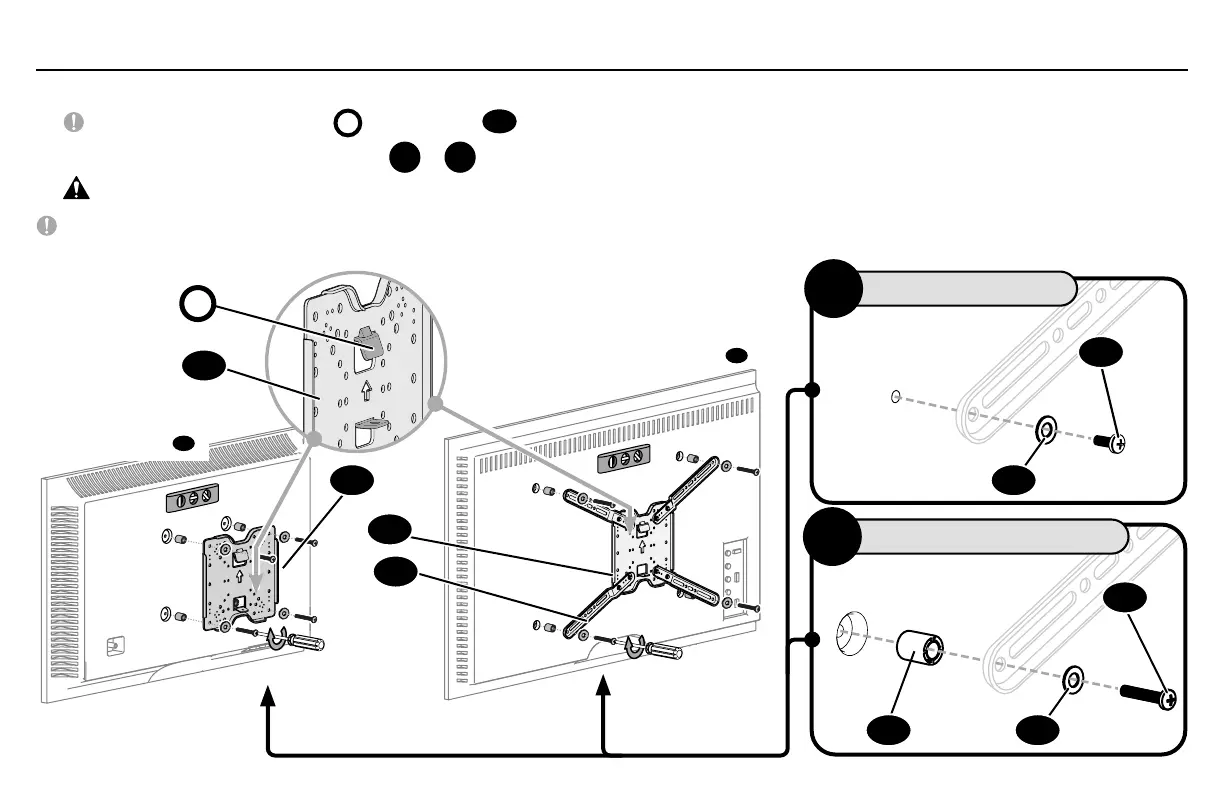
Position your TV bracket configuration (A, B, C, D, E or F) onto your TV, making sure the bracket is both centered and level over your TV hole pattern.
IMPORTANT: The hanging tab
H
on TV bracket
04
must be oriented toward the top of the TV.
Secure the TV bracket using your selection:
A
or
B
.
CAUTION: Avoid potential personal injuries and property damage! DO NOT use a power screwdriver for this step.
IMPORTANT: Ensure TV bracket is securely fastened before moving on to the next step.
1.5 Attach TV Bracket
TV Bracket Configuration A
Illustrated (with spacers
18
)
TV Bracket Configuration D
Illustrated (with spacers
03
)
H
NO SPACER
A
SPACER NEEDED
B
04
04
04
05
02
02
01
03
01


 To Next Page