Page 16
The Steering Dual Rate function is used to change the amount of steering servo travel compared to the
amount of physical movement of the steering wheel. For example, by increasing the Steering Dual Rate,
you can make the steering servo travel more which might prevent your model from pushing during turns. If
your model oversteers during turns, you can reduce the amount of Steering Dual Rate.
3) Move the steering wheel right and left to full. Adjust the Dual Rate percentage
value to decrease (DEC/-) or increase (+/INC) the amount of steering to reach
the steering stops without binding. For more information, see the next page.
WARNING The Steering Dual Rate percentage value should not be increased
to the point where your steering linkage and servo bind when the steering wheel is
moved all the way to the right or left. Binding will cause the steering servo to 'buzz',
resulting in a quicker loss of battery power and eventual damage to the servo.
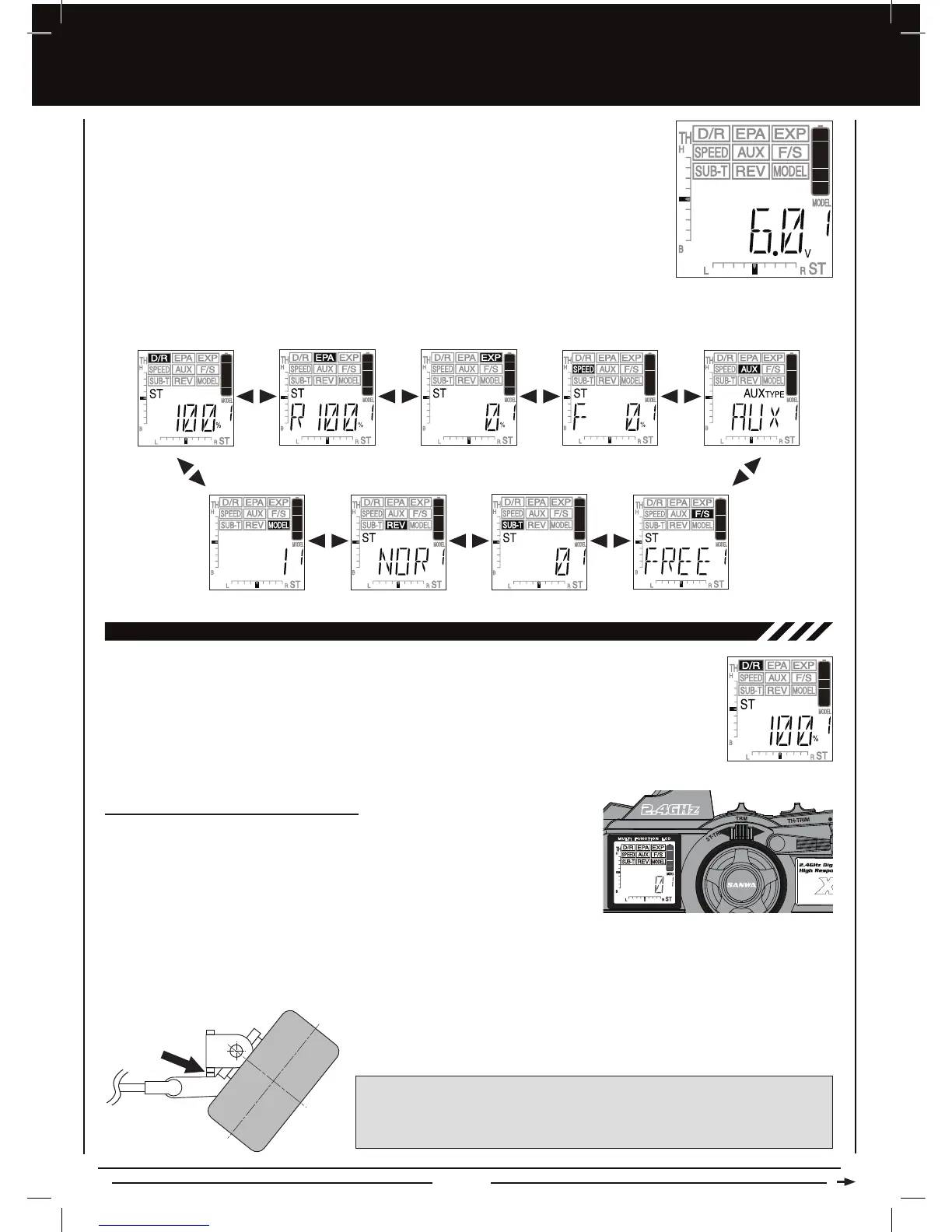
To enter the PROGRAMMING menu, turn the transmitter ON. when the transmitter is turned ON
the transmitter is subsequently turned ON, the last screen displayed when the transmitter was
turned OFF will be displayed.
The following PROGRAMMING menus are available by repeatedly pressing the Right MENU key or the Left MENU key:
Steering Dual Rate End Point Adjustment Exponential Servo Speed Auxiliary Functions
Fail SafeServo Sub-TrimServo ReversingModel Select
2) Attach the steering linkage to the servo horn per your model's assembly manual, then install the servo horn onto the steering
servo, making sure it's as close to being centered as possible. Use the Servo Sub-Trim function to center the servo arm
exactly, then mechanically adjust both wheels to point straight ahead. For more information, see page 35.
Centering the Steering Servo and Wheels
1) Set the Steering Trim to '0' using the ST-TRIM switch. Push the ST-TRIM switch
forward to increase Steering Trim toward the right and pull the ST-TRIM switch
back to increase Steering Trim toward the left. The current amount of Steering
Trim is indicated on the LCD in both digital format in the Programming Window
and in scaled format along the bottom of the display.
[[PROGRAMMING MENU
the very first time is the PROGRAMMIG menu with the Digital Voltage Indicator displayed.When
D/R - STEERING DUAL RATE


 To Next Page