Satcube Ku User Manual v2.0-2019
SATCUBE PROPRIETARY
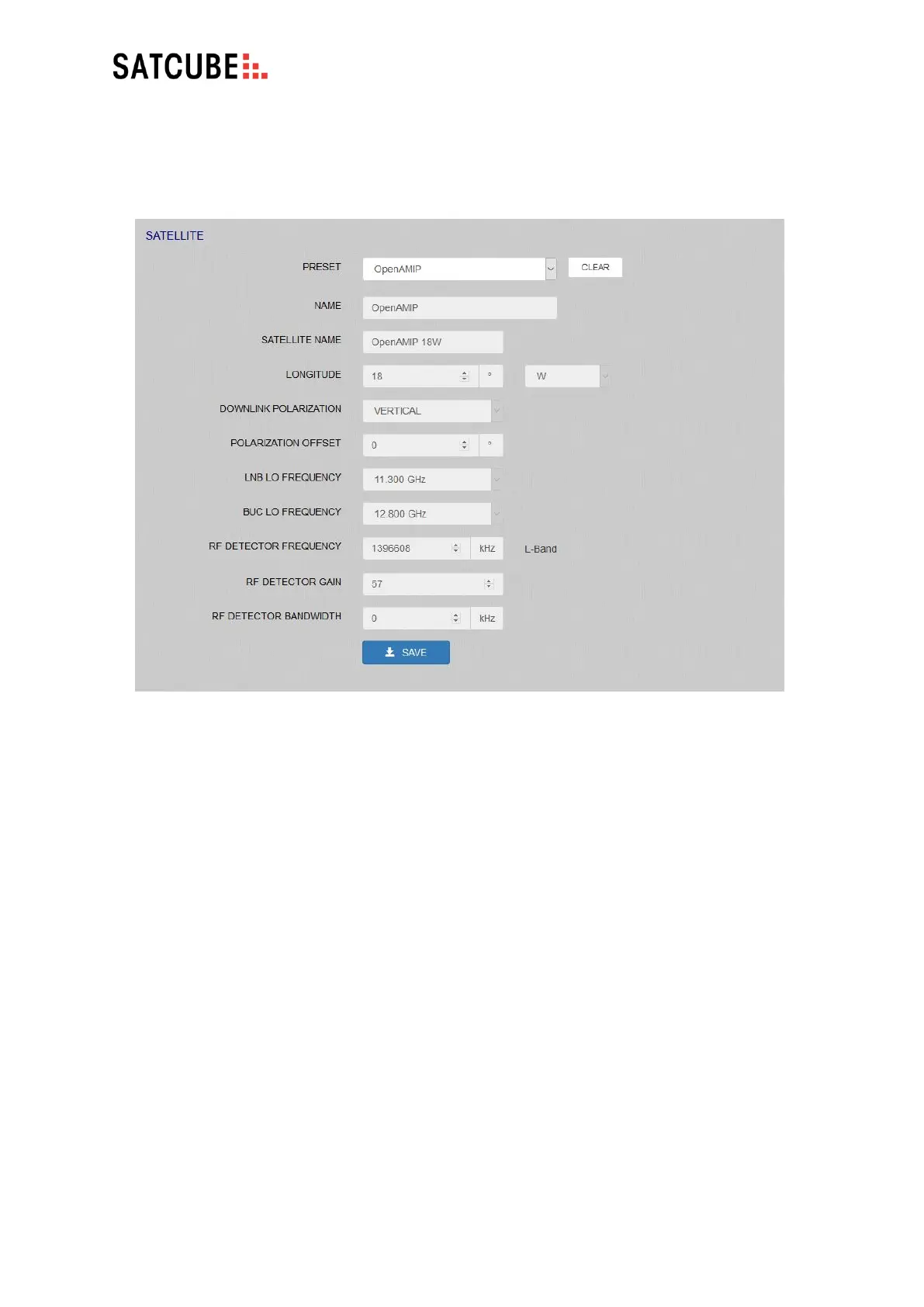
• SATELLITE NAME: Enter the name of the satellite.
• LONGITUDE: Enter the satellite’s unique longitude.
• DOWNLINK POLARIZATION: Select the correct polarization for the selected satellite.
• POLARIZATION OFFSET: Enter a polarization offset in degrees if the selected satellite has its
polarization axis outside of the geostationary arch.
• LNB/BUC LO FREQUENCY: Enter the frequencies appropriate for the selected satellite. LNB is
used for receive/BUC is used in the transmit.
• RF DETECTOR FREQUENCY: A known carrier frequency to identify the selected satellite. This
is the L-band frequency given in kHz.
• RF DETECTOR GAIN: Enter a value where the gain is increased if the selected carrier is weak.
• RF DETECTOR BANDWIDTH: Carrier bandwidth should be entered in kHz. This enables the
sensor to make a relative measurement of carrier strength to noise floor. If 0 is entered a
point measurement of the absolute carrier power will be taken.
• SAVE: Clicking SAVE stores the current settings and uploads the profile to the terminal.


 To Next Page