Satcube Ku User Manual v2.0-2019
SATCUBE PROPRIETARY
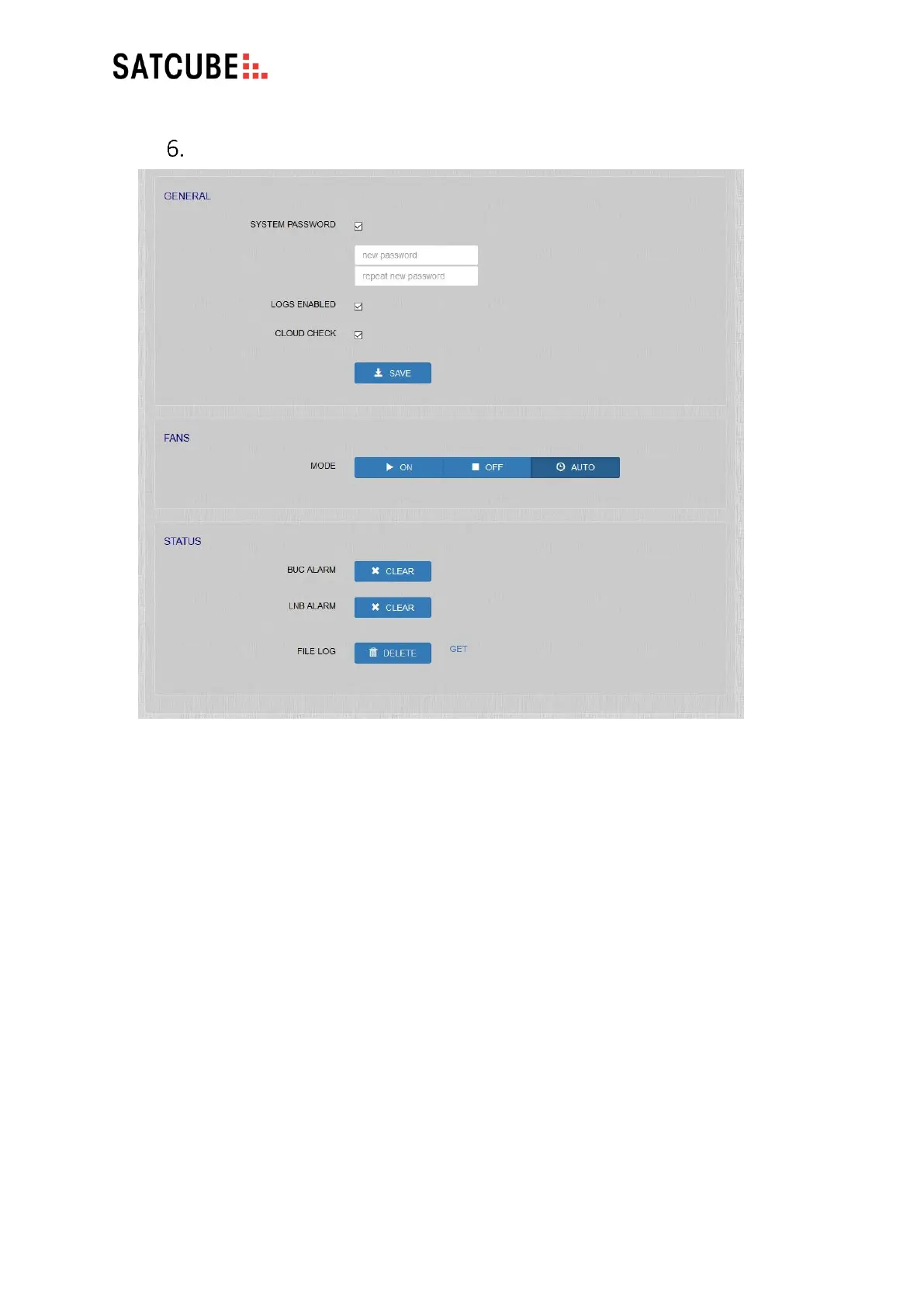
SETTINGS | GENERAL – STATUS
• GENERAL
• SYSTEM PASSWORD: tick the check box to password protect access to the GUI. By default,
this is admin. We advise you to change this to prevent unauthorized access to the terminal.
• LOGS ENABLED: Tick the check box to generate log files. Unchecking this will result in the
inability to for the support to solve issues experienced.
• CLOUD CHECK: Enables the terminal to reach out to Satcube server to check for software
updates, help facilitate terminal support and if diagnostic data sharing has been enabled the
terminal can give the user a notification when terminal connects to internet.
• FANS: Turn the fans ON/OFF or activate AUTO mode (fans will turn on automatically if the
terminal gets hot.)
• STATUS
• BUC ALARM/LNB ALARM: Alarms can be cleared and/or deactivated.
• FILE LOG: DELETE or GET to retrieve.


 To Next Page