Satellic NV • Airport Plaza • Leonardo Da Vincilaan 19 A Bus 4• B-1831 Diegem • support@satellic.be • www.satellic.be
Customer Support: T 00800-72 83 55 42 or • F +32 2 416 02 99
11
✓ Supporting Screen – “Top-Up Screen”
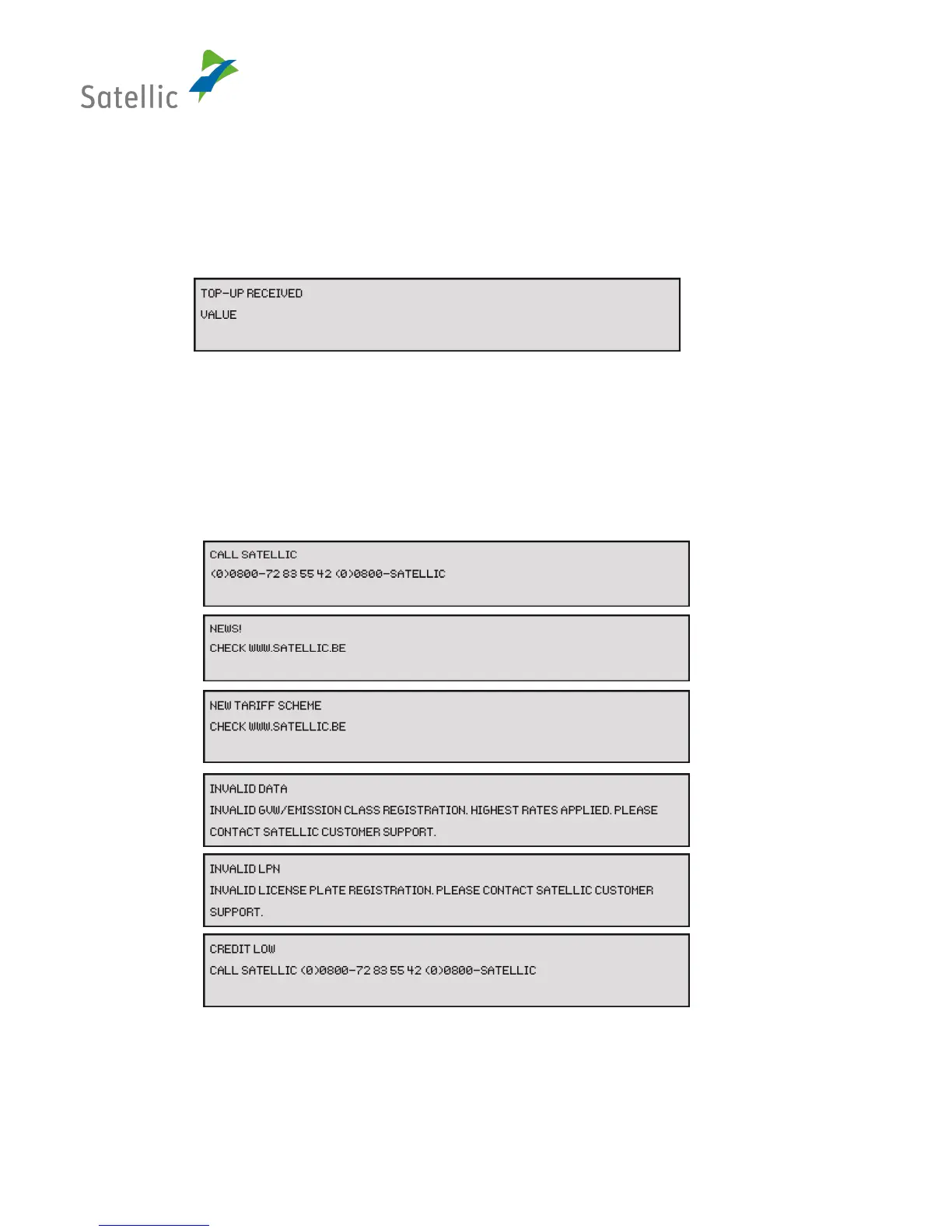
This screen is shown if the prepaid balance of the OBU is updated.
The screen shows the following information:
• Line 1: “Top-up received”
• Line 2: Top-up value, ####,## €
Figure 6: Screen "Top-up"
✓ Supporting Screen – “Satellic Communication Screen”
A Satellic Communication Screen is shown if Satellic informs or points something out to the road
user. The screen shows the following information:
• Line 1: <screen title>, e.g. “Invalid LPN”
• Line 2: <message text> “Invalid licence plate registration. Please contact Satellic
Customer Support”
Figure 7: Screen "Satellic Communication"
✓ Supporting Screen – “Wake-up on Movement Screen”
• If your OBU is fixed installed, the OBU switches on automatically when you start the
ignition of the truck, regardless of which software version it has.


 To Next Page