Satellic NV • Airport Plaza • Leonardo Da Vincilaan 19 A Bus 4• B-1831 Diegem • support@satellic.be • www.satellic.be
Customer Support: T 00800-72 83 55 42 or • F +32 2 416 02 99
7
3. Operation
3.1 Initial operation with the OBU
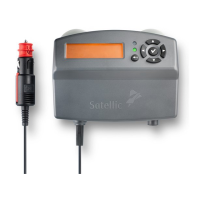
When setting up the OBU for the first time it boots automatically. The red LED will light up. The full
booting process can take up to ten minutes. Meanwhile, the OBU itself will have a red light next to the
LCD display, showing the Satellic logo followed by the text “Starting…”. As soon as the LED turns green
and the screen shows your personalized information, such as your licence plate number, it is ready to
collect toll. This personalized information includes the amount you will be charged for every kilometre
you travel on the road you are on (€/km), the total amount you will be charged for the total distance
and the total kilometres travelled on toll roads. When driving on a tollfree road, this will be shown on
the display of the OBU.
Check our FAQ in chapter 5 for any questions you may have. Other issues will be dealt with by the
Satellic Customer Support Department.
3.1.1 OBU Display
The following messages are shown during the OBU start-up process:
(1) Satellic logo
(2) Starting…
(3) After successful start-up: default screen
3.1.2 OBU LED
A red LED is shown during the booting process. The green LED will switch on if the OBU is ready for toll
collection within approximately 10 minutes.
3.1.3 OBU SOUNDS
No sound during the start-up process.


 To Next Page