ENGLISH - 19
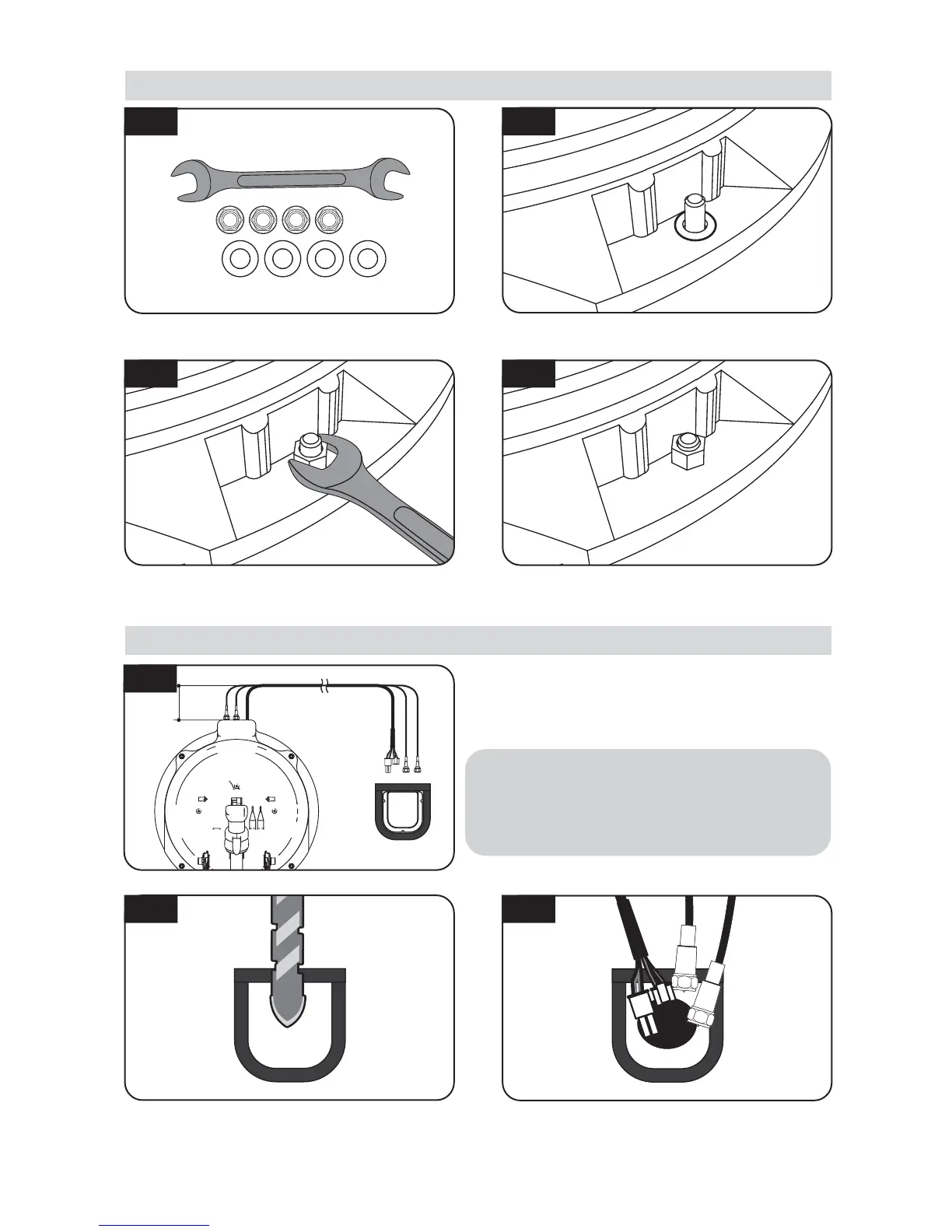
To avoid cable damage, x cables as
above image. Keep cables straight in
6cm from the antenna port and make
curves toward cable holder.
※
Make sure you check and four (4) nuts are
tightened
Place the antenna and deector on the aluminium
plate and put the washers over each bolt
6 cm
D. Fix the antenna main unit with 4 pcs of nuts using spanner
E. Cable holder installation 1
Fit the supplied nuts to each of the four bolts
and tighten rmly with spanner
Parts required, spanner, four(4) nuts, four(4)
washers and deector
Make sure that hole size is big enough to insert
all cables together by one and one
E-2
Connect signal cable to antenna, place cable holder
and apply electrical tape 5mm from the outside of
the cable holder
E-3
E-1
Drill a 25mm hole (or larger) in the centre of the
tape marking
D-2D-1
D-4D-3


 To Next Page