THE PROF E SSI O NAL E QU I PME N T-- - --- - --- - --- - --- | U SER ’S MANU AL| THE PROF E SSI O NAL E QU I PME N T-- - --- - --- - --- - --- | U SER ’S MANU AL|
Signal Finder Professional Combo| 27
26 | Signal Finder Professional Combo
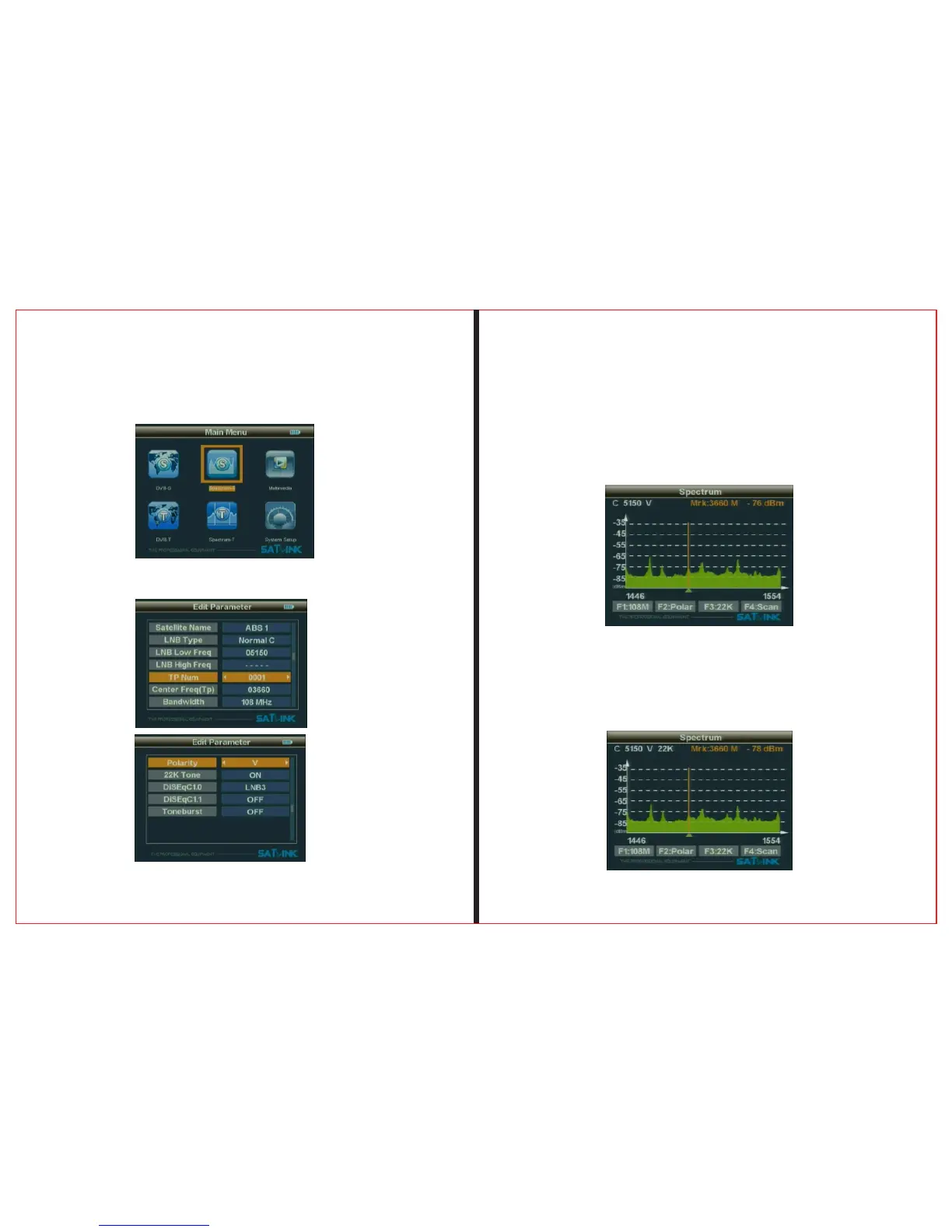
2.5.1 Frequency is the difference value between the
downstream frequency and local frequency and the value
range is 950---2150MHz.
To set parameters according to requirements, and then
press OK button to enter the chart of spectrum.
2.5.2 When the screen appears the spectrum, press "F1"
button to change bandwidth and press"F2" to change the
polarity.press "F3"t to select 22K ON/OFF.
2.5.3 To select the beginning frequency to scan and press
"F4" button then press OK button.
Press OK button and then enter spectrum-s parameter to set
menu.parameter
2.5 Spectrum-S


 To Next Page