THE PROF E SSI O NAL E QU I PME N T-- - --- - --- - --- - --- | U SER ’S MANU AL| THE PROF E SSI O NAL E QU I PME N T-- - --- - --- - --- - --- | U SER ’S MANU AL|
Signal Finder Professional Combo| 11
10 | Signal Finder Professional Combo
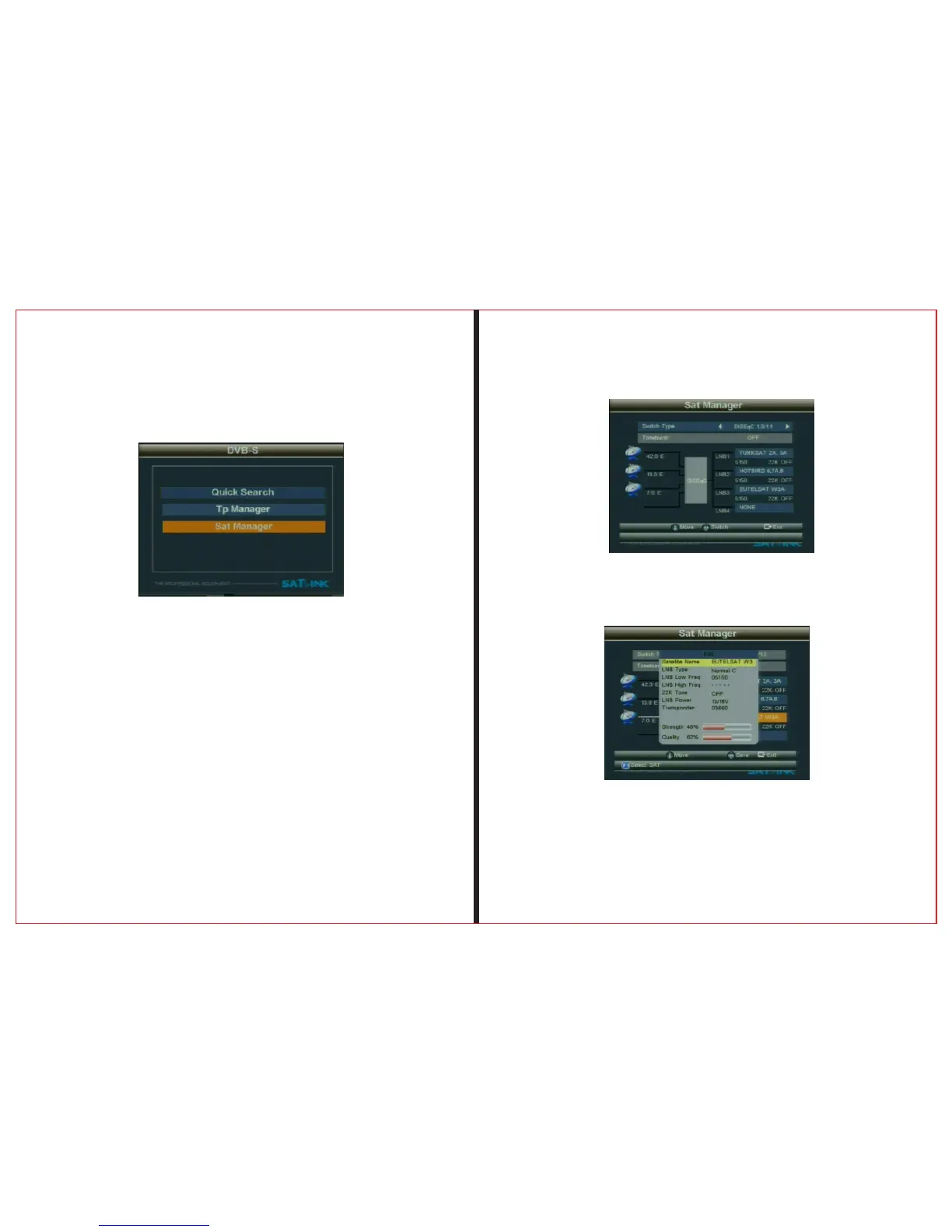
2.1.2.1 S a t Manager
Press “OK” bu tton to en ter the Sub-menu, and then
set the state of the dish
2.1.2.1.1 Switch Type
Press ◄ ► button to choose Switch Type(NONE,
DisEqC1.0/1.1, DisEqC 1.2/USALS)
1、DiSEqC 1.0/1.1
Use ◄ ► button to select LNB1/LNB2/LNB3/LNB4
2.1 .2 Satellit e Install
Press “F1” button to enter the Sub-Menu,select satellite。
Press “OK” button to enter the Sub-Menu,Press “▲▼” Edit
parameter.


 To Next Page