EasyManua.ls Logo

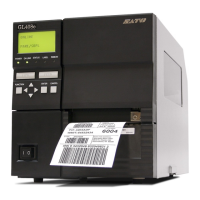
SATO GL412e - User Manual

SATO GL412e
29 pages
Print Icon
To Next Page IconTo Next Page
Loading...
SATO All-In-One Application 1-29
User Manual

Other manuals for SATO GL412e

Questions and Answers

  • T
    Teresa BlakeAug 25, 2025
    What does CALIBRATION FAIL mean on my SATO Barcode Reader?
    • D
      Daniel BarnesAug 25, 2025
      The SATO Barcode Reader shows CALIBRATION FAIL because calibration values derived from Manual Calibrate were not acceptable. To fix this, perform a Run Manual Cal (run manual calibration) again.
  • M
    Michael BrownSep 1, 2025
    Why does my SATO Barcode Reader display MEDIA OUT COMPATIBLE WITH CUTTER Check Media Mode?
    • R
      Rodney JacksonSep 1, 2025
      The SATO Barcode Reader shows 'MEDIA OUT COMPATIBLE WITH CUTTER' because Tear-Off or Peel-Off Media Handling selection was attempted with the cutter option still installed. These modes require that the front door assembly be installed to use the Label Taken Sensor. Select a different Media Handling mode.
  • S
    stephen15Sep 2, 2025
    What does B12 ERROR: PROGRAM MISSING Repeat Download mean for SATO GL412e Barcode Reader?
    • E
      elliottcolleenSep 2, 2025
      The SATO Barcode Reader displays 'B12 ERROR: PROGRAM MISSING' because the printer cannot find the data controller program or the validation checksum is corrupt. Power off the printer for 15 seconds, then power on again. If the problem persists, contact an authorized customer service representative.
  • J
    Jeffery BrownSep 2, 2025
    How to fix INVALID FILE SYS Optimize&Reboot on SATO Barcode Reader?
    • M
      Monica SantosSep 2, 2025
      The SATO Barcode Reader shows 'INVALID FILE SYS' because the file system was not detected or flash was corrupted. Enter the PRINTER SETUP menu and use the Optimize & Reboot option.
  • A
    ashleyhoffmanSep 3, 2025
    Why does SATO GL412e Barcode Reader show ERROR: WRONG CHECKSUM Repeat Download?
    • H
      heidi13Sep 3, 2025
      The SATO Barcode Reader displays 'ERROR: WRONG CHECKSUM' because the printer received the complete program but the checksum did not match, indicating data corruption during download. Power off the printer for 15 seconds, then power on again. If the problem persists, contact an authorized customer service representative.
  • J
    Jill PaulSep 3, 2025
    What to do when SATO GL412e Barcode Reader displays DOWNLOADER ERROR EXTERNAL FLASH IS FULL Optimize Files?
    • J
      Jeffrey HarrisSep 4, 2025
      The SATO Barcode Reader displays 'DOWNLOADER ERROR EXTERNAL FLASH IS FULL' because an attempt was made to download to a full EFC. Delete and optimize files.
  • D
    Diana HughesSep 4, 2025
    What causes DOWNLOADER ERROR MAIN FLASH IS FULL Optimize Files on SATO GL412e?
    • Z
      zwoodsSep 4, 2025
      The SATO Barcode Reader displays 'DOWNLOADER ERROR MAIN FLASH IS FULL' because an attempt was made to download to a full main flash memory. Delete and optimize files.
  • B
    brenda65Sep 5, 2025
    How to fix DOWNLOADER ERROR FLASH NOT ERASED Repeat Download on SATO GL412e Barcode Reader?
    • L
      Leslie NguyenSep 5, 2025
      The SATO Barcode Reader displays 'DOWNLOADER ERROR FLASH NOT ERASED' because the printer encountered an error trying to program flash memory. Power off the printer for 15 seconds, then power on again. If the problem persists, contact an authorized customer service representative.
  • C
    Christian TownsendSep 5, 2025
    Why does my SATO GL412e say PROGRAM IS NOT COMPATIBLE WITH THIS PRINTER Repeat Download?
    • R
      rstaffordSep 5, 2025
      The SATO Barcode Reader displays 'PROGRAM IS NOT COMPATIBLE WITH THIS PRINTER' because an attempt was made to download a non-compatible program file. Try downloading again. If the problem persists, contact an authorized customer service representative.
  • S
    Sarah JonesSep 6, 2025
    What does DOWNLOADER ERROR EXTERNAL FLASH WAS NOT FOUND Insert Cartridge mean on SATO Barcode Reader?
    • J
      Jeremy TaylorSep 6, 2025
      The SATO Barcode Reader displays 'DOWNLOADER ERROR EXTERNAL FLASH WAS NOT FOUND' because an attempt was made to download to a non-existant EFC. Insert cartridge and repeat the process.

SATO GL412e Specifications

General IconGeneral
BrandSATO
ModelGL412e
CategoryBarcode Reader
LanguageEnglish

Related product manuals