.
.
.
.
. .
...
'::
.
.
...
:
~i&e~'r'the.Gv~..'
.
......
.......
.
,
...
.
.
e.
'
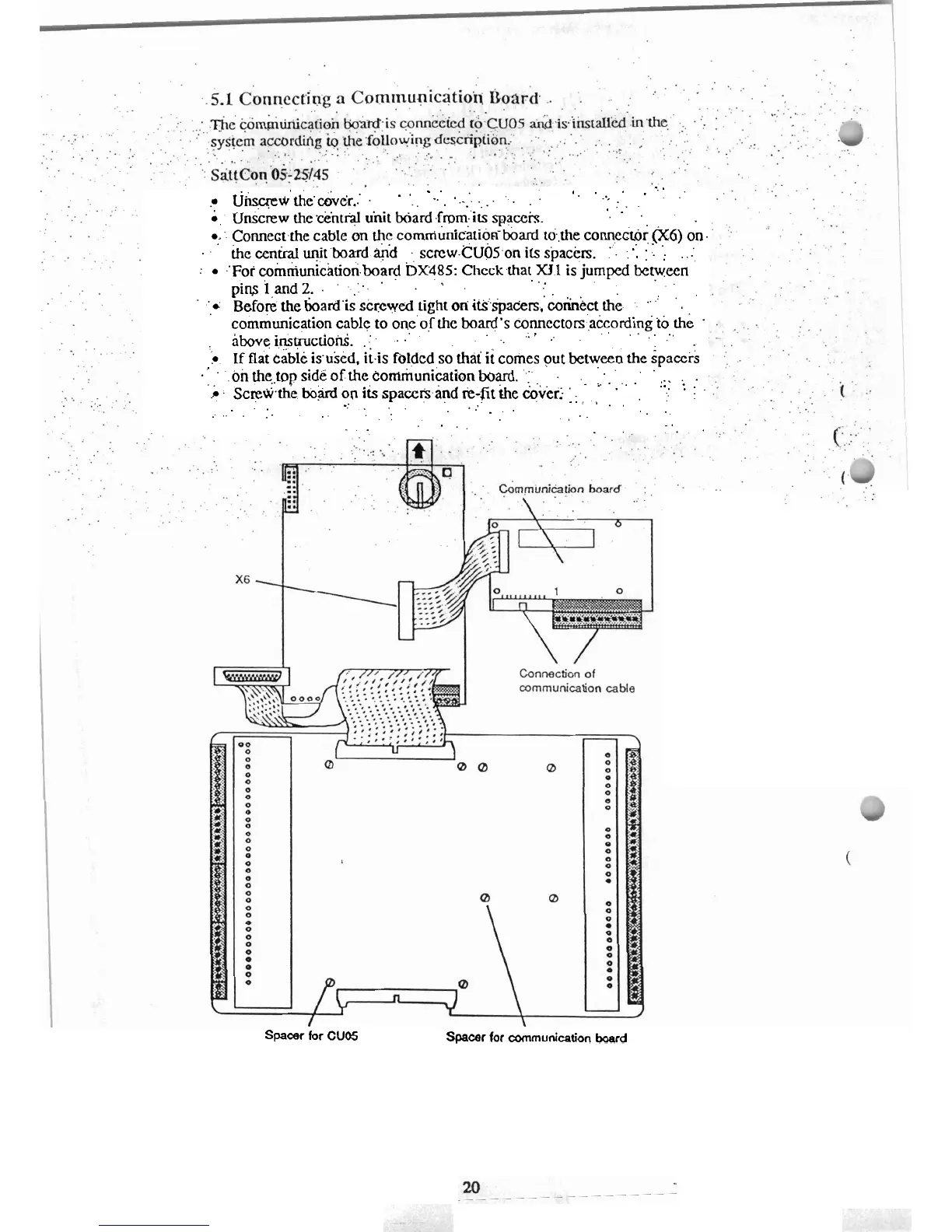
Unscrew the ciintral unit board
.
.fmm.'its
.
spaceis.
0:
..
Comect.the cable
on
the comniunic.ation-board to,the comeitor
(X.6)
on.
...
..... ..
..
the
central
uqitboard
g;d
scrcw.~~~~.on
its
s'pactrs.
:'.
:
.
...
.
:
.'Foi cohiiuni'cition.board
bx.485:
Chcckthat
X11
is jumped
between
.
.
pim
iand 2. ..
..:..
'
.
.
'
',i
Before
the
boardis
screwed tight
on
it~'spaders.'&&kct
the
.
.
'
.
'
communication cable to one'of the board's Connectors ,according
to
the
.
.......
.;:
-.
...
:
aboveinstructiotii.
.:.
.
.
.
If
flat cable isused. itis folded so
thai
it
comes out between
the
spacers
........
."
.
.
.on
the,.top side of the communiktkn
board.
:'
..............
....
...
r
.
screwii.the
bo:ard
on its spaccfs.and
.
.
+-fit the &ved
'
.
,
'
.
.
.
.
.....
.
,
. .
...
. .
.
.
...
. .
.
.
..........
. .
. .
.
.
.
.
.
.
. .
,
.
...
.
.
. . . .
Spacer
for
CUDS
Spacer
for
mrnunication
board



 To Next Page