Step
416969www.sauder.com/services
Pae 37
Step 32
å
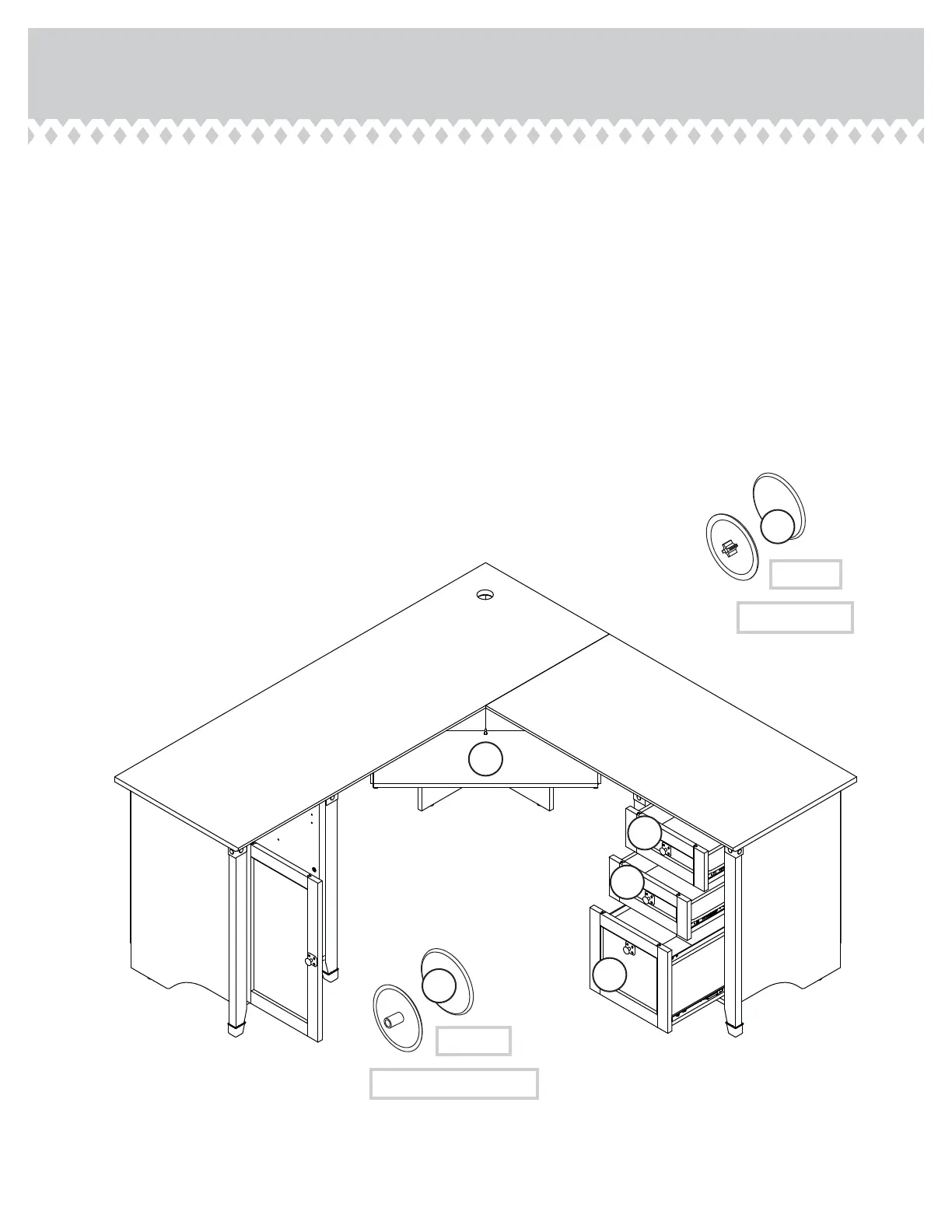
To insert the SMALL DRAWERS T into your unit, tip the
fronts of the drawers down and drop the rollers on the
drawers behind the rollers on the unit. Lift the fronts of the
drawers up and slide them into the unit. Repeat this step to
insert the KEYBOARD SHELF (L).
å
To insert the FILE DRAWER S into your unit, line up the
EXTENSION SLIDES on the drawer with the EXTENSION
RAILS on the unit and push the drawer into the unit until
the drawer is fully inserted. The drawer will push in hard
until it is all the way in, then it will slide in and out easier.
å
Center a SCREW COVER (20P) over the head of each
SCREW and press fi rmly.
å
Push a CAM COVER (12P) onto each visible HIDDEN CAM.
S
T
T
L
To cover screws
(12 used)
20P
(22 used)
To cover HIDDEN CAMS
12P



 To Next Page