Page 28
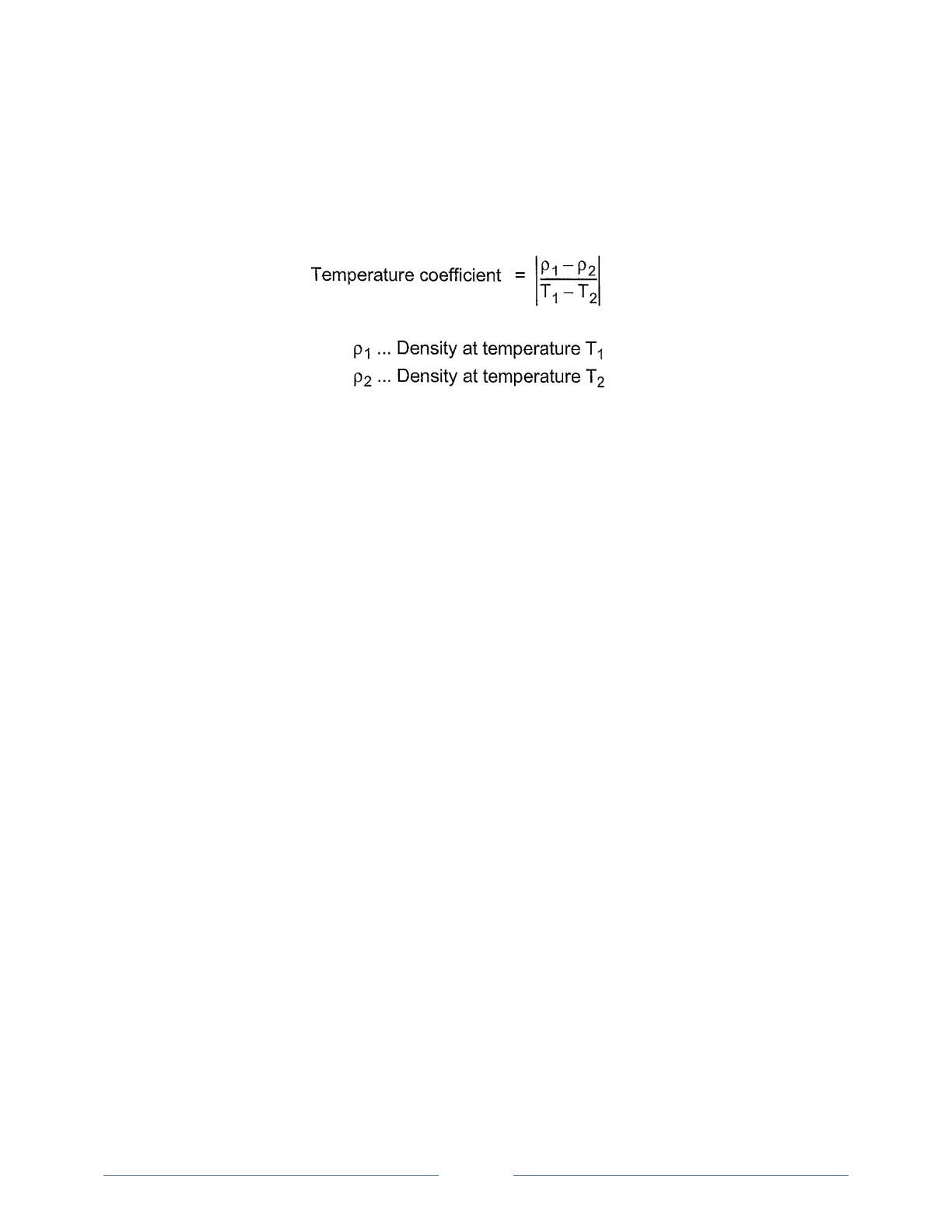
9.1.2 Calculating a Temperature Coefficient
A temperature coefficient α (g/cm
3
/K) is needed for the calculation of some measuring units at certain
reference temperatures.
The temperature coefficient can be calculated as follows:
Typical temperature coefficients:
Numerous aqueous solutions from 0 to approx. 20% 0.0003
Numerous aqueous solutions from 10 to approx. 50% 0.0005
Numerous organic solutions
9.1.3 Importing Custom Functions
In addition to the predefined measuring units, you can import up to five custom functions to the
instrument and select one of these as the measuring unit.
To do this, the coefficients for the calculation of your measuring unit need to be transferred to the
instrument in the correct format. Contact your SBS representative if you want to import one or more
additional measuring units to your instrument. You will receive a file with the custom functions in the
correct format from SBS.
To Import Custom functions
1. If your PC has no IrDA interface, install the IrDA USB adapter on your PC.
2. Press <Menu> and select “Setup > Import / Export> Receive from PC”.
3. Hold the IrDA interface of the SBS-3500 to the IrDA interface of your PC to establish
communication between the two instruments.
4. On your PC, right click on the file you want to transmit and choose “Send to > Infrared
Recipient”.
The custom function list is sent to the SBS-3500 and the custom functions are then available as
measuring units.



 To Next Page