34
c.
-s- 5
d. e.
2 sec.
MODE
MODE
0.8 0 01.0 0 0
5 sec.
(*)
sample
80
g. h.
-s- 5
a.
i.
2 sec.
TARE
PT
kg kg
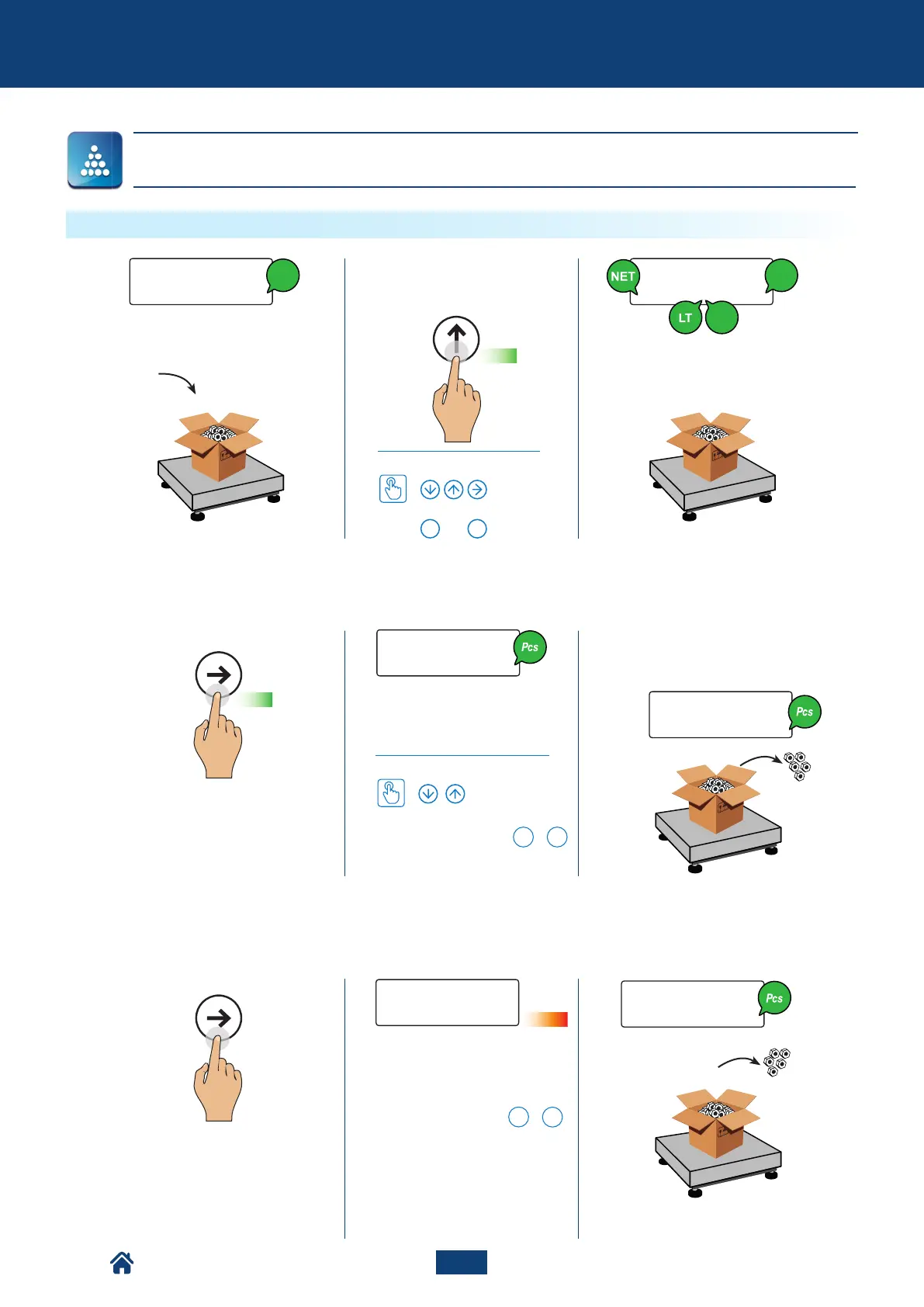
f. Take the samples (5, 10, 20, 30,
40, 50, 60, 75, 100, 200 pezzi).
Pieces counting of the total load
Select the desired referen-
ce quantity (5, 10, 20, ... 200
pieces)
How to set the value
With the numerical keyboard,
the combination of the
F
+
5
keys allows to type the desired
quantity (in any amount).
Sampling in progress, please
wait...
* With the numerical keyboard,
the combination of the
F
+
7
keys allows to modify the sam-
pling time. The more the time,
the more the sampling precision.
b. Insert the tare value
How to set the value
or
...
0 9
Advanced functions of the scale
COUNTING - Count
NU2-IPC20_50-E-0918



 To Next Page