
 To Next Page
Д
ДенисOct 14, 2026
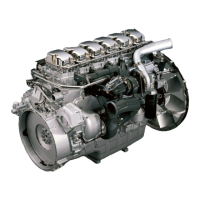
Добрый день, подскажите пожалуйста на Скания di09 каталожный номер переднего уплотнения коленчатого вала

Добрый день, подскажите пожалуйста на Скания di09 каталожный номер переднего уплотнения коленчатого вала
Describes main display, auxiliary display, control panel, and system diagrams.
Explains the role of network switch, safety module, junction box, and gateway.
Details junction box components, connector pin assignments, and connection procedures.
Details power supply, alarms, CAN interface, and RP connections for main and auxiliary displays.
Covers connecting magnetic pulse sensors, PT100 sensors, and flexible I/O connections.
Provides detailed pin lists for main display connectors C1-C4.
Illustrates SDU connections and provides an overview of the gateway's functions.
Guides through the first-time setup, starting with language selection.
Explains how to set the IP address for the main display and its uniqueness requirement.
Details loading configuration files and completing the power-on wizard.
Outlines using USB for configuring the main display and upgrading its software.
Details copying configuration files from a USB stick to the main display.
Provides steps for upgrading the main or auxiliary display software using a USB memory stick.
Guides on connecting a PC to the main display for web-based configuration.
Details network connection, login procedures, and troubleshooting connection issues.
Covers key system settings like type, screensaver, password, and idle speed.
Guides on checking signal strength of sensors and micro switches in the troubleshooting section.
Details how to check and adjust the throttle control signal for accurate interpretation.
Explains how to configure the throttle control signal in the interface for 100% interpretation.
Shows connecting 4-20mA sensors and PT100 sensors for monitoring.
Guides on configuring the 4-20mA input, custom naming, and setting ranges.
Details connecting PT100 sensors for engine compartment temperature measurement.
Guides on configuring PT100 sensor inputs, naming, units, and alarming.
Describes connecting a thermocouple sensor using a signal converter for exhaust gas temperature.
Guides on creating and customizing instrument pages by adding signals and widgets.
Guides on how to navigate to and open the password-protected administration section.
Describes accessing and navigating the auxiliary display's administration section for settings.
 General
| Engine Model | DI09 |
|---|---|
| Engine Type | Diesel |
| Cylinder arrangement | Inline |
| Number of cylinders | 5 |
| Displacement | 9.3 liters |
| Bore | 130 mm |
| Stroke | 140 mm |
| Fuel System | Common rail |