- 32 -
www.SCEPTRE.com
SCEPTRE UMR Series UHD Display User Manual
SETUP
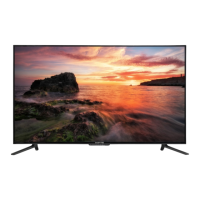
This option allows user to adjust the display’s miscellaneous options.
1. Press MENU to open the OSD.
2. Press ◄ or ► to select SETUP and press ENTER.
3. Use ▲ or ▼ to select the one you want to adjust and ◄ or ► or ENTER to adjust them.
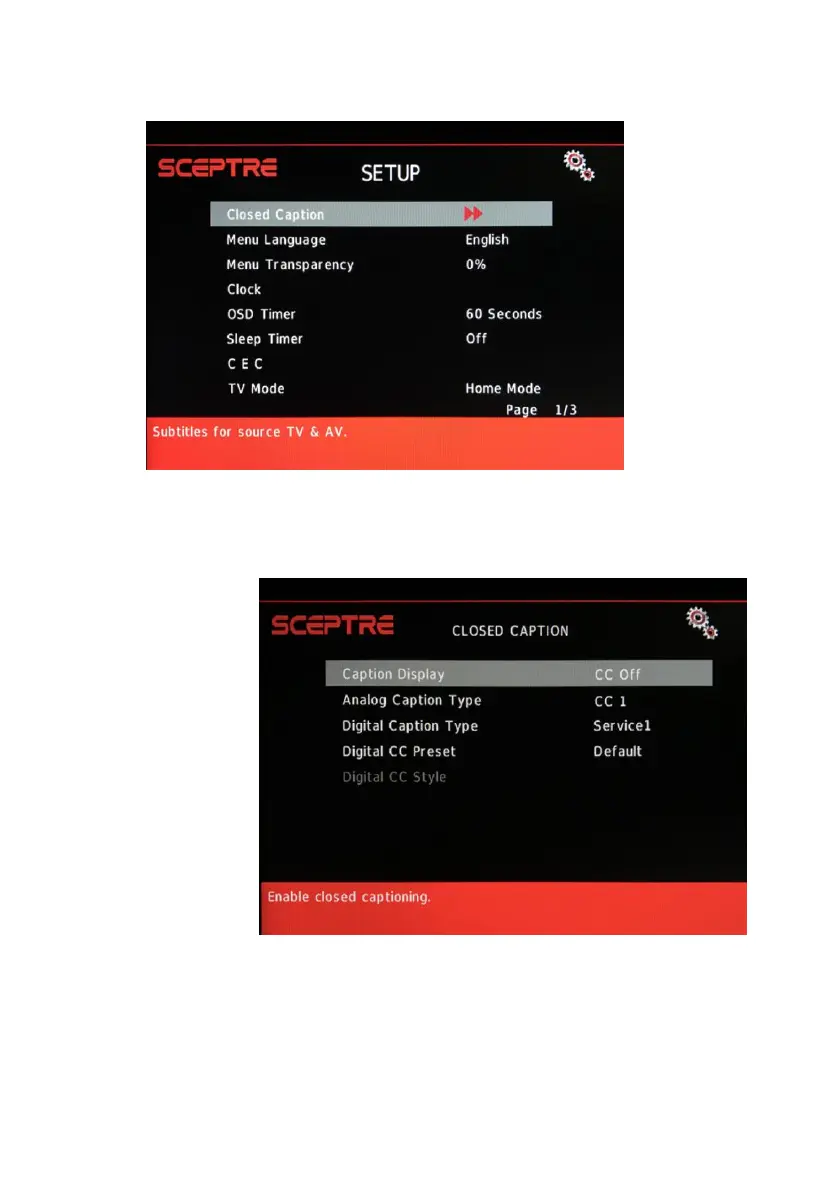
I. CLOSED CAPTION – This provides your display tuner, AV ports with
subtitles.
i. CAPTION DISPLAY – This turns on or off the closed captioning.
ii. ANALOG CAPTION TYPE – This chooses the subchannel that
supplies the closed captioning. For United States, usually the
setting is CC1. TEXT1-4 displays advertisements of the channel.
iii. DIGITAL CAPTION TYPE – This chooses the subchannel for
digital channel closed captioning.
iv. DIGITAL CC PRESET – This unlocks users ability to change
caption styles.


 To Next Page
 Loading...