EasyManua.ls Logo

Scheppach HF60 - User Manual

Scheppach HF60
108 pages
Go to English
Print Icon
To Next Page IconTo Next Page
Loading...
Nachdrucke, auch auszugsweise, bedürfen der Genehmigung.
Technische Änderungen vorbehalten. Abbildungen beispielhaft!
Art.Nr.
5902106901
AusgabeNr.
5902016901_0101
Rev.Nr.
12/07/2021
DE
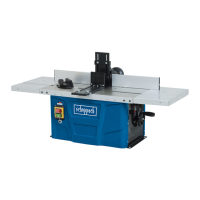
Tischfräsmaschine
Originalbedienungsanleitung
8
GB
Table milling machine
Translation of original instruction manual
24
FR
Défonceuse stationnaire
Traduction des instructions d’origine
37
IT
Fresatrice da banco
La traduzione dal manuale di istruzioni originale
51
NL
Tafelfreesmachine
Vertaling van de originele gebruikshandleiding
65
ES
Fresadora de mesa
Traducción del manual de instrucciones original
79
PT
Fresadora de mesa
Tradução do manual de operação original
93
HF60

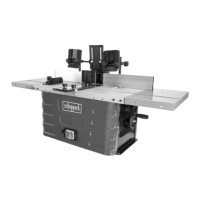
Table of Contents

Questions and Answers

  • K
    Kevin FrancoSep 3, 2025
    How to fix untidy cutting pattern on Scheppach Wood Router?
    • H
      Heidi DavisSep 3, 2025
      An untidy cutting pattern on your Scheppach Wood Router can be caused by a blunt cutter or uneven feed. Replace the cutter and cut with constant pressure and reduced feed rate.
  • E
    Eric WrightSep 2, 2025
    Why does my Scheppach Wood Router switch off automatically?
    • A
      Alexis BrownSep 2, 2025
      If your Scheppach Wood Router switches off automatically while idling, it could be due to a mains failure. Check the fuse on the mains side. Also, due to the built-in undervoltage protection, the machine does not restart by itself and must be switched on again when the voltage is restored.
  • A
    Amanda HudsonAug 31, 2025
    What to do if the chip ejector is clogged on my Scheppach Wood Router?
    • M
      Michael Richardson DDSAug 31, 2025
      If the chip ejector is clogged on your Scheppach Wood Router (without extraction), it may be due to a high degree of chip take-off, a blunt cutter, or wood that is too wet. You should reduce chip take-off, replace the cutter, and only machine dry wood.
  • M
    Melvin LandryAug 29, 2025
    Why does the speed drop during machining on my Scheppach Wood Router?
    • M
      Michelle NelsonAug 29, 2025
      If you observe the speed dropping during machining with your Scheppach Wood Router, this could be due to a high degree of chip take-off, feed being too high, or a blunt cutter. To resolve this, reduce chip take-off, reduce the feed speed or replace the cutter.
  • L
    Laura MartinezAug 27, 2025
    Why Scheppach Wood Router won't turn on?
    • A
      Alex ParrishAug 28, 2025
      If the Scheppach Wood Router is not switching on, the possible causes are: - Mains voltage is not available. In this case check the power supply. - Carbon brushes worn. In this case contact the customer service workshop
  • R
    richardsshellyAug 26, 2025
    What to do if my Scheppach Wood Router stops during machining?
    • J
      Jill CaseAug 26, 2025
      If your Scheppach Wood Router stops during machining, it's likely that the overload protection has tripped. This can happen if the cutter blade is blunt, or if the feed rate or cutting depth is too high. Replace the blades or allow the motor to cool down before resuming work.
  • A
    Alex HenryAug 25, 2025
    Why Scheppach HF60 will not switch on?
    • C
      Christine ChavezAug 25, 2025
      The Scheppach Power Tool might not switch on due to unavailable mains voltage or worn carbon brushes. Check the power supply. For worn carbon brushes, contact the customer service workshop.
  • M
    mariarasmussenAug 23, 2025
    Why does Scheppach Power Tool speed drop during machining?
    • I
      igarciaAug 23, 2025
      The speed of your Scheppach Power Tool may drop during machining due to a high degree of chip take-off, a feed that is too high, or a blunt cutter. To resolve this, reduce the chip take-off, reduce the feed speed, or replace the cutter.

Summary

Explanation of the symbols on the device

1. Introduction

2. Device description (Fig. 1)

1. Table width extension

Component for extending the table surface.

2. Stop

Component for guiding workpieces during milling.

3. Work table

The main surface where milling operations are performed.

4. Clamping screw for working depth

Adjusts the vertical position of the cutter.

5. Handle

Control for adjusting machine settings like spindle height.

6. Speed switch

Selects the rotational speed of the spindle.

7. On;off switch

Starts and stops the machine's motor.

8. Overload switch

Protects the motor from excessive load.

9. Front pressure bar

Helps hold the workpiece against the fence.

10. Transverse cutting gauge

Guides cuts at angles to the fence.

11. Mounting device for table width extensions

Attaches table extensions to the main table.

12. Suction adapter

Connection point for dust extraction systems.

13. Protective cover with alignment pin

Safety guard for the milling cutter area.

14. Reduction piece

Adapter to reduce the opening around the spindle.

15. Tool receiver

Holds the milling cutters securely on the spindle.

16. Combination spanner SW18

Tool for specific maintenance and adjustments.

17. Combination spanner SW24

Tool for specific maintenance and adjustments.

3. Scope of delivery

4. Proper use

5. General safety instructions

Safe Work Environment

Maintaining a clean and safe workspace, considering environmental factors and electrical safety.

Safe Tool Operation Practices

Guidelines for operating the machine safely, including workpiece handling, PPE, and awareness.

Tool Integrity and Hazard Awareness

Safety procedures for tool checks, repairs, EMF fields, and additional precautions.

6. Residual risks

7. Technical data

8. Unpacking

9. Layout

Fastening the machine to Workbench

Instructions for securely mounting the machine on a workbench.

Parts for table width extension (Fig. 2)

Installing the table width extensions (Fig. 3)

Parts for cutter stop (Fig. 4)

Installing the cutter stop (Fig. 5 - 16)

Step-by-step Cutter Stop Assembly

Detailed sequence for assembling the cutter stop components.

Final Assembly Steps and Connections

Completing assembly including pressure bar, cover, and suction system.

10. Start up

Tool Installation and Settings

Procedures for fitting tools, setting the stop, and using reducers.

Machine Operation Adjustments

Adjusting speed, stops, cutting gauge, and working depth.

11. Operation

Core Operation Procedures

Key steps for safe and effective milling, including feed control and overload protection.

12. Electrical connection

Electrical Connection Safety

Guidelines for safe electrical hookup and managing damaged cables.

Routine Cable Inspection

Regular checks of power cables for damage.

13. Cleaning

14. Storage

15. Maintenance

Maintenance and Service Information

Details on wear parts and safety for electrical repairs.

16. Disposal and recycling

17. Troubleshooting

Troubleshooting Common Issues

Solutions for common faults like power loss, stopping, and cutting quality.

Scheppach HF60 Specifications

General IconGeneral
BrandScheppach
ModelHF60
CategoryPower Tool
LanguageEnglish

Related product manuals