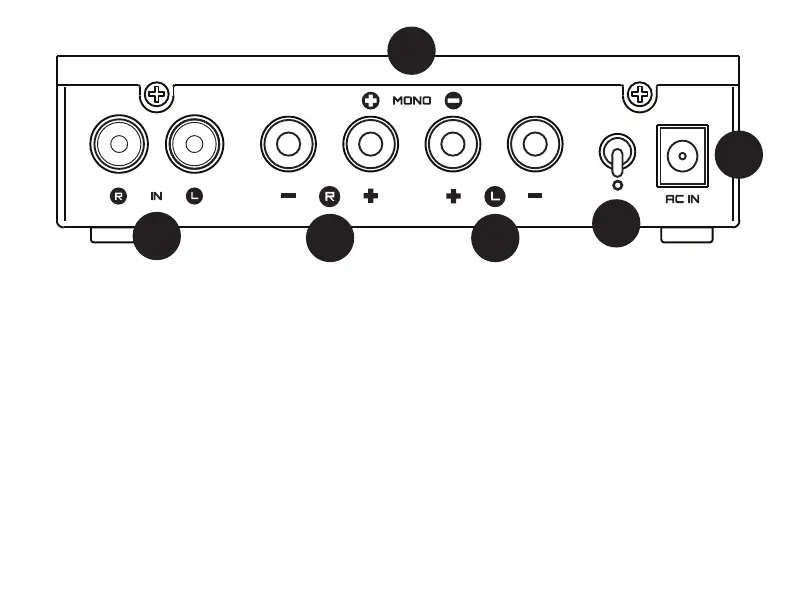
1 Connect your source to the Rekkr’s “IN”
RCA jacks with high-quality RCA cables.
“Source” is a fancy word for headphone
amp or, preamp, or any other device that
has volume-controlled audio output.
2 Connect the supplied wall-wart cable to
the jack labeled “AC IN.” Do not use any
other wall-wart, or Rekkr will not work.*
3 Stereo: Connect the speakers to the “L”
and “R” outputs using banana plugs. En-
sure that the two switches on the bottom
are not set to “MONO.”
1
4 Mono: using the right RCA input only,
connect the speaker to the two middle
outputs with banana plugs. Ensure the two
switches on the bottom are set to “MONO.”
5 Turn on and off the power with the
power switch. Up is on. Down is off.
6 Make sure the Mono switches are set
correctly. Both towards “MONO” for mono,
both away from “MONO” for stereo.
*Rekkr’s wall-wart is AC output. Most AC adapters
are DC output, and will not work with Rekkr. Rekkr
works with a 6VAC, 2-4A output adapter only.
2
3
4
CONNECTIONS
3
5


 To Next Page