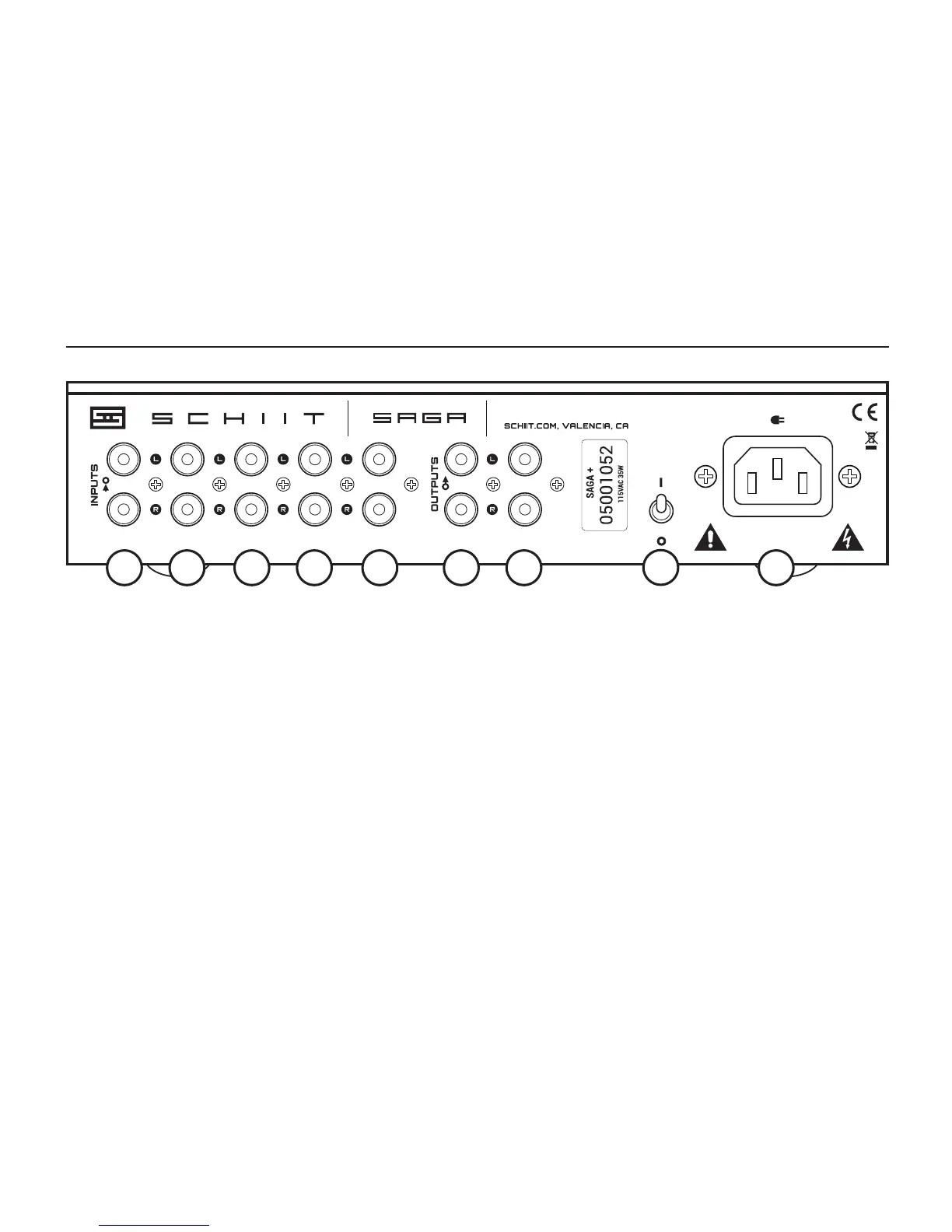
3 On-Off Switch. Up is on. Down is off. If you have
the preamp in a place where you can’t easily reach
it, just plug it in to a power strip or use a remote-
controlled outlet. Yes, those are a thing.
4 AC Input. Plug the power cord in here. Plug the
other end into an outlet of the correct voltage.
Trying to run a 115V product on 230V will blow the
fuse and generally make for a bad, bad day.
1 RCA Inputs.
You can connect up to 5 inputs to Saga+ using
RCA cables. The inputs are conveniently num-
bered “1” to “5” to match the front panel indica-
tors. Select the input you want to listen to using
the front panel buttons or the remote control.
2 RCA Outputs.
We’ve provided two sets of RCA outputs here,
so you can connect to 2 amps, or an amp and a
subwoofer, or you can just use a single output.
You don’t have to use both.
ASSEMBLED IN USA


 To Next Page