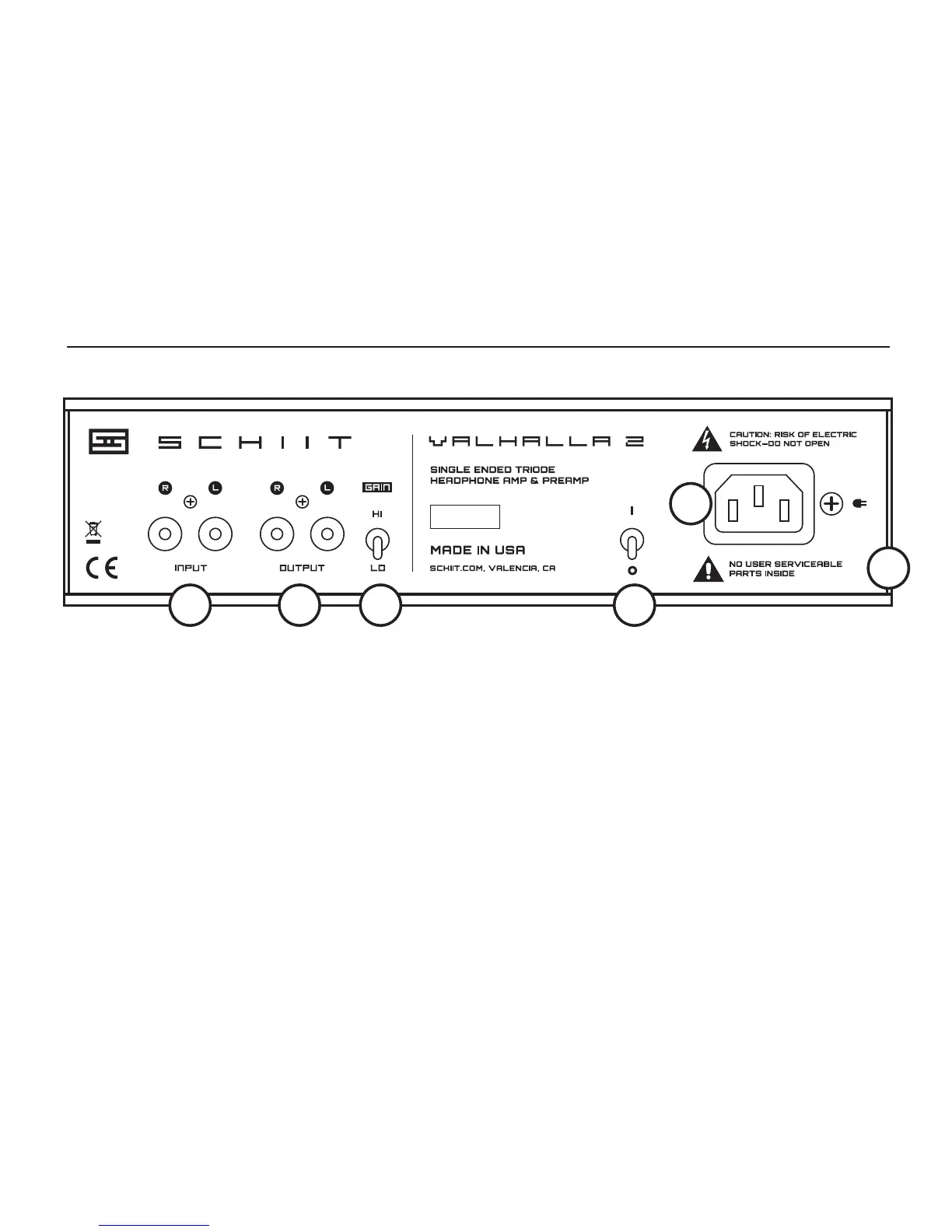
CONNECTIONS
3 Gain Switch. Up is high gain, for high imped-
ance headphones. Low gain provides additional
capability for low-impedance headphones.
4 On-Off Switch. Up is on. Down is off. For best
tube life, turn it off when not in use.
5 AC Input. Plug the power cord in here. Plug the
other end into an outlet of the correct voltage.
6 Disclaimer. No, seriously. Don’t take this apart.
There are seriously dangerous voltages inside.
1 RCA Inputs. Connect to your music source here.
You can even use fancy cables if you like.
2 Preamp Outputs. Connect to powered monitors
or a speaker amp. CAUTION: Switch Valhalla 2
on and wait at least 30 seconds before turning
on a powered monitor or amp, and turn off the
powered monitor or amp before turning Valhalla
2 off. Preamp outs are muted when headphones
are plugged in.
03.200101
1 2 3 4
5
6


 To Next Page