12
Cable/Wire Specications
Application Part number AWG Description Max distance
DC Power
Input
Belden 8760 or equivalent 18 2 Conductor
1000 Feet
(305 meters)
RS485
Belden 9841 or 9842 or
equivalent, or as specied
by local electrical codes or
the ACP provider
24
2 or 4 Conductor
shielded
4000 Feet
(1219 meters)
Factory Default Reset (FDR)
A Factory Default Reset (FDR) will return the ENGAGE Gateway settings to the original settings as
shipped from the factory. A FDR removes congurations, databases, and requires the device to be
recommissioned. A FDR will not remove the device from your ENGAGE account. If you wish to move
the Gateway to a different ENGAGE site, you must also login to the other site and recommission after
completing a FDR on the Gateway and deleting it from the previous site.
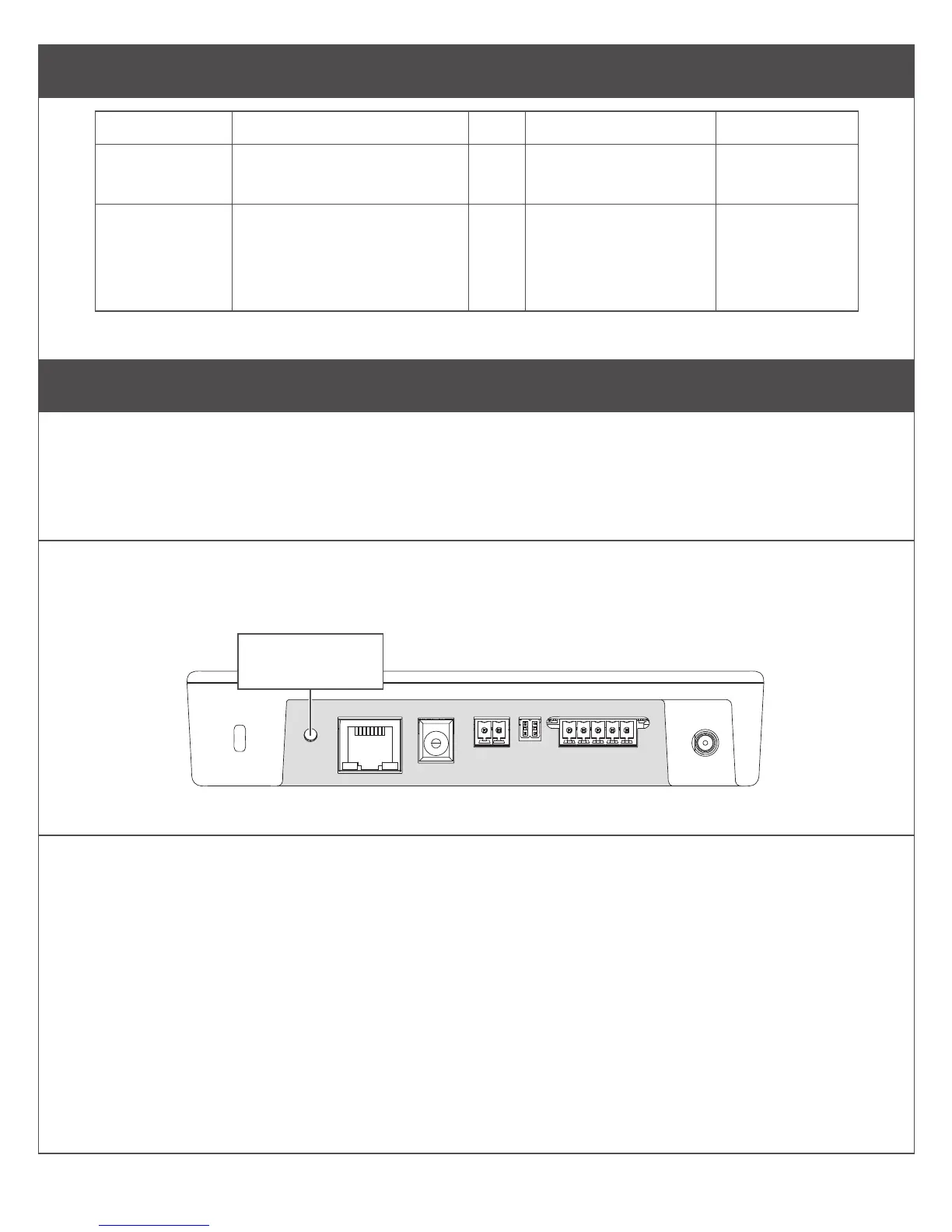
A Press and hold the FDR button.
Hold the button until the Gateway Status LED ashes green two times and remains solid. After the
indicator ashes twice, you may release the FDR button.
Factory Default
Reset button
Top View
B Wait for the Gateway to complete FDR.
After starting the FDR process the Gateway indicator will be solid green for a moment and reboot. The
reboot process can take a few minutes. During the boot process the Gateway indicator will be solid amber.
The Gateway will be in a factory default state when the indicator is solid red.


 To Next Page