6
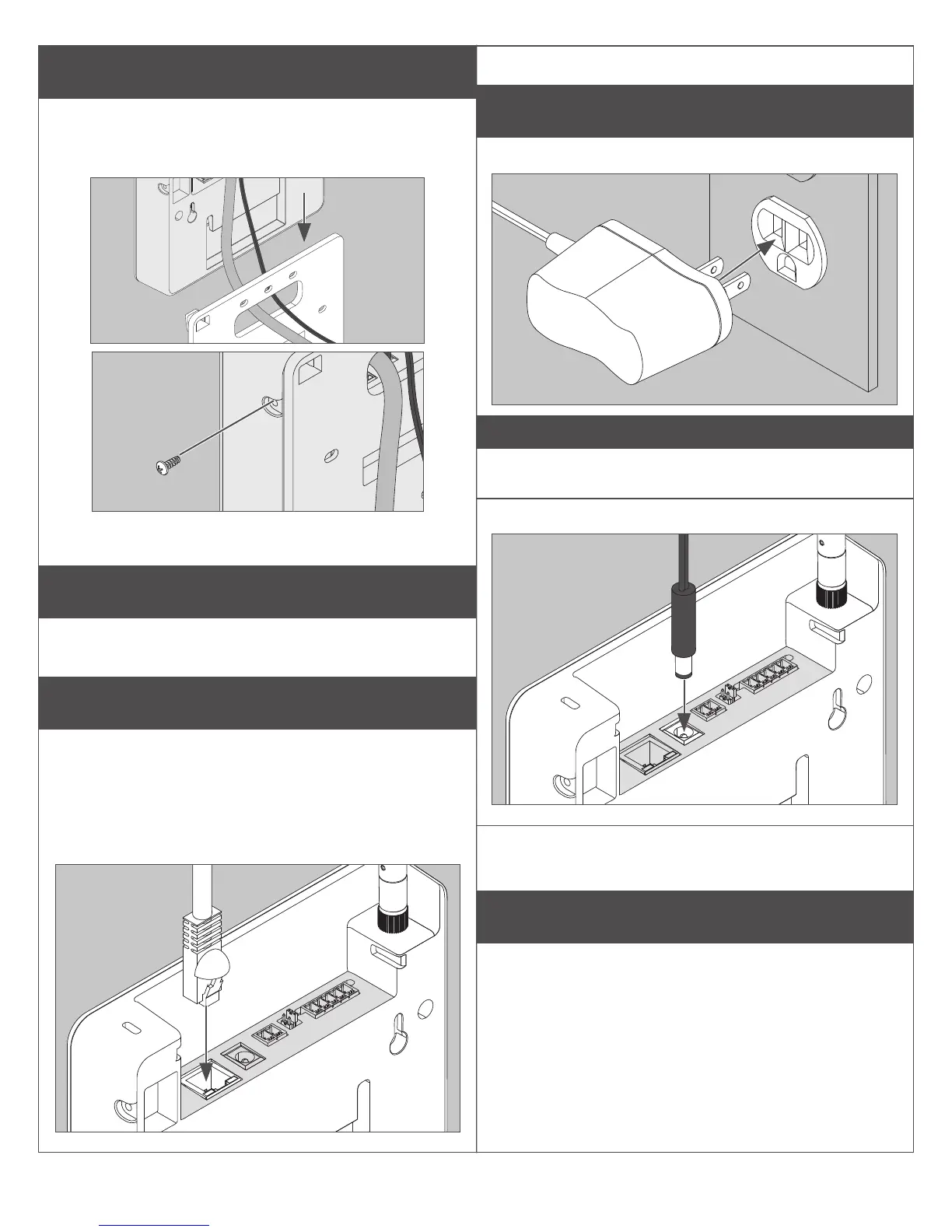
6 Slide Gateway onto mounting plate.
Taking care not to pinch wires, slide Gateway
straight down until it is rmly seated on the
mounting plate.
Install optional security screw for added security.
Power Options
The Gateway can be powered in three ways.
Use only 1 power option at a time!
1 Power over Ethernet (PoE)
Power is supplied through Ethernet port. Category
5e cabling required. Facility must have compatible
powered Ethernet connection.
1a Plug powered Ethernet cable into
Ethernet port.
1b Check Gateway for LED indicator.
2 Supplied 24V power adapter
2a Plug power adapter into wall socket.
CAUTION
Use only Schlage supplied power supply.
2b Plug power cord into socket.
2c Check Gateway for LED indicator.
3 Using ACP 2-wire DC power input
Power is supplied by an access control panel or
access control power supply. See next section for
detailed instructions.


 To Next Page