5
Mounting Options
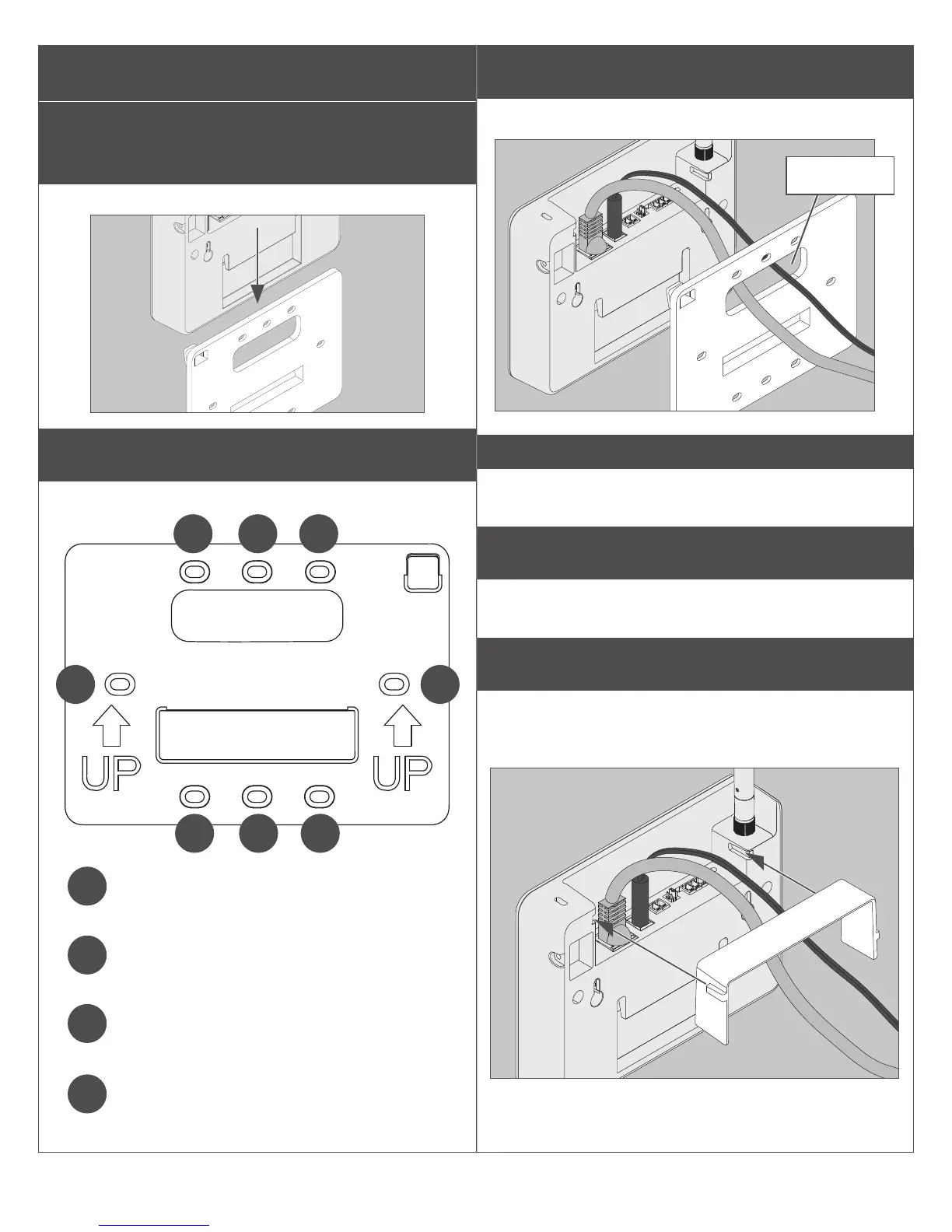
1 Remove mounting plate from
Gateway.
Slide mounting plate down to remove.
2 Choose mounting option.
There are four different mounting options.
2 2
3 4
4
4
4 3
1
Desk mounting: Does not require screws.
Replace mounting plate, and place on at
surface, mounting plate down.
2
Wall mounting: Place the mounting plate
against the wall in the desired location and
mark the indicated holes with a pencil.
3
Single gangbox mounting: Place the
mounting plate with the holes aligned with
the screw holes in the gangbox.
4
Double gangbox mounting: Place the
mounting plate with the holes aligned with
the screw holes in the gangbox.
3 Route wires.
Route wires through top hole in mounting plate.
Wire hole
IMPORTANT
Leave some slack when routing wires through
mounting plate to avoid damaging wires.
4 Secure mounting plate.
Use #6 screws to secure mounting plate to wall or
gangbox. Use the holes indicated on step 2.
5 Install wire cover.
Align the notches on the wire cover to the
Gateway, then slide straight in. Do not pinch
wires!


 To Next Page