HandPunch 2000 Manual
57
Appendix D
Troubleshooting Guide
Display Messages During Verification
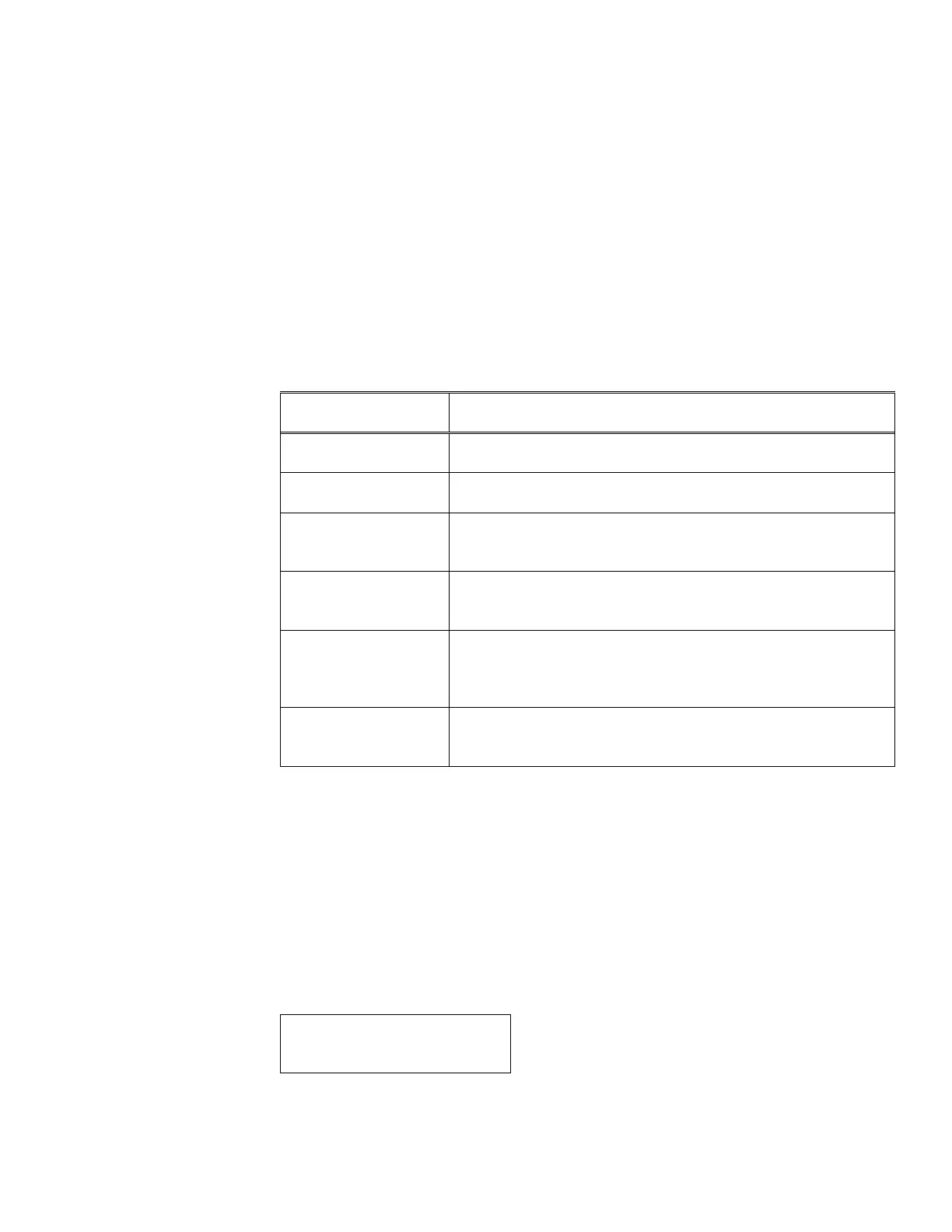
Various messages can appear on the HandPunch’s display during hand verification.
These messages are defined in Table 11.
Table 11: Display Messages During Verification
Message Definition
PLACE HAND The platen is ready to receive your hand for verification.
ID VERIFIED You are verified, proceed.
REMOVE HAND Remove your hand and place it on the platen again. Follow
proper hand placement rules.
TRY AGAIN Your attempt was rejected. Repeat verification following proper
hand placement rules.
ID REFUSED Your rejections exceeded the maximum number of tries
allowed. Wait until another employee has verified and try again
or call your supervisor
ENTER ID You entered your ID number incorrectly or your access time is
restricted.
• If the display shows TRY AGAIN, you are not verified. You may have made an error
in entering your ID number or in placing your hand on the platen. Re-enter your ID
number and try again, taking care to follow proper hand placement rules (see page
page 44).
•
• If the display shows TIME RESTRICTION, you are not authorized to punch in at this
time. If this seems to be in error, contact your supervisor about time restrictions.
•
• After a pre-programmed number of denied attempts, an ID number will no longer be
accepted and the display will appear as follows.
ID INVALID
TEMPORARILY


 To Next Page