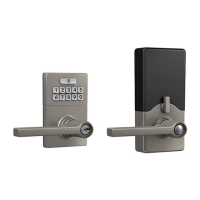
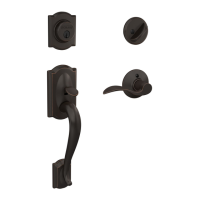
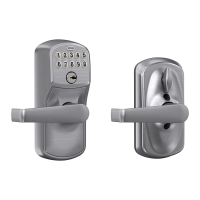
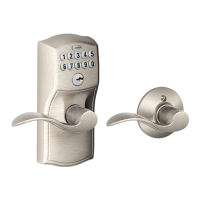
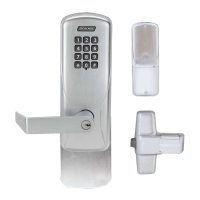
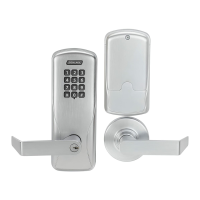
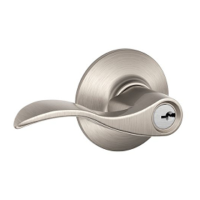
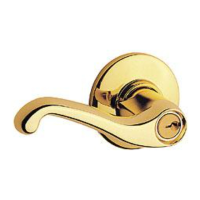
This document describes the J-Series by Schlage Z-Wave™ Connected Deadbolt (JBE109) and Connected Lever (JFE109), which are electronic locks featuring Z-Wave Plus Communication. These locks are designed to be integrated into a Z-Wave network, offering enhanced security and smart home capabilities.
Function Description:
The J-Series locks provide secure access control through a keypad, allowing users to lock and unlock the deadbolt or lever. They are designed to operate within a Z-Wave network, enabling remote control and monitoring via a Z-Wave controller. The locks support both the original Z-Wave Security Standard S0 and the newer Security Standard S2 with SmartStart enabled, ensuring compatibility with a wide range of Z-Wave certified products. When included in a Z-Wave network, these locks can communicate their status, receive commands, and participate in automated routines.
Important Technical Specifications:
General Z-Wave Specifications:
- Z-Wave Hardware Platform: ZGM130S (Z-Wave 700 Series)
- Z-Wave Version: 7.11.1
- Z-Wave Library Type: 0x03 Routing Slave
- Z-Wave Role Type: Listening Sleeping Slave
- Z-Wave Device Type: Door Lock
- Associated Category: Lock
- Z-Wave Plus: Yes
- Security S2 Classes: S2 Access Control
- SmartStart Compatible: Yes
- Manufacturer ID: 0x003B
- Product Type ID: 0x0004
Model-Specific Product IDs:
- JBE109 (Keypad Deadbolt): 0x2109
- JFE109 (Keypad Lever): 0x6109
Supported Command Classes (with Version and Security Status):
The locks support a comprehensive set of Z-Wave Command Classes, many of which are secured when added to the network:
- Application Status (V1): Supported (S)
- Association (V2): Supported (S), Secured Added (✓)
- Association Group Information (V1): Supported (S), Secured Added (✓)
- Basic (V2): Supported (S), Secured Added (✓)
- Battery (V1): Supported (S), Secured Added (✓)
- Configuration (V4): Supported (S), Secured Added (✓)
- Device Reset Locally (V1): Supported (S), Secured Added (✓)
- Door Lock (V4): Supported (S), Secured Added (✓)
- Firmware Update Meta Data (V5): Supported (S), Secured Added (✓)
- Multichannel Association (V3): Supported (S), Secured Added (✓)
- Indicator (V3): Supported (S), Secured Added (✓)
- Manufacturer Specific (V1): Supported (S), Secured Added (✓)
- Notification (V8): Supported (S), Secured Added (✓)
- Power Level (V1): Supported (S), Secured Added (✓)
- Schedule Entry Lock (V3): Supported (S), Secured Added (✓)
- Security 0 (V1): Supported (S), Listed in NIF (✓), Non-Secured Command Class (✓), Secured Command Class (✓)
- Security 2 (V1): Supported (S), Listed in NIF (✓), Non-Secured Command Class (✓), Secured Command Class (✓)
- Supervision (V1): Supported (S&C), Listed in NIF (✓), Non-Secured Command Class (✓), Secured Command Class (✓)
- Time (V1): Supported (S&C), Listed in NIF (✓), Non-Secured Command Class (✓), Secured Command Class (✓)
- Transport Service (V2): Supported (S), Listed in NIF (✓)
- User Code (V1): Supported (S)
- Version (V3): Supported (S), Secured Added (✓)
- Z-Wave Plus Info (V2): Supported (S), Listed in NIF (✓), Non-Secured Command Class (✓)
Configuration Parameters (V4):
- Beeper (0x03): Read/Write, Size 1, Config Value 1. 0x00 (Disable Beeper), 0xFF (Enable Beeper). Associated.
- Vacation Mode (0x04): Read/Write, Size 1, Config Value 1. 0x00 (Disable Vacation Mode), 0xFF (Enable Vacation Mode). Associated.
- Lock & Leave (0x05): Read/Write, Size 1, Config Value 1. 0x00 (Disable Lock & Leave), 0xFF (Enable Lock & Leave). Associated.
- Lock & Leave (KPL) (0x05): Read Only, Size 1, Config Value 1. 0x00 (Disable Lock & Leave). Not Associated.
- User Slot Bit Field (Occupied slots) (0x06): Read Only, Size 4. 0x00 - 0xFF for User Slots 8-1, 16-9, 24-17, 30-25. Not Associated.
- Auto Lock (0x0F): Read/Write, Size 1, Config Value 1. 0x00 (Disable Auto Lock), 0xFF (Enable Auto Lock). Associated.
- Auto Lock (KPL) (0x0F): Read Only, Size 1, Config Value 1. 0xFF (Enable Auto Lock). Not Associated.
- User Code PIN Length (0x10): Read/Write, Size 1, Config Value 1. 0x04 - 0x08 (default 4). Associated.
Door Lock Capabilities (V4):
- Supported Operation Type Bit Mask Length: 0x01 (constant operation supported)
- Supported Operation Type Bit Mask 1: 0x02 (constant operation)
- Supported Door Lock Mode List Length: 0x02 (2 lock modes supported)
- Supported Door Lock Mode 1: 0x00 (unsecured)
- Supported Door Lock Mode 3: 0xFF (secured)
- Supported [Outside, Inside] Handle Modes Bitmask: 0x00
- Supported door components: 0x00/0x02 (none or deadbolt)
- ARS, HRS, TAS, BTBS: 0x08 (only ARS supported)
Door Lock Configuration (V4):
- Operation Type: 0x01 (constant operation)
- [Outside, Inside] Door Handles Mode: 0x00
- Lock Timeout Minutes: 0xFE (constant operation)
- Lock Timeout Seconds: 0xFE (constant operation)
- Auto-relock time 1 (MSB): 0x1E (0/30 secs for KPD and 5 secs always for KPL)
- Auto-relock time 2 (LSB): 0x00
- Hold and release time 1 (MSB): 0x00
- Hold and release time 2 (LSB): 0x00
- BTB, TA: 0x00 (not supported)
- Manufacturer ID: 0x003B
- Firmware 0 ID: 0x4890
- Firmware Upgradable: 0xFF
- Number of Firmware Targets: 0x01
- Max Fragment Size: 0x1C
- Firmware 1 ID: 0x4891
- Wait Time: 0x1E (30 Seconds)
Version Command Class (V3):
- Z-Wave Library Type: 0x03 (Routing Slave)
- Z-Wave Protocol Library Version: 0x07
- Z-Wave Protocol Library Sub Version: 0x0B
- Firmware 0 Version: 0x01
- Firmware 0 Sub Version: 0x08
- Hardware Version: 0x03
- Number of firmware targets: 0x01
- Firmware 1 Version: 0x01
- Firmware 1 Sub Version: 0x0B
Z-Wave Plus Info (V2):
- Z-Wave Plus Version: 0x02
- Role Type: 0x07 (ROLE_TYPE_SLAVE_SLEEPING_LISTENING)
- Node Type: 0x00 (NODE_TYPE_ZWAVEPLUS_NODE)
- Installer Icon Type: 0x0300 (ICON_TYPE_GENERIC_DOOR_LOCK_KEYPAD)
- User Icon Type: 0x0300 (ICON_TYPE_GENERIC_DOOR_LOCK_KEYPAD)
Usage Features:
Styles and Finishes:
The locks are available in two styles:
- Century (Gatlin): Keypad Deadbolt (KPD) and Keypad Lever (KPL)
- Camelot (Billows): Keypad Deadbolt (KPD) and Keypad Lever (KPL)
And two finishes:
- Satin Nickel (619)
- Aged Bronze (716)
Network Management:
- Add to Network / Remove from Network (Inclusion/Exclusion): A one-button process. Place the Z-Wave Controller in "Add" or "Remove" mode, remove the battery cover, and press and hold the Enrolling button for 0.5 to 3 seconds until a solid Amber LED turns ON. Release the button, and an amber LED will flash, indicating the process is in progress. Success is confirmed by a green LED blink and a beep. If a red LED turns on, the process should be repeated.
- SmartStart: JBE109 and JFE109 locks are SmartStart enabled, allowing automatic inclusion with a SmartStart enabled Z-Wave Plus Controller upon power-up.
User Code Management (User Code Command Class V1):
- The lock supports up to 30 user codes, with lengths between 4 and 8 digits. The user code PIN length is configurable via the Configuration Command Class.
- User codes can be set, deleted individually, or all user codes can be deleted.
- The lock responds with "User code Report Command" upon successful or unsuccessful user code addition.
- User ID Status values: 0x00 (Available), 0x01 (Occupied), 0x02 (Reserved by Administrated), 0xFE (Status not available).
Scheduling (Schedule Entry Lock Command Class V3):
- The lock supports scheduling mechanisms for user codes, configurable from the Z-Wave Controller.
- Each user code can have up to 2 schedule slots, supporting either 2-Daily repeating schedule types or 1-year day scheduling types.
- The lock time must be synchronized with the Z-Wave Network for scheduling to function correctly.
Notifications (Notification Command Class V8):
The lock advertises various events and states, including:
- Access Control: Manual Lock/Unlock, RF Lock/Unlock, Keypad Lock/Unlock (includes user code if applicable).
- Auto Lock Locked Operation: Device automatically returned to the locked state by the auto-lock function.
- Lock Jammed: Lock could not reach the desired position after two attempts, or if moved to an unknown region with the thumb turn.
- Keypad Temporarily Disabled: Four invalid user codes entered, disabling the keypad for 30 seconds. This event expires automatically and cannot be remotely cleared.
- New Program Code Entered: Indicates manual reprogramming of the code at the lock.
- Power Management: "Replace battery soon" (low battery, below 20%) and "Replace battery now" (critical battery, lock will no longer operate). These are persistent notifications and will continue to send daily battery reports until batteries are replaced. They cannot be remotely cleared.
- Notifications are sent unsolicited in Supervision Get command if the lock is included in S2 security mode.
- The notification set command allows enabling or disabling different notification types (0x00 disables, 0xFF enables). Power Management Notifications cannot be disabled.
Basic Command Class (V2):
- Basic Set and Report commands are mapped to Door Lock Operation Set and Report.
- Basic Report is sent as a response to Basic Get, indicating current lock mode (0x00 for unlocked, 0xFF for locked).
- The Basic Command Class is not advertised in the Node Information Frame or Security Commands Supported Report.
Indicator Command Class (V3):
- The inside LED is used for indication (Amber).
- Supports Indicator Set command (0xFF for ON, 0x00 for OFF in V1 CC).
- V3 CC supports Node Identify feature (Indicator ID "0x50- Node Identify") and Property IDs "0x03-On/Off Period", "0x04 - On/Off Cycles", and "0x05 - On time On/Off period" for set and get commands.
Maintenance Features:
Factory Reset (FDR):
- Steps: Press and hold the enrollment button (LED will be solid amber). After about 8 seconds, the amber light will turn off. Release the button. Successful FDR is indicated by 3 long green blinks and 3 long beeps.
- Verification: To check if the lock was reset, press the Schlage Button and enter one of the Default User Codes. If successful, the Default User Codes will unsecure the lock.
- Important Note: Locate the default code sticker on the lock before attempting FDR. After FDR, all stored user codes are deleted and cannot be recovered.
- Device Reset Locally Notification (V1): Upon FDR, the lock informs the Z-Wave Controller about the resetting node, allowing the controller to perform housekeeping operations like removing the node and associations. All network settings are cleared.
Battery Management (Battery Command Class V1):
- Reports remaining battery life as a percentage (100% full, 0% dead). The lock will not operate at 0%.
- Battery report is sent as an unsolicited report during power-up (if included) and after inclusion.
- The lock reports 0% on low voltage and 0xFF when voltage drops below low voltage.
- The lock sends a battery report approximately every 24 hours to nodes in the association group.
- In critical battery state, the lock will not respond to or listen for Z-Wave commands.
- Used to transfer firmware images to or from the Z-Wave node.
- Version 5 is backward compatible with Version 4.
- Supports hardware identifiers to ensure correct firmware images are loaded.
- The firmware update process auto-completes once activated from the PC controller. A status report (0xFF) indicates successful storage in temporary non-volatile memory, followed by storage in primary memory and a device restart.

 Need help?

 To Next Page
 General