6
Operating instructions
Safety-monitoring module
SRB-E-212ST / SRB-E-322ST
EN
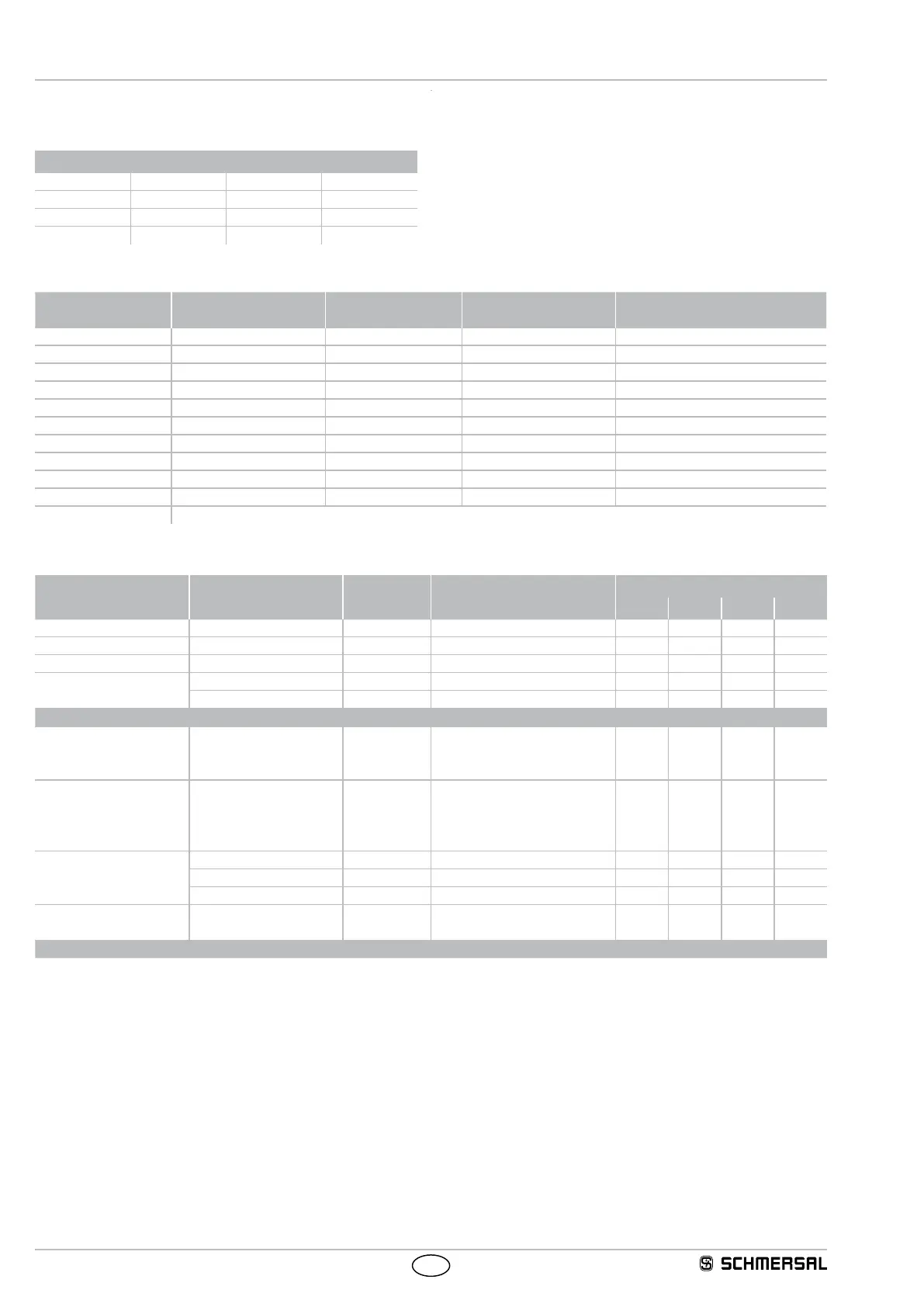
5.2 Adjustable applications
Rotary switch (time)
Drop-out delay in seconds
0 2.0 5.0 15.0
0.5 2.5 8.5 20.0
1.0 3.0 10.0 25.0
1.5 4.0 12.0 30.0
Rotary switch (mode)
Rotary knob
position
Reset button (detection
of the trailing edge)
Cross-wire
monitoring active
Input / Sensor
configuration
Monitoring of sensor channels
for synchronisation (< 5 sec.)
1 Yes Yes NC / NC Yes
2 Yes Yes NC / NC No
3 Yes No NC / NC Yes
4 Yes No NC / NC No
5 Yes Yes NC / NO Yes
6 Autostart Yes NC / NO No
7 Autostart Yes NC / NC Yes
8 Autostart Yes NC / NC No
9 Autostart No NC / NC Yes
10 Autostart No NC / NC No
C Configuration mode
5.3 Changing setting or application
Description / procedure Rotary (mode) switch Rotary (time)
switch
System response LED indications
RUN In 1 In 2 Out
Factory setting Position 1 0 s Ready for application 1 - - - -
Switch operating voltage on Position 1 Without connected sensors! Lights up - - -
Turn to position C Application 1 is deleted Lights up Flashes Flashes Flashes
Setting cycle active
Application 1 is deleted - - - -
No valid application stored Flashes - - -
SRB-E ready for new applications
Select drop-out delay Set desired
time (0-30
sec.)
Flashes - - -
Select application Select desired application
(1-11). (Time window for
setting procedure approx.
3 sec.)
New application will be loaded Lights up - - -
Setting cycle active
Lights up Lights up - -
Lights up Lights up Lights up -
Lights up Lights up Lights up Lights up
Ready for operation The desired application
is configured
Adopt new application Lights up - - -
Switch off operating voltage and connect wires according to selected application -> SRB-E... ready for operation






 To Next Page